
1. المقدمة
Thank you for choosing the ADE CK2310 Digital Radio Alarm Clock. This device offers precise timekeeping via DCF radio signal, dual alarm settings, temperature and humidity display, and a convenient backlight function. Its compact design makes it suitable for both home use and travel. Please read this manual carefully to ensure proper use and optimal performance of your new alarm clock.

Image 1.1: The ADE CK2310 Digital Radio Alarm Clock is designed for portability, making it an ideal travel companion.
2. معلومات السلامة
- احفظ الجهاز بعيدًا عن الماء والرطوبة العالية.
- لا تعرض الجهاز لدرجات حرارة شديدة أو لأشعة الشمس المباشرة.
- تجنب إسقاط الجهاز أو تعريضه لصدمات قوية.
- لا تحاول تفكيك الجهاز أو إصلاحه بنفسك. اتصل بفني صيانة مؤهل.
- تخلص من البطاريات المستخدمة وفقا للوائح المحلية.
- احتفظ بالبطاريات بعيدًا عن متناول الأطفال.
3. محتويات العبوة
يرجى التحقق من محتويات العبوة عند فتحها:
- ADE CK2310 Digital Radio Alarm Clock
- 2 بطاريات AAA
- دليل التعليمات

Image 3.1: The package includes the ADE CK2310 alarm clock and two AAA batteries.
4. انتهى المنتجview
Familiarize yourself with the various components and display elements of your alarm clock.
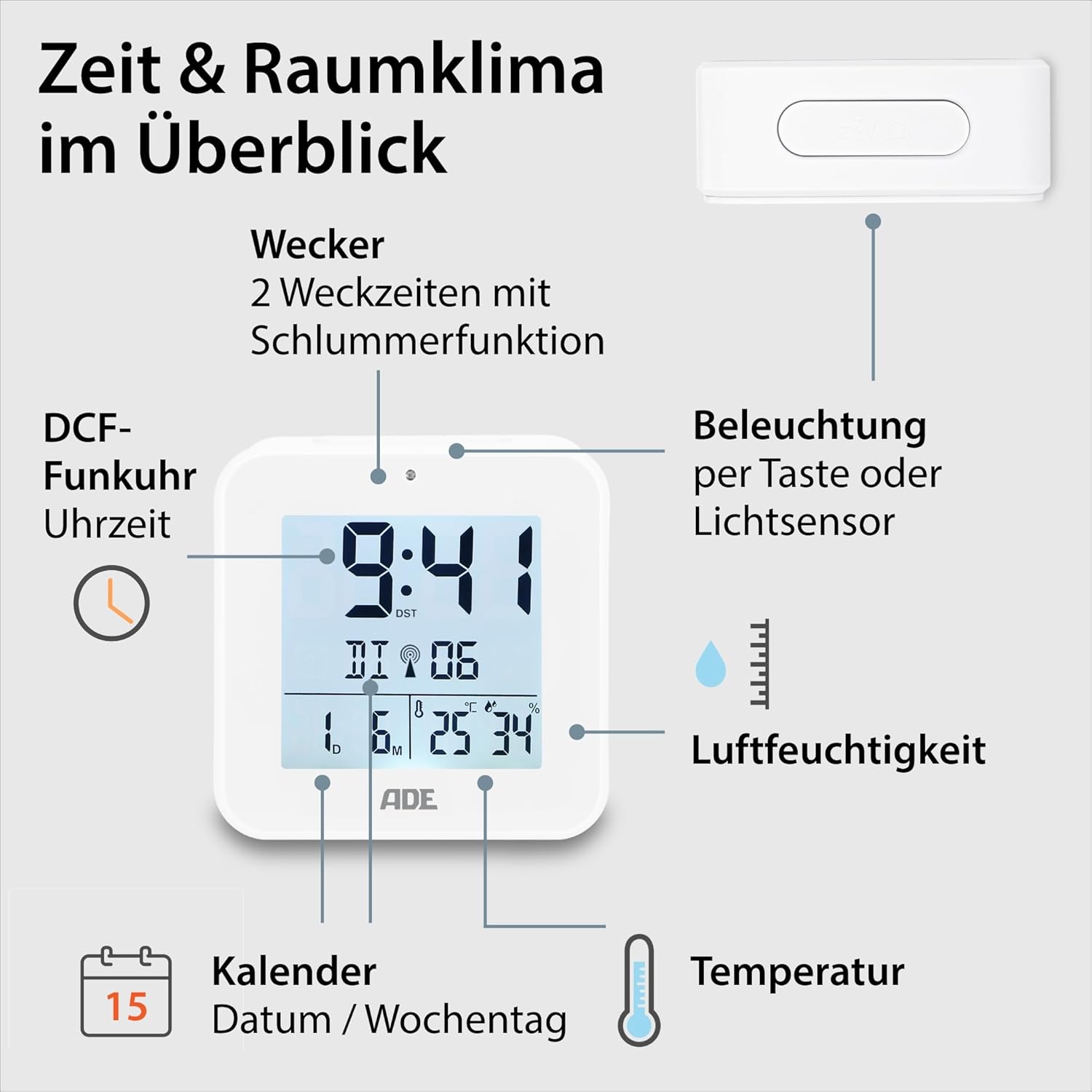
Image 4.1: Front display and key features of the ADE CK2310.
- عرض الوقت: Shows current time (hours, minutes).
- DCF Signal Indicator: Indicates successful reception of the radio time signal.
- مؤشرات الإنذار: Shows if Alarm 1 or Alarm 2 is active.
- التاريخ واليوم من الأسبوع: Displays the current date and day.
- عرض درجة الحرارة: Shows ambient temperature in Celsius or Fahrenheit.
- عرض الرطوبة: Shows ambient relative humidity.
- زر الغفوة/الضوء: Activates snooze during an alarm or backlight manually.
- أزرار الوظائف: Buttons for setting time, alarms, and other functions (located on the back/side).
- مستشعر الضوء: Automatically activates backlight in dark environments.

الصورة 4.2: خلفي view with controls and battery compartment.
The compact dimensions of the alarm clock are approximately 7.2 x 3.8 x 7.2 cm (width x depth x height).

Image 4.3: Dimensions of the ADE CK2310 alarm clock.
5. الإعداد
5.1. تركيب البطارية
- Open the battery compartment cover on the back of the alarm clock (refer to Image 4.2).
- قم بإدخال بطاريتين AAA، مع التأكد من القطبية الصحيحة (+ و-).
- أغلق غطاء حجرة البطارية جيدًا.
The alarm clock will power on automatically and begin searching for the DCF radio signal.
5.2. DCF Radio Signal Reception
Upon initial power-on or after battery replacement, the alarm clock will automatically attempt to receive the DCF radio time signal. This process can take several minutes. During reception, a signal icon may flash on the display. Once the signal is successfully received, the time will be set automatically, and the signal icon will appear steadily. For best reception, place the alarm clock near a window and away from electronic devices that may cause interference.
The DCF signal also ensures automatic adjustment for daylight saving time (summer/winter time).
5.3. ضبط الوقت يدويًا (اختياري)
إذا لم تكن إشارة DCF متاحة أو كنت تفضل ضبط الوقت يدويًا:
- Press and hold the "SET" button (or equivalent, refer to specific button labels on your device) for a few seconds until the time display starts flashing.
- Use the "+" or "-" buttons to adjust the hours.
- Press "SET" again to confirm the hours and move to minutes.
- استخدم زري "+" أو "-" لضبط الدقائق.
- Press "SET" to confirm and exit manual setting mode.
- Repeat similar steps to set the date and year if necessary.
6. تعليمات التشغيل
6.1. ضبط المنبهات (المنبه 1 والمنبه 2)
The ADE CK2310 features two independent alarm times. This is useful for different wake-up times on weekdays and weekends.

Image 6.1: The alarm clock supports two independent alarm times.
- Press the "ALARM 1" or "ALARM 2" button (usually located on the side or back) once to display the current alarm time.
- Press and hold the respective "ALARM" button until the alarm time starts flashing.
- Use the "+" or "-" buttons to adjust the alarm hours.
- Press the "ALARM" button again to confirm hours and move to minutes.
- استخدم زري "+" أو "-" لضبط دقائق المنبه.
- Press the "ALARM" button to confirm and exit alarm setting mode.
- To activate or deactivate an alarm, use the dedicated ON/OFF switch for Alarm 1 and Alarm 2 (refer to Image 6.1 for typical switch location). An alarm icon will appear on the display when active.
6.2. وظيفة الغفوة
When an alarm sounds, press the large "SNOOZE/LIGHT" button on top of the alarm clock. The alarm will pause for approximately 5 minutes and then sound again. To turn off the alarm completely, press any other button or let it ring for its full duration.
6.3. عرض درجة الحرارة والرطوبة
The alarm clock continuously displays the indoor temperature and relative humidity. You can switch between Celsius (°C) and Fahrenheit (°F) for temperature display by pressing a dedicated button (often labeled "°C/°F" or integrated with another setting button).
6.4. وظيفة الإضاءة الخلفية
يمكن تنشيط الإضاءة الخلفية بطريقتين:
- تشغيل يدوي: Press the "SNOOZE/LIGHT" button on top. The backlight will illuminate for approximately 8 seconds.
- Automatic Activation (Light Sensor): Slide the "AUTO LIGHT" switch on the back of the device to the "ON" position (refer to Image 4.2). The built-in light sensor will detect low ambient light conditions and automatically activate a soft backlight, making the display visible in the dark. Slide the switch to "OFF" to disable this feature.
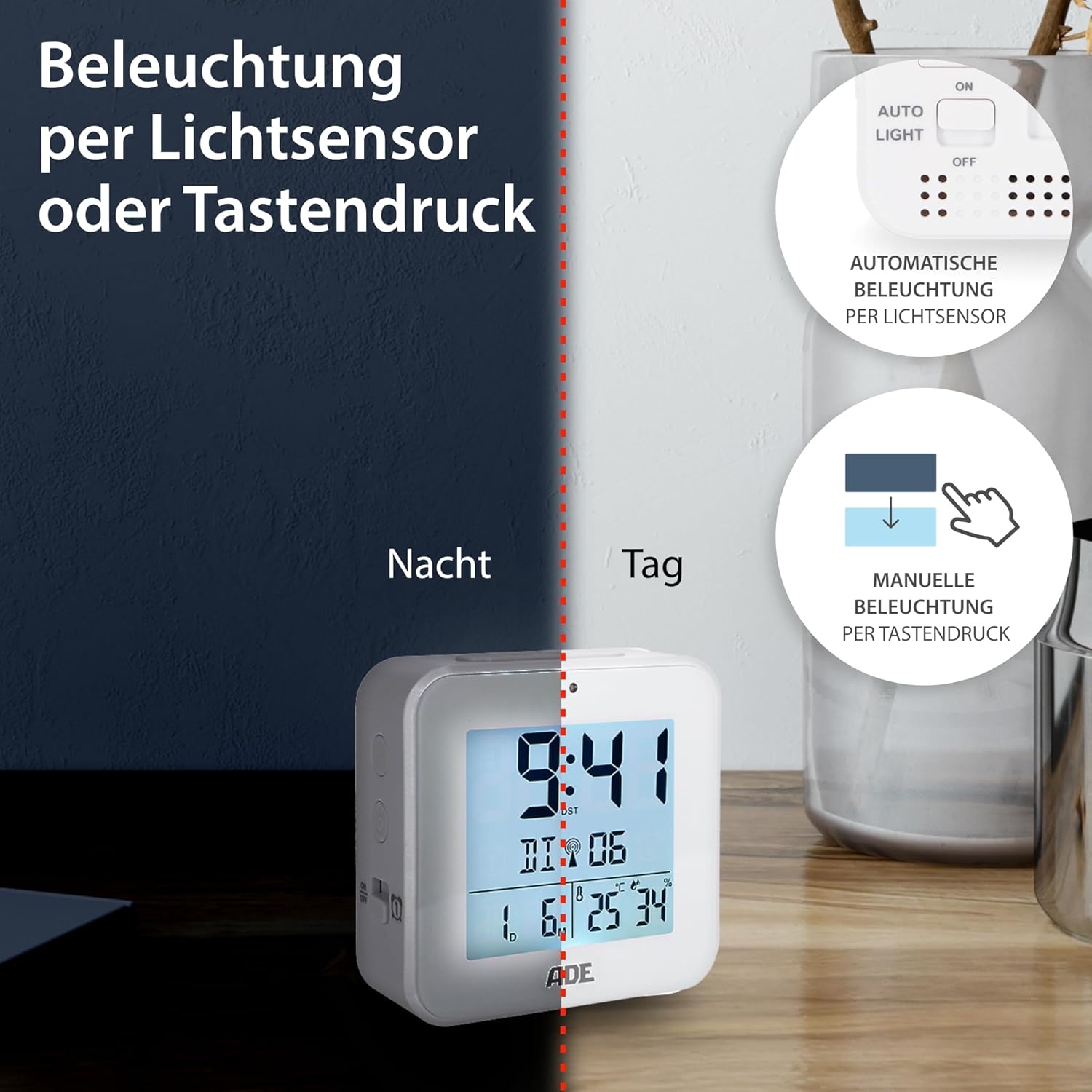
Image 6.2: Backlight can be activated manually or automatically via the light sensor.
7. الصيانة
- تنظيف: امسح الجهاز بقطعة قماش ناعمة وجافة. لا تستخدم منظفات أو مذيبات كاشطة.
- استبدال البطارية: When the display becomes dim or functions are erratic, replace both AAA batteries. Ensure correct polarity. If the device will not be used for an extended period, remove the batteries to prevent leakage.
8. استكشاف الأخطاء وإصلاحها
| مشكلة | السبب المحتمل | حل |
|---|---|---|
| العرض فارغ أو خافت. | البطاريات منخفضة أو تم إدخالها بشكل غير صحيح. | استبدل البطاريات بأخرى جديدة، مع التأكد من القطبية الصحيحة. |
| الوقت غير صحيح أو لا يتم ضبطه تلقائياً. | Poor DCF signal reception or interference. | Move the alarm clock to a location with better reception (e.g., near a window, away from electronics). Allow time for signal acquisition. Manually set the time if necessary. |
| لا يصدر صوت الإنذار. | لم يتم تفعيل التنبيه أو تم ضبطه بشكل غير صحيح. | Ensure the alarm is switched "ON" and the alarm time is set correctly. Check for the alarm icon on the display. |
| الإضاءة الخلفية لا تعمل. | AUTO LIGHT switch is OFF, or batteries are low. | Check if the "AUTO LIGHT" switch is in the "ON" position. Press the SNOOZE/LIGHT button manually. Replace batteries if needed. |
9. المواصفات
- نموذج: سي كيه 2310
- أبعاد: 8 x 3.81 x 8 cm (approx. W x D x H)
- وزن: 100 جرام
- مصدر الطاقة: 2 × بطاريات AAA (مضمنة)
- نوع العرض: رقمي
- مادة: بلاستيك ايه بي اس
- المميزات الخاصة: DCF Radio Signal, 2 Alarm Times, Snooze Function, Temperature Display (°C/°F), Humidity Display, Calendar Display, Automatic Backlight (Light Sensor), Manual Backlight.
- الاستخدام الداخلي/الخارجي: داخلي
10. الضمان والدعم
ADE products are manufactured with quality and reliability in mind. For information regarding warranty terms and conditions, please refer to the warranty card included with your purchase or visit the official ADE website. For technical support or service inquiries, please contact your retailer or the ADE customer service department.
الشركة المصنعة: أي دي إي