
1. المقدمة
The eppfun AK8675B Pro is a versatile Bluetooth 5.2 audio adapter designed to function as both a transmitter (TX) and a receiver (RX). It features advanced Qualcomm QCC3040 chip technology, supporting various aptX codecs including aptX-Adaptive, aptX HD, and aptX Low Latency, ensuring high-quality audio with minimal delay. This device allows you to wirelessly stream audio from non-Bluetooth devices (like TVs or PCs) to Bluetooth headphones/speakers, or from Bluetooth-enabled devices (like smartphones) to wired audio systems.
2. محتويات العبوة
تأكد من تضمين جميع العناصر المدرجة أدناه في الحزمة الخاصة بك:
- eppfun AK8675B Pro Bluetooth Transmitter/Receiver
- كابل شحن USB-C
- 3.5 مللي متر كابل صوت AUX
- Optical Fiber Audio Cable
- دليل المستخدم (هذا المستند)

Image: Contents of the eppfun AK8675B Pro package, including the device, various cables, and the user manual.
3. انتهى المنتجview والضوابط
تعرّف على مكونات الجهاز وأدوات التحكم فيه:

Image: Diagram of the eppfun AK8675B Pro device with key interfaces and buttons labeled.
- ج: زر الطاقة - Press and hold to turn the device on or off.
- B: RX/TX Mode Switching - Slide switch to select Transmitter (TX) or Receiver (RX) mode.
- C: Pairing Button - Press to initiate Bluetooth pairing mode.
- D: AUX 3.5mm Interface - For connecting audio devices via a 3.5mm audio cable.
- E: Volume Adjusting - Buttons to increase or decrease audio volume.
- F: One Click Mute, Double Click Audio Decoding Switch - Single press for mute/unmute; double press to cycle through audio decoding options.
- G: USB Charging - USB-C port for charging the device.
- H: Optical Interface - For connecting audio devices via an optical fiber cable.
4. Setup and Operation Modes
The AK8675B Pro operates in two primary modes: Transmitter (TX) and Receiver (RX). Select the appropriate mode using the RX/TX mode switching slider (B).

Image: Comparison of Transmitter and Receiver modes, showing usage time, compatible codecs, and simultaneous linking capabilities.
4.1. وضع الإرسال (TX)
In TX mode, the device transmits audio from a non-Bluetooth source (e.g., TV, PC) to Bluetooth-enabled headphones or speakers.
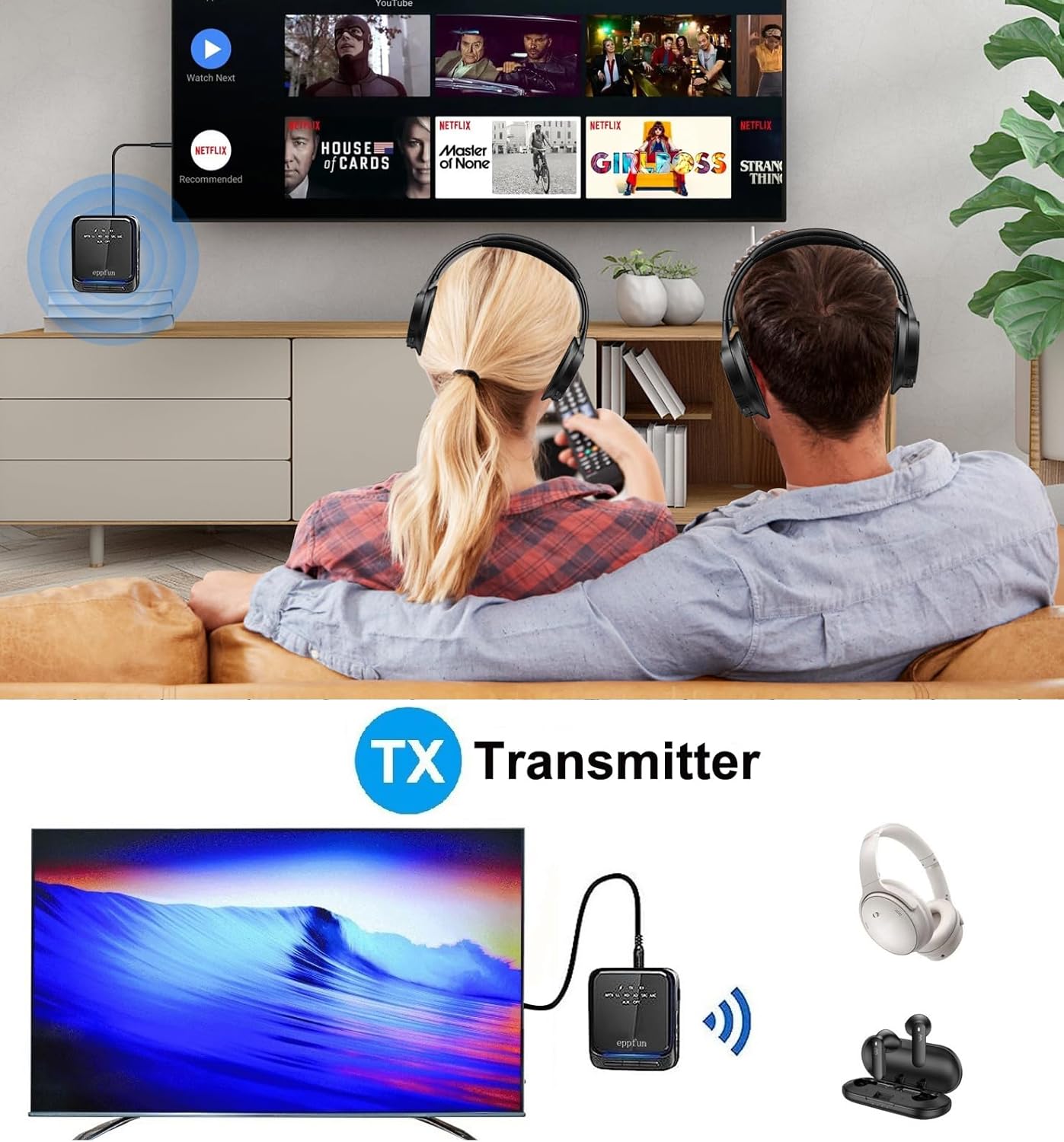
Image: An illustration of the eppfun AK8675B Pro connected to a TV, transmitting audio wirelessly to two pairs of Bluetooth headphones.
- Slide the mode switch (B) to TX.
- Connect the AK8675B Pro to your audio source (e.g., TV, PC) using either the 3.5mm AUX cable (D) or the Optical Fiber cable (H).
- Turn on the AK8675B Pro by pressing and holding the Power Button (A).
- ضع سماعات الرأس أو مكبرات الصوت التي تعمل بتقنية البلوتوث في وضع الاقتران.
- Press the Pairing Button (C) on the AK8675B Pro to initiate pairing. The LED indicator will show pairing status.
- Once connected, audio from your source will stream wirelessly to your Bluetooth device(s).
TX Mode Features:
- برامج الترميز المتوافقة: aptX، aptX-Adaptive، aptX LL (زمن استجابة منخفض)، aptX HD، SBC.
- ساعات العمل: حوالي 12 ساعة بشحنة كاملة.
- اتصال مزدوج: Supports connecting two Bluetooth headphones/earbuds simultaneously with aptX LL technology.
4.2. وضع الاستقبال (RX)
In RX mode, the device receives audio wirelessly from a Bluetooth-enabled source (e.g., smartphone, tablet) and outputs it to a wired audio system (e.g., wired headphones, speakers).

Image: An illustration of the eppfun AK8675B Pro connected to wired speakers, receiving audio wirelessly from a smartphone.
- Slide the mode switch (B) to RX.
- Connect the AK8675B Pro to your wired audio output device (e.g., speakers, wired headphones) using the 3.5mm AUX cable (D).
- Turn on the AK8675B Pro by pressing and holding the Power Button (A).
- Enable Bluetooth on your smartphone or other Bluetooth audio source and search for available devices.
- Select "eppfun AK8675B Pro" from the list of available Bluetooth devices to pair. The LED indicator will confirm connection.
- Once connected, audio from your Bluetooth source will play through your wired audio system.
RX Mode Features:
- برامج الترميز المتوافقة: aptX، aptX-Adaptive، aptX HD، SBC، AAC.
- ساعات العمل: حوالي 20 ساعة بشحنة كاملة.
5. شحن الجهاز
To charge the eppfun AK8675B Pro:
- Connect the supplied USB-C cable to the USB Charging port (G) on the device.
- قم بتوصيل الطرف الآخر من كابل USB-C بمحول طاقة USB قياسي (غير مرفق) أو بمنفذ USB في الكمبيوتر.
- The LED indicator will show the charging status. A full charge typically takes about 2 hours.
Note: The device cannot be used while it is charging.
6. الصيانة
To ensure the longevity and optimal performance of your eppfun AK8675B Pro:
- حافظ على الجهاز جافًا. تجنب تعريضه للرطوبة أو المطر أو السوائل.
- نظّف الجهاز بقطعة قماش ناعمة وجافة. تجنّب استخدام مواد كيميائية قاسية أو منظفات كاشطة.
- قم بتخزين الجهاز في مكان بارد وجاف عندما لا يكون قيد الاستخدام.
- تجنب درجات الحرارة القصوى.
- لا تحاول تفكيك الجهاز أو تعديله، لأن هذا سيؤدي إلى إبطال الضمان وقد يتسبب في حدوث أضرار.
7. استكشاف الأخطاء وإصلاحها
If you encounter issues with your AK8675B Pro, refer to the following common solutions:
- لن يتم تشغيل الجهاز:
- تأكد من شحن الجهاز بالكامل. وصّله بمصدر طاقة باستخدام كابل USB-C.
- Press and hold the Power Button (A) for a few seconds.
- لا يمكن الاقتران بجهاز بلوتوث:
- Ensure the AK8675B Pro is in the correct mode (TX for transmitting, RX for receiving).
- Make sure both devices are in pairing mode and within the 10-meter communication range.
- Clear previous pairing records on both the AK8675B Pro and your Bluetooth device, then attempt to pair again.
- Restart both the AK8675B Pro and your Bluetooth device.
- No audio output/input:
- Check all cable connections (3.5mm AUX or Optical Fiber) to ensure they are secure and in the correct ports.
- Verify that the volume on both the AK8675B Pro (E) and the connected audio device is not muted or set too low.
- Ensure the correct audio input/output is selected on your source device (e.g., TV audio settings).
- Confirm that the AK8675B Pro is successfully paired and connected to the desired Bluetooth device.
- Audio delay or poor quality:
- Ensure both the AK8675B Pro and your connected Bluetooth device support aptX Low Latency (aptX LL) for minimal delay, especially in TX mode.
- Reduce the distance between the AK8675B Pro and the connected Bluetooth device, and remove any obstacles.
- التحقق من وجود أي تداخل محتمل من الأجهزة اللاسلكية الأخرى.
8. المواصفات
| ميزة | مواصفة |
|---|---|
| اسم الموديل | AK8675B Pro |
| نسخة البلوتوث | 5.2 |
| شرائح بلوتوث | كوالكوم QCC3040 |
| برامج الترميز المدعومة (TX) | aptX، aptX-Adaptive، aptX LL، aptX HD، SBC |
| برامج الترميز المدعومة (RX) | aptX، aptX-Adaptive، aptX HD، SBC، AAC |
| نطاق التردد | 2.402 جيجاهرتز - 2.480 جيجاهرتز |
| مسافة التواصل | حتى 10 مترا (33 قدما) |
| وقت العمل في وضع الإرسال | حوالي 12 ساعات |
| وقت العمل في وضع RX | حوالي 20 ساعات |
| وقت الشحن | حوالي 2 ساعات |
| منفذ الشحن | يو اس بي-سي |
| إدخال/إخراج الصوت | 3.5mm AUX, Optical TOSLINK |
| نوع البطارية | أيون الليثيوم (مضمن) |
| أبعاد المنتج | 75 مم × 66 مم × 18 مم (تقريبًا) |
| وزن المنتج | 60.5 جم (تقريبًا) |
9. الضمان والدعم
صُممت منتجات إيبفن لضمان الموثوقية والأداء العالي. للحصول على معلومات الضمان والدعم الفني، يُرجى الرجوع إلى موقع إيبفن الرسمي. webالموقع أو تواصل مع بائع التجزئة. احتفظ بإيصال الشراء كإثبات للشراء في حال وجود أي مطالبات بالضمان.