
SAMA M203
SAMA M203 M-ATX/ITX Computer Case Instruction Manual
الموديل: M203
مقدمة
This manual provides detailed instructions for the installation, operation, and maintenance of your SAMA M203 M-ATX/ITX Computer Case. Please read this manual thoroughly before beginning assembly to ensure proper setup and optimal performance.

صورة: من زاوية أمامية view of the SAMA M203 computer case, showcasing the tempered glass side panel and three front-mounted F-RGB fans, along with one rear F-RGB fan.
مميزات المنتج
- دعم اللوحة الأم: Vertical M-ATX/ITX form factors.
- لوحة الإدخال/الإخراج الأمامية: USB 3.0 x 1, USB 2.0 x 2, HD Audio (Headphone/Microphone).
- حملة الخلجان: 3.5-inch HDD x 1, 2.5-inch SSD x 4.
- تخليص مبرد وحدة المعالجة المركزية: Up to 160mm height.
- Graphics Card Length: حتى 330 ملم.
- إدارة الكابلات: 22mm backline space.
- فتحات التوسعة: فتحتان PCI.
- نظام التبريد: Pre-installed F-RGB fans. Supports front 3x120mm (or 2x140mm) fans/240/280mm radiators, rear 1x120mm fan/120mm radiator, top 2x120mm fans/120/240mm radiators.
- أبعاد: 380 x 205 x 425mm (Chassis).
- مادة: Tempered Glass side panel.
الإعداد والتثبيت
1. إعداد القضية
Before installing components, ensure the case is placed on a stable, flat surface. Carefully remove the tempered glass side panel by unscrewing the four thumb screws and gently pulling it away from the chassis. It is recommended to lay the case on its side during component installation.
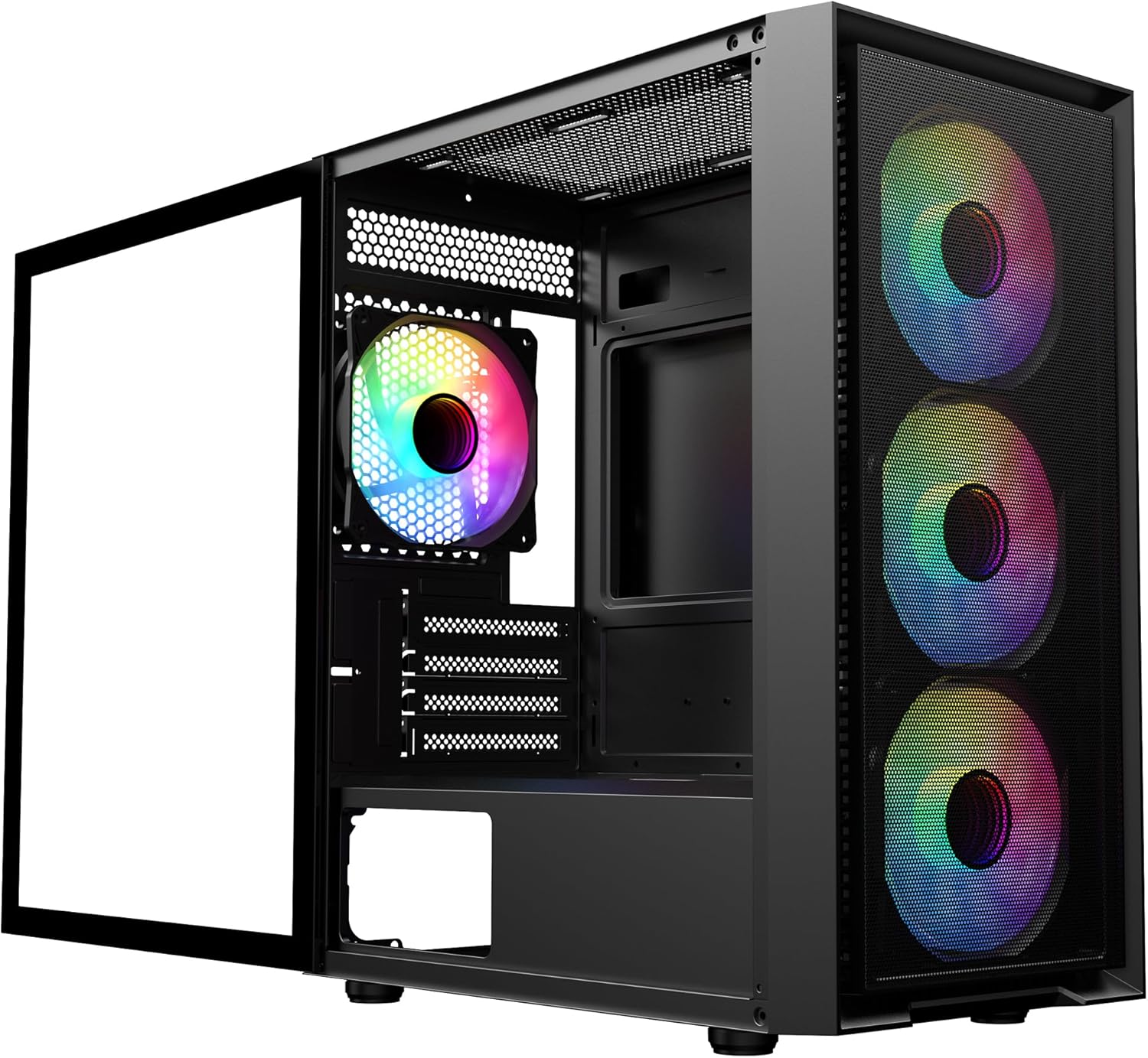
Image: The SAMA M203 computer case with its tempered glass side panel removed, revealing the interior for component installation.
2. تركيب اللوحة الأم
The SAMA M203 supports vertical M-ATX and ITX motherboards. Install the necessary standoffs for your motherboard form factor. Carefully align your motherboard with the standoffs and the rear I/O shield opening, then secure it with screws.

Image: Diagram illustrating the vertical M-ATX and ITX motherboard compatibility within the SAMA M203 case.
3. Drive Installation (HDD/SSD)
The case provides support for one 3.5-inch HDD and up to four 2.5-inch SSDs. Refer to the internal layout diagram for specific mounting locations. The 3.5-inch HDD typically mounts in the bottom HDD cage. 2.5-inch SSDs can be mounted on the motherboard tray or within the PSU shroud area.
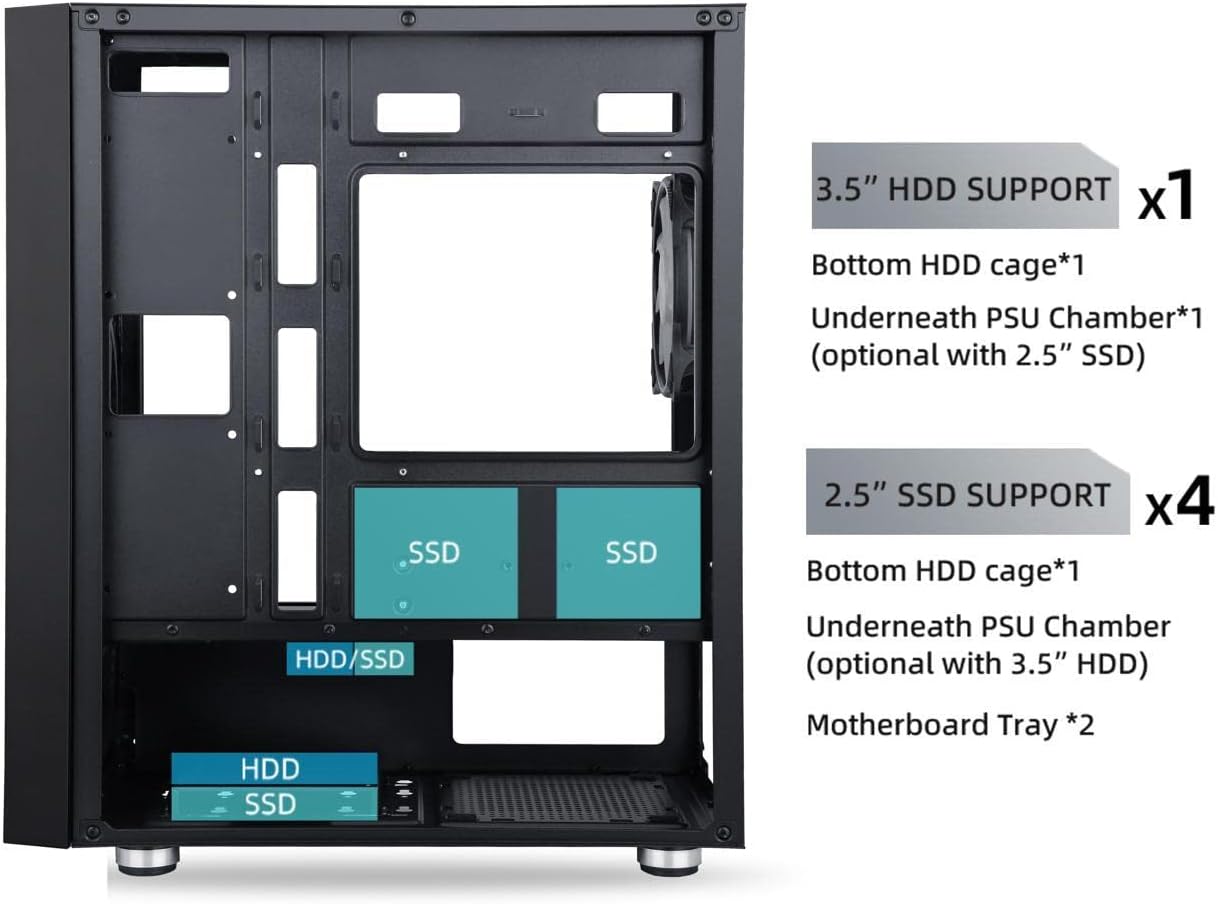
Image: Diagram showing the internal layout of the SAMA M203 case, highlighting the locations for 3.5-inch HDD and 2.5-inch SSD installations.
4. تركيب وحدة إمداد الطاقة (PSU)
Install your power supply unit into the dedicated compartment at the bottom rear of the case. Secure it with screws from the exterior rear of the chassis.
5. تركيب بطاقة الرسومات وبطاقة التوسعة
Remove the necessary PCI slot covers from the rear of the case. Note that some PCI slot covers are break-off type. Carefully insert your graphics card or other expansion cards into the motherboard's PCI-E slots and secure them with screws.
6. Cooling System Setup
The SAMA M203 comes with pre-installed F-RGB fans. Additional fans or radiators can be installed in the front, top, and rear positions as per the specifications. Ensure proper airflow direction for optimal cooling.

Image: Diagram detailing the fan and radiator support locations and sizes for the front, top, and rear of the SAMA M203 case.
7. إدارة الكابلات
Utilize the 22mm backline space and cable routing cutouts to organize cables behind the motherboard tray. Connect all power cables from the PSU to the motherboard and components. Connect the front panel I/O cables (USB 3.0, USB 2.0, HD Audio, Power, Reset, LED) to the corresponding headers on your motherboard.

الصورة: عن قرب view of the SAMA M203's top panel, showing the front I/O ports including Power, Reset, USB 3.0, USB 2.0, HD Audio, and Microphone jacks.
تعليمات التشغيل
After all components are securely installed and cables connected, replace the tempered glass side panel. Connect your peripherals (monitor, keyboard, mouse) and power cable. Press the power button on the top panel to start your computer. The F-RGB fans will illuminate upon power-on. If your motherboard supports RGB control, you may be able to customize fan lighting.
صيانة
مرشحات الغبار
The SAMA M203 case includes dust filters on the top and bottom to prevent dust accumulation. Regularly clean these filters to maintain optimal airflow and cooling performance. The front mesh also acts as a filter and can be cleaned.
- أفضل فلتر: Magnetic, easily removable for cleaning.
- فلتر سفلي: Located under the PSU, slide out for cleaning.
- Front Mesh: Can be cleaned with a soft brush or compressed air.
التنظيف العام
استخدم قطعة قماش ناعمة وجافة لمسح الجزء الخارجي من الجهاز. أما بالنسبة للوحة الزجاجية المقسّاة، فاستخدم منظف زجاج وقطعة قماش من الألياف الدقيقة. تجنّب استخدام المنظفات الكاشطة أو المذيبات.
استكشاف الأخطاء وإصلاحها
- الكمبيوتر لا يعمل:
- Ensure the power supply is switched on and properly connected to the wall outlet and motherboard.
- Verify all front panel connectors (especially the power switch) are correctly attached to the motherboard headers.
- Check that all internal power cables (24-pin ATX, CPU, GPU) are securely connected.
- المراوح لا تدور أو إضاءة RGB لا تعمل:
- Confirm that the fan power connectors (Molex) are securely plugged into the power supply.
- If RGB is not working, ensure any RGB control cables are properly connected to the motherboard or a dedicated controller (if applicable).
- ضوضاء المروحة المفرطة:
- Check if any cables are obstructing fan blades.
- Ensure fans are securely mounted and not vibrating against the chassis.
- Clean dust from fan blades and dust filters.
- المكونات غير المتوافقة:
- مبرد وحدة المعالجة المركزية: تأكد من أن ارتفاع مبرد وحدة المعالجة المركزية لا يتجاوز 160 مم.
- بطاقة الرسوميات: تأكد من أن طول بطاقة الرسومات الخاصة بك لا يتجاوز 330 مم.
- اللوحة الأم: Verify your motherboard is M-ATX or ITX form factor.
تحديد
| ميزة | التفاصيل |
|---|---|
| ماركة | ساما |
| نموذج | م203 |
| دعم اللوحة الأم | M-ATX، ITX |
| نوع الحالة | برج صغير |
| مادة | Tempered Glass (Side Panel) |
| منافذ الإدخال / الإخراج الأمامية | 1x USB 3.0, 2x USB 2.0, HD Audio (Headphone/Microphone) |
| 3.5" HDD Support | 1 |
| 2.5" SSD Support | 4 |
| حد ارتفاع مبرد وحدة المعالجة المركزية | 160 ملم |
| Graphics Card Length Limit | 330 ملم |
| Backline Space | 22 ملم |
| فتحات التوسعة | 4 منفذ PCI |
| مراوح مثبتة مسبقًا | 4 F-RGB Fans |
| دعم المروحة (الأمامي) | 3x 120 مم أو 2x 140 مم |
| دعم المبرد (الأمامي) | 240 مم، 280 مم |
| دعم المروحة (الخلفي) | 1 × 120 مم |
| دعامة المبرد (الخلفية) | 120 ملم |
| دعم الجماهير (أعلى الصفحة) | 2 × 120 مم |
| دعامة المبرد (أعلى) | 120 مم، 240 مم |
| Chassis Dimensions (L x W x H) | 380 × 205 × 425 مم |
| أبعاد المنتج (الطول × العرض × الارتفاع) | 48.26 × 38.1 × 17.78 سم |
| وزن العنصر | 5.15 كجم |
| نوع تركيب مصدر الطاقة | التركيب السفلي |
| طريقة التبريد | الهواء، الماء |
الضمان والدعم
For warranty information and technical support, please refer to the official SAMA webالموقع أو تواصل مع بائع التجزئة. احتفظ بإثبات الشراء لطلبات الضمان.