
VEVOR 26042-KIT
VEVOR Manual Die Cutting & Embossing Machine User Manual
Model: 26042-KIT
الماركة: VEVOR
1. المقدمة
This manual provides comprehensive instructions for the safe and effective operation, maintenance, and troubleshooting of your VEVOR Manual Die Cutting & Embossing Machine. This versatile tool is designed for various crafting projects, including scrapbooking, card making, and other arts and crafts. Please read this manual thoroughly before initial use to ensure proper functionality and to extend the lifespan of your machine.

Figure 1.1: VEVOR Manual Die Cutting & Embossing Machine with included accessories and sample crafts.
2. معلومات السلامة
- Always operate the machine on a stable, flat surface to prevent tipping or movement during use.
- Keep fingers and loose clothing away from the rollers and cutting area during operation.
- تأكد من تجميع جميع المكونات بشكل صحيح قبل الاستخدام.
- Do not force materials through the machine. If resistance is met, check your "sandwich" configuration.
- Keep the machine out of reach of children when not in use. Adult supervision is recommended during operation by minors.
- Use only compatible dies, embossing folders, and cutting pads with the machine.
- Clean the machine regularly as per maintenance instructions to prevent material buildup that could affect performance.
3. محتويات العبوة
Upon unpacking, please verify that all the following components are included in your package. If any items are missing or damaged, please contact VEVOR customer support.
- 1 x Die Cut Machine
- 1 x Embossing Pad
- 1 × طبق
- 2 x Cutting Pads
- 1 x A6 Embossed Folder
- 8 x 0.8 mm Cutting Dies
- 10 x A5 Card Stocks

Figure 3.1: Included components of the VEVOR Manual Die Cutting & Embossing Machine kit.
4. انتهى المنتجview
The VEVOR Manual Die Cutting & Embossing Machine features a robust design for consistent performance. Key components include:
- الوحدة الرئيسية: The core machine housing the roller system.
- مقبض: A premium metal handle used to manually turn the rollers, providing the necessary force for cutting and embossing.
- Steel Roller System: Internal rollers that apply pressure to dies and embossing folders, ensuring clean cuts and crisp impressions.
- افتتاح: A 6-inch (160 mm) wide opening to accommodate various sizes of dies, embossing folders, and materials.

Figure 4.1: Detail of the machine's premium metal handle and steel roller system.
5. الإعداد
- فك التعبئة: أزل جميع المكونات من العبوة بعناية. احتفظ بالعبوة للتخزين أو النقل لاحقًا.
- الموقع: Place the die cutting machine on a clean, flat, and stable surface. Ensure there is enough space around the machine for comfortable operation and to allow materials to pass through.
- مرفق المقبض: Insert the metal handle into the designated slot on the side of the machine and secure it firmly.
- التفتيش الأولي: Before first use, inspect the machine and all accessories for any signs of damage.
6. تعليمات التشغيل
The VEVOR Manual Die Cutting & Embossing Machine operates by passing a "sandwich" of materials and dies/folders through its rollers. The specific "sandwich" configuration depends on whether you are die cutting or embossing, and the thickness of your materials.
6.1. Die Cutting
To cut shapes using cutting dies:
- Place one cutting pad (or the plate, depending on the die and material thickness) on the machine's platform.
- Place your chosen material (e.g., cardstock, felt, fabric) on top of the cutting pad.
- Position the cutting die(s) on top of the material with the cutting edge facing down towards the material.
- Place the second cutting pad on top of the die(s) to complete the "sandwich."
- Carefully feed the assembled "sandwich" into the machine's opening.
- Turn the handle clockwise (or counter-clockwise, depending on the machine's orientation) to pass the "sandwich" through the rollers. You will feel resistance as the rollers engage. Continue turning until the "sandwich" has fully passed through.
- Remove the "sandwich" and carefully separate the cut material from the die.

Figure 6.1: Demonstrating the use of the machine for creative projects.
6.2. Embossing
To create raised designs using embossing folders:
- Open the embossing folder and place your material (e.g., cardstock, paper) inside.
- Close the embossing folder.
- Place the embossing folder (with material inside) on the machine's platform, typically on top of a cutting pad or the plate, depending on the required pressure.
- Place the embossing pad on top of the embossing folder to complete the "sandwich."
- Feed the assembled "sandwich" into the machine's opening and turn the handle to pass it through the rollers.
- Remove the "sandwich" and open the embossing folder to reveal the embossed design.

Figure 6.2: The A5 wide opening accommodates various materials and folders.
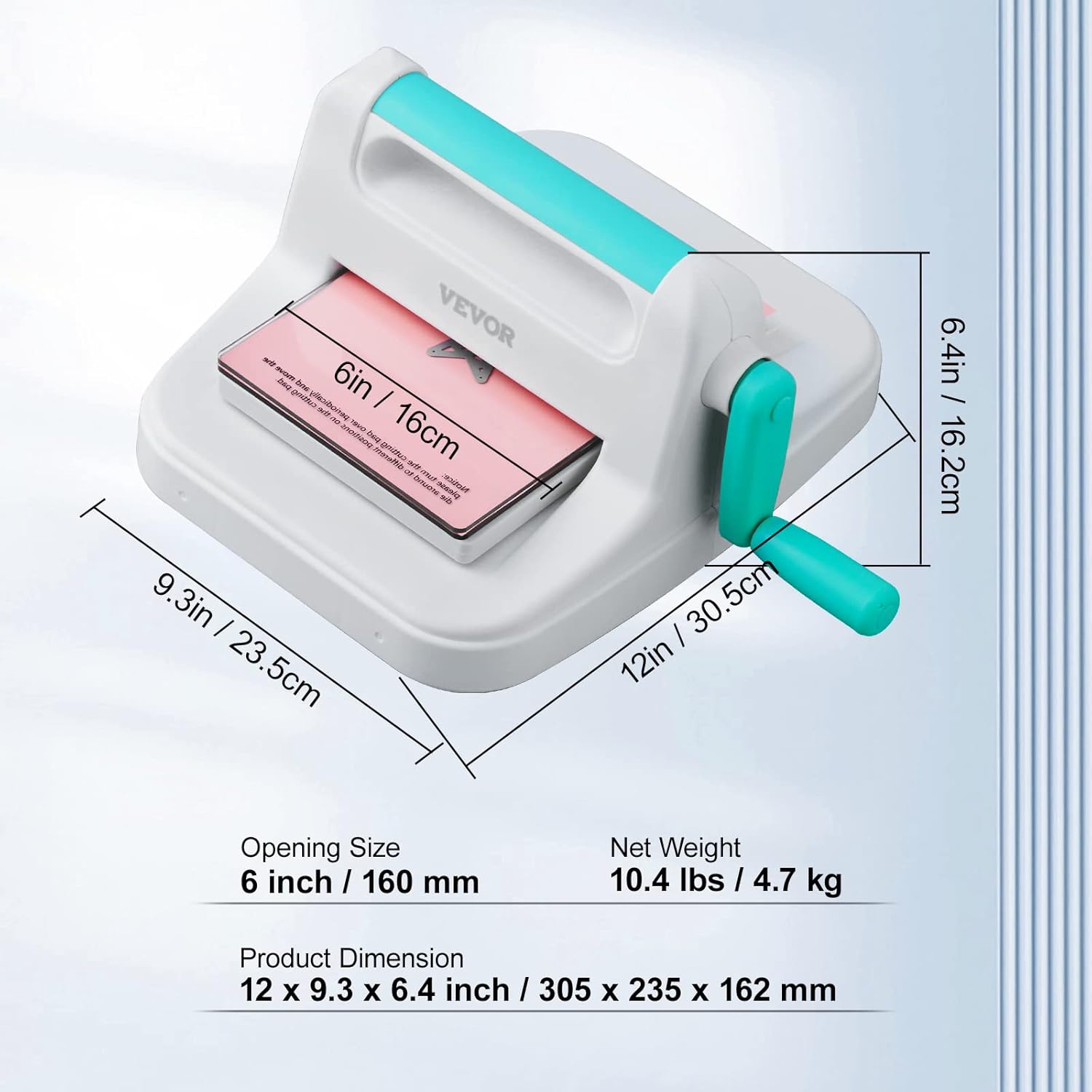
Figure 6.3: The machine is applicable to a wide range of materials.
7. الصيانة
- تنظيف: After each use, wipe down the machine with a soft, dry cloth to remove any paper dust or material residue. For stubborn marks, a slightly damp يمكن استخدام قطعة قماش، ثم تجفيفها فوراً. لا تستخدم المنظفات الكاشطة أو المذيبات.
- العناية بالبكرات: Periodically inspect the rollers for any debris or damage. Keep them clean to ensure smooth operation.
- تخزين: Store the machine in a clean, dry place away from direct sunlight and extreme temperatures. If storing for an extended period, consider re-packaging it in its original box to protect it from dust and damage.
- Die and Pad Care: Clean dies and embossing folders after use. Store cutting pads flat to prevent warping.
8. استكشاف الأخطاء وإصلاحها
| مشكلة | السبب المحتمل | حل |
|---|---|---|
| Material not cutting completely. | Incorrect "sandwich" configuration (too thin); dull die; material too thick. | Adjust the "sandwich" by adding shims (e.g., a piece of cardstock) or using the correct plate combination. Ensure the die is placed cutting-edge down. For very thick materials, multiple passes or a different die may be required. |
| Embossing is not deep enough. | Incorrect "sandwich" configuration (too thin); material too thick for the folder. | Ensure the embossing pad is correctly placed. Add shims if necessary to increase pressure. Some 3D embossing folders may require specific "sandwich" adjustments or even omitting a bottom plate. |
| Machine rollers feel jumpy or bumpy during operation. | Debris in the roller mechanism; internal component misalignment; excessive force applied. | Stop operation immediately. Inspect the rollers and internal mechanism for any visible debris and carefully remove it. Ensure the "sandwich" is not too thick, causing undue strain. If the issue persists and appears to be an internal mechanical problem, contact customer support. |
| Material or die gets stuck. | "Sandwich" is too thick; material is not aligned properly. | Do not force the handle. Gently reverse the handle to release the "sandwich." Re-evaluate the thickness of your "sandwich" and ensure all components are aligned before re-attempting. |
9. المواصفات
| ميزة | التفاصيل |
|---|---|
| نموذج | 26042-كيت |
| أبعاد المنتج (الطول × العرض × الارتفاع) | 12 × 9.3 × 6.4 بوصة / 305 × 235 × 162 ملم |
| Opening Size / Active Surface Area | 6 بوصة / 160 مم |
| الوزن الصافي | 10.4 رطل / 4.7 كجم |
| مادة | Metal (handle, roller system) and durable plastic |
| لون | أبيض |

Figure 9.1: Product dimensions and opening size.
10. الضمان والدعم
For warranty information, product support, or to purchase replacement parts, please visit the official VEVOR webأو اتصل بخدمة عملاء VEVOR مباشرة.
You can also visit the VEVOR Store on Amazon for more information and products: متجر VEVOR الرسمي.
Ask a question about this manual
Ask about setup, troubleshooting, compatibility, parts, safety, or missing instructions. Manuals+ will review the question and use this page’s manual context to help answer it.