
مقدمة
This manual provides detailed instructions for the installation, operation, and maintenance of your EWAY Light 2.0 Spare Tire Reverse Backup Camera. Please read this manual thoroughly before installation and use to ensure proper function and safety. This camera system is designed to enhance rear visibility for safer reversing and parking.
محتويات الحزمة
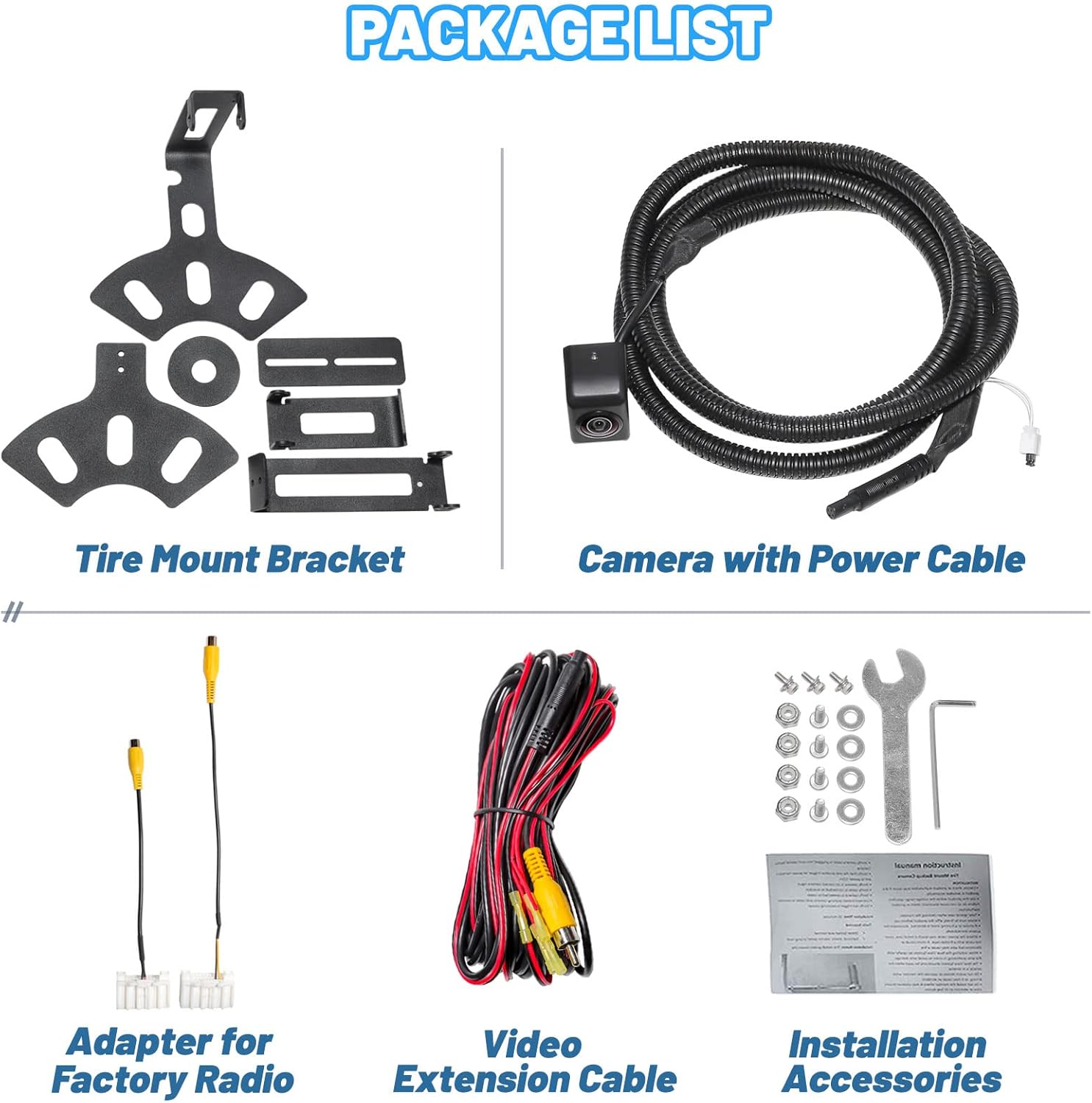
Verify that all items listed below are included in your package. If any items are missing or damaged, please contact EWAY customer support.
- Tire Mount Bracket
- Camera with Power Cable
- Adapter for Factory Radio
- Video Extension Cable
- Installation Accessories (screws, wrench, etc.)
تحديد
| ماركة | إي واي |
| أبعاد المنتج | 6.14 بوصة طول × 5.6 بوصة عرض × 3.58 بوصة ارتفاع |
| الأجهزة المتوافقة | Monitor with RCA connection |
| نوع التثبيت | Bracket Mount (Spare Tire) |
| المجلدtage | 12 فولت |
| تقنية الاستشعار البصري | جهاز اقتران الشحنات |
| نوع العدسة | زاوية واسعة |
| زاوية حقيقية View | 150 درجة |
| نوع الموصل | ار سي ايه |
| دقة التقاط الفيديو | 720 بكسل |
| تصنيف مقاومة الماء | IP69 |
التوافق
The EWAY Light 2.0 Spare Tire Reverse Backup Camera is compatible with the following Jeep models and years:
- Jeep Commander (2008-2010)
- Jeep Compass (2009-UP)
- جيب جراند شيروكي (2008-2013)
- Jeep Liberty (2008-2014)
- Jeep Patriot (2009-2015)
- Jeep Wrangler (2007-UP)
- Jeep Rubicon (2007-2020)
This system is designed for use with factory or aftermarket displays that support an RCA connection.

معلومات السلامة
Always exercise caution when operating your vehicle, especially when reversing. The backup camera is an aid and should not replace direct observation. Ensure the camera lens is clean and unobstructed for optimal performance. Professional installation is recommended for electrical components if you are unfamiliar with vehicle wiring.
الإعداد والتثبيت
The EWAY Light 2.0 camera features an upgraded, lighter bracket design and an adjustable camera lens for flexible mounting and optimal viewing angles. The system is designed to accommodate various wheel designs, both factory and aftermarket.
Bracket and Camera Adjustment
The camera lens can be adjusted vertically up to 90 degrees to achieve the most comfortable and effective viewing angle for your specific vehicle setup. The bracket itself offers multiple adjustment points to fine-tune the camera's position.


خيارات التركيب
The Light 2.0 includes two mounting brackets, providing flexibility for installation. It is designed to fit spare tire openings typically found at the 1-2 o'clock position or can be installed upside-down, accommodating virtually any wheel design.


توصيل الأسلاك
Connect the camera's video output to your vehicle's display unit using the provided RCA video extension cable. The power cable should be connected to a 12V power source, typically the reverse light circuit, so the camera activates when the vehicle is in reverse. An adapter for factory radios is included for compatible systems.
دليل التثبيت بالفيديو
For a visual guide on the installation process and features of the EWAY Light 2.0 Spare Tire Adjustable Camera, please watch the video below.
تعليمات التشغيل
Once properly installed, the EWAY Light 2.0 camera will automatically activate when your vehicle is shifted into reverse, displaying the rear view on your connected monitor.
Viewing Angle and Clarity
The camera provides a 150-degree wide viewing angle, offering a comprehensive view of the area behind your vehicle. The high-definition color CCD sensor ensures clear image crispness during the day and enhanced brightness at night.


Removable Guidelines
The camera features removable parking guidelines. You can switch these guidelines on or off by unplugging or inserting the small black button located on the camera's wiring, providing flexibility based on your preference.

صيانة
To ensure the longevity and optimal performance of your EWAY Light 2.0 camera, follow these maintenance guidelines:
- تنظيف: نظف عدسة الكاميرا بانتظام بقطعة قماش ناعمة و...amp cloth to remove dirt, dust, or mud. Avoid abrasive cleaners that could scratch the lens.
- تصميم مقاوم للماء: The camera is IP69-rated waterproof, designed to withstand significant vibration, mud, and dirt. However, avoid directing high-pressure water jets directly at the camera for extended periods.
- فحص الكابلات: Periodically check all cables and connections for any signs of wear, damage, or corrosion. Ensure connections remain secure.

استكشاف الأخطاء وإصلاحها
If you encounter issues with your EWAY Light 2.0 camera, refer to the following common troubleshooting steps:
- لا توجد صورة على الشاشة:
- Check all power connections to ensure they are secure and receiving 12V.
- Verify the video cable is securely connected to both the camera and the monitor.
- Ensure your monitor is set to the correct input source for the camera.
- Distorted or Unclear Image:
- نظف عدسة الكاميرا جيداً.
- Check for any loose or damaged video cable connections.
- Ensure the camera lens is not obstructed by the spare tire or other vehicle components. Adjust the camera angle if necessary.
- Guidelines Not Appearing/Disappearing:
- Check the small black button on the camera's wiring. Insert it to enable guidelines, unplug it to disable them.
If these steps do not resolve the issue, please contact EWAY customer support for further assistance.
الضمان والدعم
EWAY is committed to providing quality products and excellent customer service. For warranty information, technical support, or any inquiries regarding your Light 2.0 Spare Tire Reverse Backup Camera, please refer to the contact information provided with your purchase or visit the official EWAY website. Our professional after-sales team is available to assist you.