
VSYSTO F9D
VSYSTO F9D Motorcycle Dash Cam Instruction Manual
الموديل: F9D
1. انتهى المنتجview
The VSYSTO F9D is a dual-channel motorcycle dash camera system designed to record high-definition video from both front and rear perspectives. It integrates advanced features such as Super Night Vision, a 24-hour parking monitor, and a Smart Gauge Mode that provides real-time data including speed, location, altitude, and battery voltage. The system also supports Tire Pressure Monitoring System (TPMS) sensors and offers convenient control via a multifunction remote and a dedicated WiFi application.
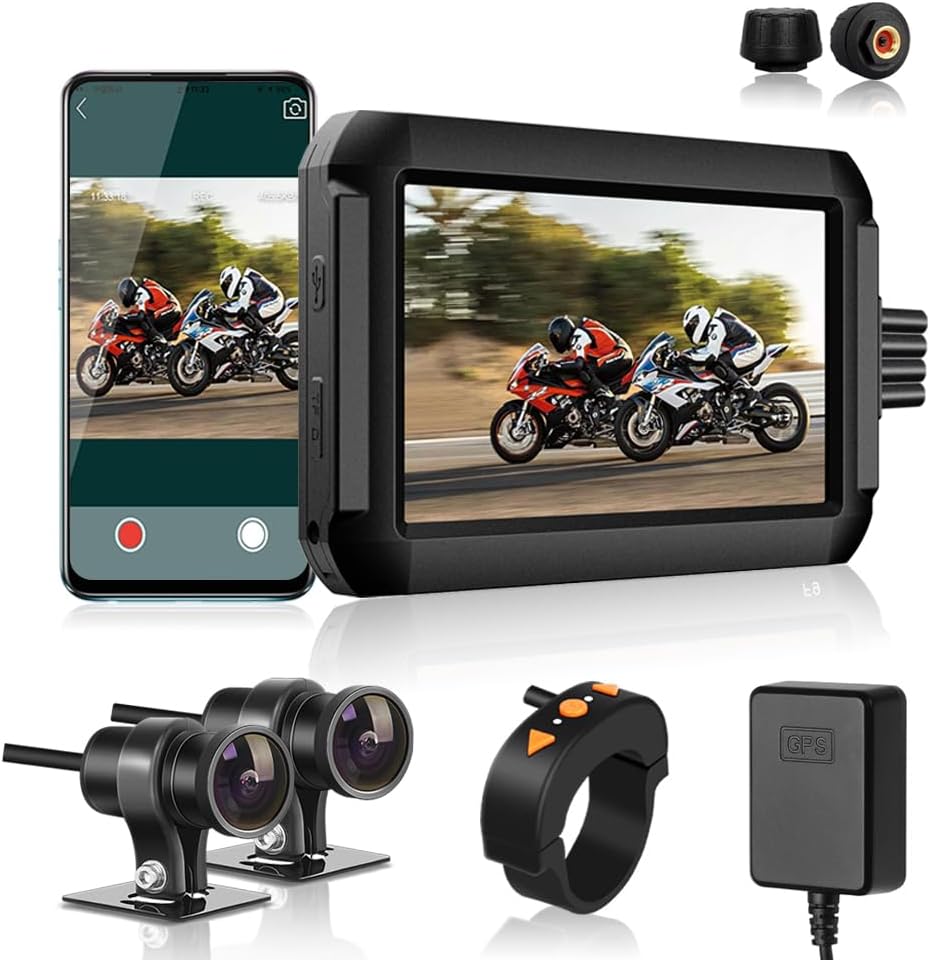
الصورة: أكثر منview of the VSYSTO F9D Motorcycle Dash Cam system, showing the main display unit, dual cameras, remote control, GPS module, and TPMS sensors.
2. محتويات العبوة
يرجى التأكد من أن جميع العناصر المدرجة أدناه متضمنة في الحزمة الخاصة بك:
- Monitor (Main Unit)
- كاميرات (2)
- كابل الطاقة
- حامل المقود
- Tire Pressure Sensors (2)
- متتبع نظام تحديد المواقع العالمي (GPS)

Image: Detailed diagram illustrating all components included in the VSYSTO F9D package, with labels for easy identification.
3. الإعداد والتثبيت
The VSYSTO F9D system is designed for direct hard-wiring to your motorcycle's battery for continuous power. Professional installation is recommended if you are unfamiliar with motorcycle electrical systems.
- تركيب الوحدة الرئيسية: Secure the monitor using the provided handlebar mount in a location that offers clear visibility and easy access to the remote control.
- تركيب الكاميرات: Mount the front and rear cameras in desired positions, ensuring a clear field of view. Connect the camera cables to the main unit.
- توصيل كابل الطاقة: Hard-wire the power cable to your motorcycle's battery. The system is designed to automatically start recording with ignition and stop when the engine is off.
- Install TPMS Sensors: Attach the two tire pressure sensors to your motorcycle's tire valve stems. Ensure they are securely fastened.
- Connect GPS Tracker: Connect the GPS tracker module to the main unit. Position the GPS module in a location with a clear view من السماء لاستقبال الإشارة بشكل مثالي.
- أدخل بطاقة Micro-SD: Insert a high-speed (Class 10 or higher) micro-SD card (not included) into the designated slot on the main unit. The system requires an SD card for recording.
- Mount Remote Control: Secure the multifunction remote control to your handlebar for convenient operation while riding.

Image: Diagram illustrating the connection points for the main unit, cameras, power cable, TPMS sensors, and GPS tracker, providing a visual guide for installation.
4. تعليمات التشغيل
Once installed and powered, the VSYSTO F9D system operates largely automatically. Here are key functions and how to use them:
- التسجيل التلقائي: The dash cam automatically begins recording when the motorcycle ignition is turned on and stops when the ignition is turned off.
- أوضاع العرض: The 4.0-inch HD screen supports various display modes, including front camera view, الكاميرا الخلفية viewأو شاشة مقسمة view showing both simultaneously. Use the remote control to cycle through these modes.
- Smart Gauge Mode: When connected to the GPS tracker, the display can show real-time information such as current speed, location (altitude), single driving time, mileage, and battery voltage.
- TPMS Monitoring: The system continuously monitors tire pressure and temperature via the included TPMS sensors. Alerts will be displayed on the screen if tire pressure or temperature falls outside safe parameters.
- WiFi App Connectivity: Download the dedicated VSYSTO WiFi App on your smartphone. Connect to the dash cam's WiFi network to access live previewس، رview recorded videos, and track GPS data directly from your phone.
- Multifunction Remote Control:
- زر لأعلى: Switch display modes on the monitor.
- زر موافق: Capture photos during recording.
- زر لأسفل: Display ride data (Smart Gauge Mode).
- Indicators on the remote show camera and GPS status.
- مستشعر الجاذبية: The built-in G-sensor automatically detects sudden impacts or collisions and locks the current video file to prevent it from being overwritten during loop recording.
- التسجيل المتكرر: The system continuously records video in segments. When the micro-SD card is full, the oldest unlocked video fileيتم استبدال الملفات تلقائيًا لإفساح المجال للتسجيلات الجديدة.
- 24-hour Parking Monitor: When Parking Mode is enabled, the dash cam will automatically record video if physical movement or bumps are detected while the motorcycle is parked and the engine is off.

Image: The 4.0-inch LCD display of the VSYSTO F9D showing real-time data such as speed, tire pressure, temperature, date, and time.
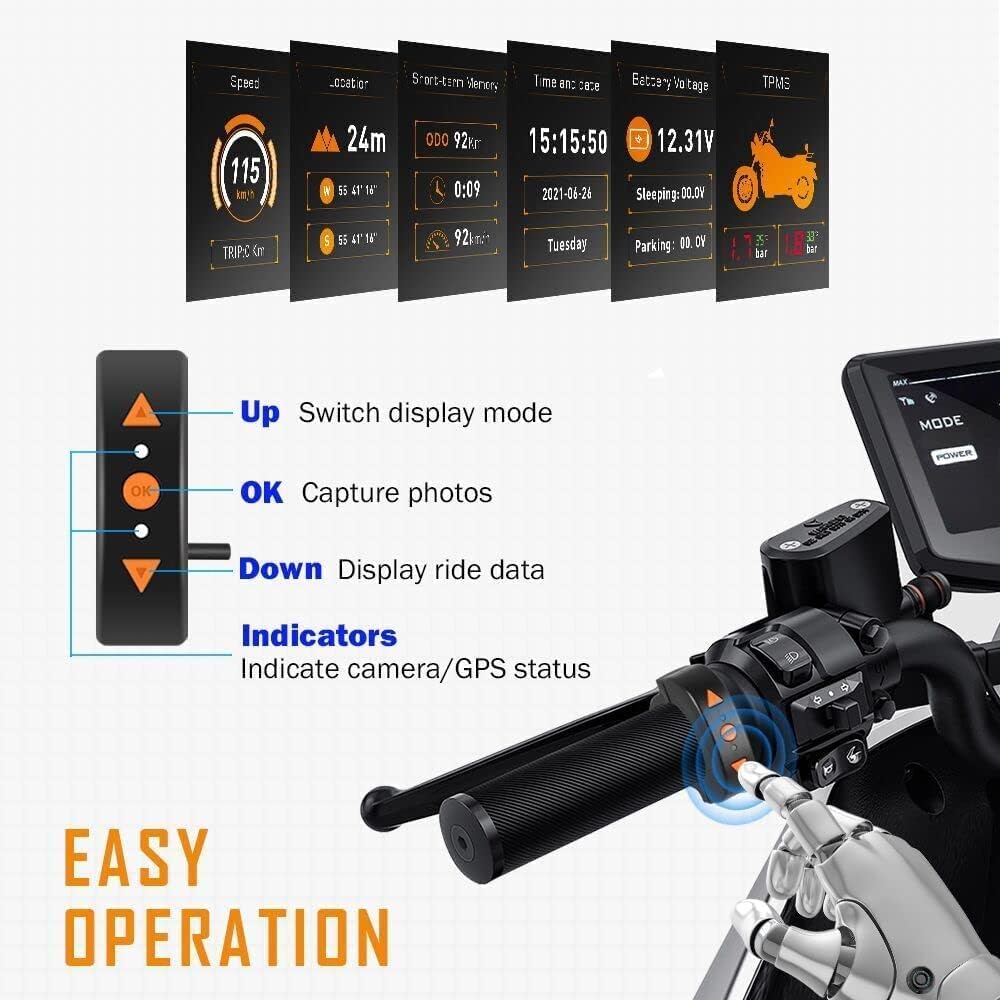
Image: The multifunction remote control mounted on a motorcycle handlebar, highlighting its buttons for easy operation.
5. الصيانة
Proper maintenance ensures the longevity and optimal performance of your VSYSTO F9D dash cam system.
- تنظيف: استخدم قطعة قماش ناعمة وجافة لتنظيف شاشة الكمبيوتر وعدسات الكاميرا. تجنب استخدام المنظفات الكاشطة أو المذيبات.
- تصميم مقاوم للماء: The system features a water-resistant design, allowing it to perform reliably in various weather conditions. However, avoid submerging the main unit or cameras in water.
- إدارة بطاقة Micro-SD: Regularly format the micro-SD card (at least once a month) using the dash cam's menu to prevent data corruption and ensure smooth recording. Back up important video fileقبل التنسيق.
- TPMS Sensor Batteries: The TPMS sensors use CR1632 button batteries. If a sensor stops transmitting data, the battery may need replacement. Refer to the TPMS sensor instructions for battery replacement procedures.
- فحص الكابلات: Periodically check all cables and connections for any signs of wear, damage, or loose connections.
6. استكشاف الأخطاء وإصلاحها
If you encounter issues with your VSYSTO F9D dash cam, refer to the following common troubleshooting steps:
| مشكلة | السبب المحتمل | حل |
|---|---|---|
| كاميرا لوحة القيادة لا تعمل. | لا يوجد مصدر للطاقة، اتصال فضفاض. | Check power cable connection to battery and main unit. Ensure motorcycle ignition is on if hard-wired. |
| Recording not starting. | No micro-SD card; card full/corrupted; recording disabled. | Insert micro-SD card. Format the card. Check recording settings in the menu. |
| جودة الفيديو رديئة / صور ضبابية. | عدسة متسخة؛ غشاء واقٍ على العدسة؛ ظروف إضاءة منخفضة. | Clean camera lenses. Remove any protective film. Ensure sufficient lighting for optimal night vision performance. |
| TPMS sensors not displaying data or showing incorrect readings. | Sensor battery low/dead; improper installation; interference. | Replace TPMS sensor batteries. Re-install sensors securely. Check for potential signal interference. |
| Battery drain when parked. | Parking Mode enabled and frequently triggered. | Adjust Parking Mode sensitivity or disable it if not required for extended parking periods. Consult a professional for electrical system diagnosis if issue persists. |
| مشاكل الاتصال بالواي فاي. | Incorrect password; app issues; distance from device. | Ensure correct WiFi password. Restart the app and dash cam. Stay within close proximity to the dash cam for connection. |
7. المواصفات
| ميزة | التفاصيل |
|---|---|
| رقم الموديل | F9D |
| أبعاد المنتج | 0.71 × 4.41 × 2.95 بوصة |
| وزن العنصر | 3.16 رطل |
| دقة التقاط الفيديو | 1080 بكسل (عالي الدقة بالكامل) |
| مجال View | 150 درجة |
| تكنولوجيا الاتصال | Hard-wired, Wi-Fi |
| المميزات الخاصة | Dual-channel video/audio, SONY COMS, Night Vision, TPMS, Parking mode, Battery voltage monitoring, GPS tracking, Altitude/Atmospheric pressure sensor, WiFi app, Waterproof |
| مصدر الطاقة | Motorcycle Battery (Hard-wired) |
8. الضمان والدعم
For warranty information, technical support, or service inquiries, please refer to the warranty card included with your product or visit the official VSYSTO webالموقع. احتفظ بإيصال الشراء الخاص بك كإثبات للشراء في حالة مطالبات الضمان.
Ask a question about this manual
Ask about setup, troubleshooting, compatibility, parts, safety, or missing instructions. Manuals+ will review the question and use this page’s manual context to help answer it.