
ELEFOCUS RC-815S, TX-8030, RC-816S, RC-903S, RC-904S, TX-8160, TX-8050, TX-8140
ELEFOCUS Replacement Remote Control User Manual
For Onkyo RC-815S, TX-8030, RC-816S, RC-903S, RC-904S, TX-8160, TX-8050, TX-8140 Network Audio/Video AV Stereo Receivers
مقدمة
This manual provides essential information for the proper use and maintenance of your ELEFOCUS replacement remote control. This remote is designed as a direct replacement for various Onkyo Network Audio/Video AV Stereo Receivers, including models RC-815S, TX-8030, RC-816S, RC-903S, RC-904S, TX-8160, TX-8050, and TX-8140.
Please note that this is a replacement item and while it functions out of the box with compatible models, some advanced or specific functions of your original remote may not be fully supported. No complex programming is required; simply insert batteries to begin use.
يثبت
1. تركيب البطارية
يتطلب جهاز التحكم عن بعد بطاريتين AAA (غير مرفقتين). اتبع الخطوات التالية لتثبيتهما:
- حدد موقع حجرة البطارية في الجزء الخلفي من جهاز التحكم عن بعد.
- اضغط لأسفل على علامة التبويب ثم حرك غطاء البطارية إلى الأسفل لفتحه.
- قم بإدخال بطاريتين AAA، مع التأكد من محاذاة الأطراف الموجبة (+) والسالبة (-) بشكل صحيح مع العلامات الموجودة داخل الحجرة.
- قم بتحريك غطاء البطارية مرة أخرى إلى مكانه حتى يستقر بشكل آمن.
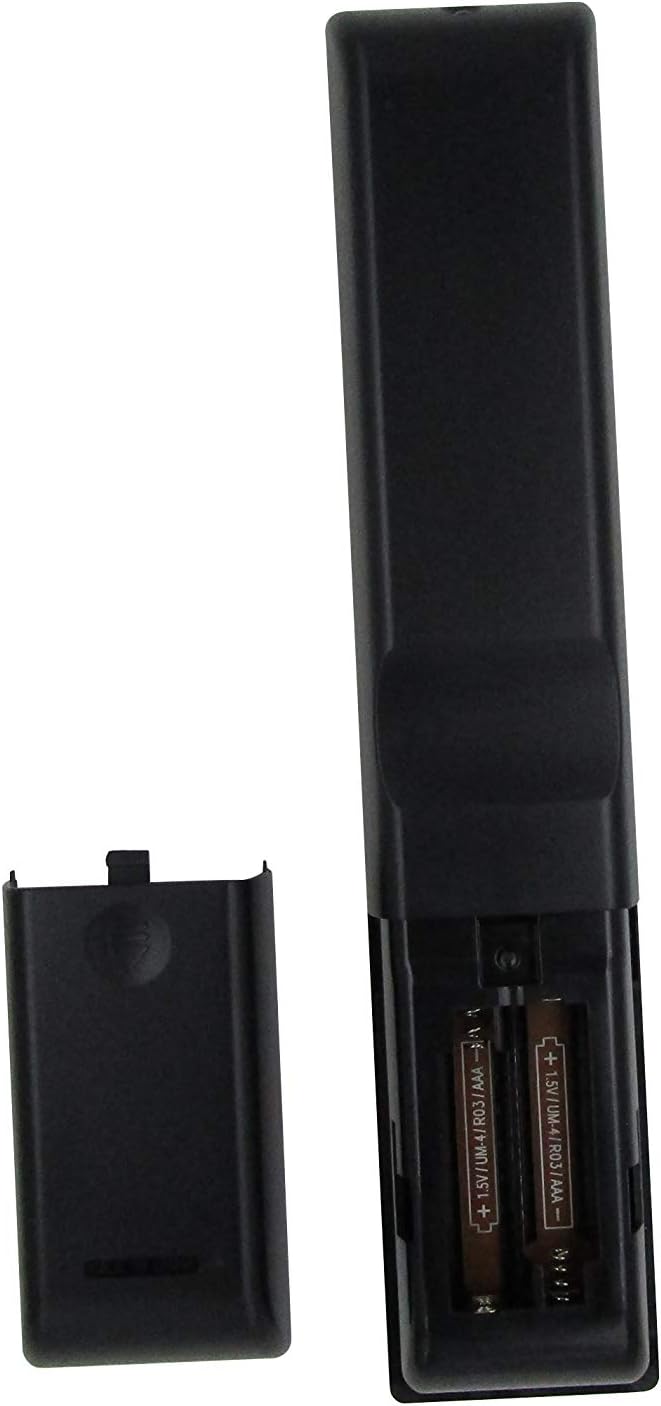
الشكل 1: Battery compartment with AAA batteries. Ensure correct polarity when inserting batteries.
Once batteries are installed, the remote is ready for use. No additional programming or setup is typically required for compatible Onkyo receiver models.
تعليمات التشغيل
This replacement remote control provides essential functions for your Onkyo receiver. Point the remote directly at the receiver's infrared (IR) sensor for optimal performance.

الشكل 2: زيادةview of the remote control layout.
الوظائف الرئيسية:
- زر الطاقة (⏻): تشغيل جهاز الاستقبال أو إيقاف تشغيله.
- Input Selector Buttons (BD/DVD, CBL/SAT, PC, Game, TV/Tape, CD, Phono, Tuner, NET, Bluetooth): يحدد مصدر إدخال الصوت/الفيديو المطلوب.
- رفع / خفض الصوت (▲ / ▼): ضبط مستوى الصوت الرئيسي.
- كتم: كتم أو إلغاء كتم صوت إخراج الصوت.
- Navigation Pad (Up, Down, Left, Right, Enter): Used to navigate menus and confirm selections on your receiver's display.
- قائمة طعام: يُتيح الوصول إلى القائمة الرئيسية لجهاز الاستقبال.
- يثبت: Enters the setup menu for configuration.
- يعود: العودة إلى القائمة أو الشاشة السابقة.
- صوتي: Cycles through audio modes or settings.
- Playback Controls (Rewind, Play/Pause, Fast Forward, Stop, Previous Track, Play, Next Track): Controls media playback for connected devices.
- يكرر: Toggles repeat playback mode.
- عشوائي: Toggles random/shuffle playback mode.
- المتحدث أ/ب: Selects speaker output groups.
- لوحة المفاتيح الرقمية (0-9): For direct input of numbers, such as radio frequencies or track numbers.
- قبعات: Functionality may vary by receiver model.
- > 10: For entering numbers greater than 9 on some systems.
- D.TUN: Direct tuning for radio.
- عرض: Changes display information on the receiver.
- باهتة: يضبط سطوع شاشة جهاز الاستقبال.
- ينام: يضبط مؤقت النوم لجهاز الاستقبال.
- CLR: Clears current input or selection.
ملاحظة هامة:
As a replacement remote, some advanced or specific functions present on your original Onkyo remote may not be replicated or fully functional. This remote is designed to cover the primary and most commonly used features.
صيانة
1. استبدال البطارية
استبدل البطاريات عندما يصبح استجابة جهاز التحكم عن بُعد بطيئة أو يتوقف عن العمل. استبدل البطاريتين معًا ببطاريات AAA جديدة. لا تخلط بين البطاريات القديمة والجديدة، أو بين أنواع مختلفة من البطاريات.
2. التنظيف
لتنظيف جهاز التحكم عن بعد، استخدم قطعة قماش ناعمة وجافة. لإزالة الأوساخ المستعصية، افركها برفق.ampاغسل قطعة القماش بالماء أو منظف لطيف غير كاشط. لا تستخدم مواد كيميائية قاسية أو مذيبات أو وسادات تنظيف كاشطة، فقد تُتلف سطح جهاز التحكم عن بُعد أو مكوناته الداخلية.
3. التخزين
When not in use for extended periods, it is recommended to remove the batteries to prevent leakage, which can damage the remote. Store the remote in a cool, dry place away from direct sunlight and extreme temperatures.
استكشاف الأخطاء وإصلاحها
| مشكلة | السبب المحتمل | حل |
|---|---|---|
| جهاز التحكم عن بعد لا يعمل على الإطلاق. |
|
|
| بعض الوظائف لا تعمل. |
|
|
| يعمل عن بعد بشكل متقطع. |
|
|
If your specific Onkyo receiver model is not listed in the product title (RC-815S, TX-8030, RC-816S, RC-903S, RC-904S, TX-8160, TX-8050, TX-8140), this remote may not be compatible. Please verify compatibility before purchase.
تحديد
- ماركة: ELEFOCUS
- الأجهزة المتوافقة: Onkyo Network Audio/Video AV Stereo Receivers (Models: RC-815S, TX-8030, RC-816S, RC-903S, RC-904S, TX-8160, TX-8050, TX-8140)
- تقنية الاتصال: الأشعة تحت الحمراء (IR)
- مصدر الطاقة: 2 بطاريات AAA (غير مدرجة)
- ميزة خاصة: تصميم مريح
- الحد الأقصى لعدد الأجهزة المدعومة: 1 (specific Onkyo receiver)
معلومات الضمان
Specific warranty details for this ELEFOCUS replacement remote control are not provided in the product information. Please refer to the seller's return policy or contact the seller directly for information regarding warranty coverage and terms.
دعم العملاء
For further assistance or inquiries regarding your ELEFOCUS replacement remote control, please contact the seller directly through the platform where the purchase was made. As this is a third-party replacement product, direct manufacturer support may not be available.
For general information about your Onkyo receiver, please refer to the original user manual provided with your receiver or visit the official Onkyo support webموقع.
منتج إضافي Views

الشكل 3: بزاوية view من جهاز التحكم عن بعد.

الشكل 4: Close-up of the upper section of the remote, showing input and media controls.
مقاطع فيديو رسمية للمنتج
No official product videos from the seller were provided for this item.