مقدمة
This manual provides comprehensive instructions for the setup, operation, maintenance, and troubleshooting of your MSI WS76 Workstation Laptop. Designed for professionals, this powerful mobile workstation features an Intel Core i9 processor, NVIDIA Quadro RTX A5000 graphics, and a 17.3-inch 144Hz FHD display, making it ideal for demanding tasks such as 3D modeling, engineering, and content creation.
ماذا يوجد في الصندوق
Upon unboxing your MSI WS76 Workstation Laptop, please ensure all the following items are present:
- MSI WS76 Workstation Laptop
- محول الطاقة
المنتج انتهىview
Familiarize yourself with the key components and features of your MSI WS76 Workstation Laptop.
أمام View

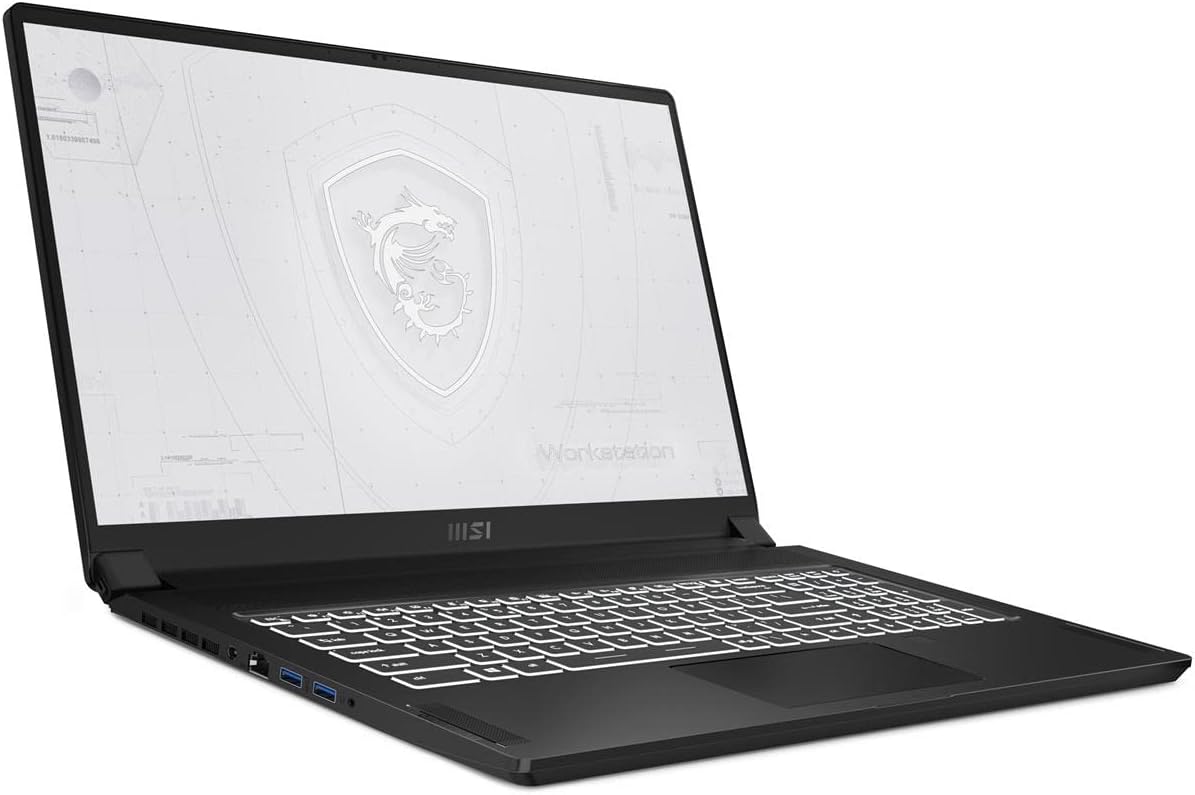
This image shows the MSI WS76 Workstation Laptop from the front, with the lid open, revealing the 17.3-inch display and the full-sized keyboard. The screen displays a stylized MSI Workstation logo.
الجانب الأيسر View

توفر هذه الصورة view of the left side of the laptop, highlighting the various input/output ports available, including USB ports and possibly an audio jack.
الجانب الأيمن View
This image displays the right side of the laptop, showcasing additional connectivity options such as USB ports and potentially a card reader or other specialized ports.
قمة View (الغطاء مغلق)

This image presents the top surface of the laptop's lid when closed, featuring the prominent MSI dragon logo.
مؤخرة View (الغطاء مغلق)

This image shows the rear edge of the laptop when the lid is closed, indicating the design and any rear-facing vents or ports.
المميزات الرئيسية:
- Visual Performance: 17.3" 144Hz FHD display for demanding visual tasks.
- Redefined Power: 11th Gen Intel Core i9 processor with 8 cores for high performance.
- Quadro Performance: NVIDIA Quadro RTX A5000 for real-time ray tracing and advanced graphics.
- الأمن القوي: Integrated TPM 2.0 and fingerprint reader.
- اتصالات متعددة الاستخدامات: Includes Thunderbolt 4 (with power delivery and 40Gbps data transfer) and USB 4.0.
- ISV Certified: Officially recognized and certified by major ISVs for engineering, 3D modeling, and design.
يثبت
- فك حزمة الكمبيوتر المحمول: قم بإزالة الكمبيوتر المحمول وجميع الملحقات من العبوة بعناية.
- توصيل الطاقة: قم بتوصيل محول الطاقة بمنفذ إدخال الطاقة الخاص بالكمبيوتر المحمول، ثم بمأخذ الحائط.
- التمهيد الأولي: Open the laptop lid and press the power button. The system will begin the initial Windows 10 Pro setup process.
- اتبع التعليمات التي تظهر على الشاشة: Complete the Windows setup, including region, language, network connection, and user account creation.
- تثبيت التحديثات: After initial setup, connect to the internet and check for Windows updates and MSI driver updates to ensure optimal performance and security.
تشغيل الكمبيوتر المحمول
إدارة الطاقة
- تشغيل/إيقاف التشغيل: Press the power button located on the keyboard deck to turn the laptop on or off.
- وضع السكون: Close the lid or select "Sleep" from the Start Menu to put the laptop into sleep mode.
- عمر البطارية: Optimize battery life by adjusting screen brightness, closing unused applications, and utilizing Windows power plans.
لوحة المفاتيح ولوحة اللمس
- الإضاءة الخلفية للوحة المفاتيح: Adjust keyboard backlight intensity using the dedicated function keys (Fn + Fx).
- إيماءات لوحة اللمس: Utilize multi-touch gestures for navigation, zooming, and scrolling. Refer to Windows settings for customization.
ربط الأجهزة الطرفية
The MSI WS76 offers a wide range of ports:
- منافذ USB: Connect USB devices such as external hard drives, mice, and keyboards.
- ثندربولت 4: Use for high-speed data transfer (up to 40Gbps), external displays, or power delivery.
- HDMI/DisplayPort: Connect external monitors for extended display setups.
- مقبس الصوت: قم بتوصيل سماعات الرأس أو مكبرات الصوت الخارجية.
- منفذ إيثرنت: لاتصالات الشبكة السلكية.
صيانة
- تنظيف: Use a soft, lint-free cloth to clean the screen and chassis. For stubborn marks, dampبللي قطعة القماش قليلاً بالماء أو بمنظف الشاشات. تجنبي استخدام المواد الكيميائية القاسية.
- تحديثات البرامج: Regularly check for and install updates for Windows, graphics drivers (NVIDIA), and MSI utilities to ensure system stability and performance.
- العناية بالبطارية: To prolong battery lifespan, avoid frequently discharging the battery completely. Store the laptop in a cool, dry place if not used for extended periods.
- تهوية: تأكد من عدم انسداد فتحات تهوية الكمبيوتر المحمول لمنع ارتفاع درجة حرارته. استخدم الكمبيوتر المحمول على سطح صلب ومستوٍ.
استكشاف الأخطاء وإصلاحها
This section addresses common issues you might encounter with your MSI WS76 Workstation Laptop.
لا يوجد طاقة / الكمبيوتر المحمول لا يعمل
- تأكد من توصيل محول الطاقة بشكل آمن بالكمبيوتر المحمول ومأخذ الطاقة العامل.
- تأكد من أن منفذ الطاقة يعمل عن طريق توصيل جهاز آخر.
- إذا كانت البطارية فارغة تمامًا، اتركها تشحن لمدة 30 دقيقة على الأقل قبل محاولة تشغيلها.
Display Issues (No Image / Flickering)
- Try connecting an external monitor to determine if the issue is with the laptop's internal display.
- أعد تشغيل الكمبيوتر المحمول.
- تأكد من تحديث برامج تشغيل الرسومات.
System Performance is Slow
- أغلق التطبيقات غير الضرورية التي تعمل في الخلفية.
- تحقق من "إدارة المهام" للعمليات التي تستهلك قدرًا كبيرًا من وحدة المعالجة المركزية أو ذاكرة الوصول العشوائي.
- تأكد من وجود مساحة خالية كافية على SSD.
- قم بإجراء فحص للفيروسات.
- تحديث برامج التشغيل وWindows.
ارتفاع درجة الحرارة
- Ensure ventilation vents are clear of dust and obstructions.
- استخدم الكمبيوتر المحمول على سطح صلب ومستوٍ.
- Consider using a laptop cooling pad for prolonged heavy workloads.
Fingerprint Reader Not Working
- تأكد من أن إصبعك نظيف وجاف.
- Re-register your fingerprint in Windows settings.
- Check for driver updates for the fingerprint sensor.
تحديد
| ميزة | التفاصيل |
|---|---|
| اسم الموديل | WS76 11UM-468 |
| المعالج | معالج Intel Core i9-11900H (2.5 جيجاهرتز، 8 نواة) |
| الرسومات | NVIDIA Quadro RTX A5000 (16 GB GDDR6) |
| عرض | 17.3 Inches, 144Hz FHD (1920 x 1080 pixels) |
| كبش | 64 جيجابايت DDR4 (3200 ميجاهرتز) |
| تخزين | 1 تيرابايت SSD |
| نظام التشغيل | ويندوز 10 برو |
| الاتصال | Thunderbolt 4, USB 4.0, USB 3.0 (x2), WiFi 6E, Bluetooth |
| ميزات الأمان | TPM 2.0, Fingerprint Reader |
| الأبعاد (الطول × العرض × الارتفاع) | 0.8 × 15.59 × 10.21 بوصة |
| وزن | 5.39 رطل |
| لون | أسود |
الضمان والدعم
Your MSI WS76 Workstation Laptop comes with a 3-year onsite warranty, as specified by the manufacturer. For warranty claims or technical support, please contact MSI customer service directly.
Before contacting support, please have your product model number (WS76 11UM-468) and serial number ready. You may also find helpful resources, drivers, and FAQs on the official MSI support webموقع.
For the most up-to-date support information, please visit the official MSI webالموقع أو راجع الوثائق المرفقة مع المنتج الخاص بك.