
ITECH IT6952A
دليل مستخدم وحدة تزويد الطاقة بالتيار المستمر القابلة للبرمجة ITECH IT6952A
Model: IT6952A | Brand: ITECH
1. المقدمة
This user manual provides essential information for the safe and effective operation of your ITECH IT6952A Programmable DC Power Supply. Please read this manual thoroughly before using the device to ensure proper functionality and to prevent damage or injury. The IT6952A is a high-performance, programmable DC power supply designed for laboratory and industrial applications, offering precise control over voltagه والإخراج الحالي.
2. معلومات السلامة
Always observe the following safety precautions to prevent electric shock, injury, or damage to the instrument:
- تأكد من توصيل مصدر الطاقة بمأخذ تيار متردد مؤرض.
- لا تقم بتشغيل الجهاز في حالة رطبة أو دamp شروط.
- لا تفتح الصندوقasinلا توجد قطع غيار قابلة للصيانة من قبل المستخدم. يُرجى إحالة جميع أعمال الصيانة إلى فنيين مؤهلين.
- تأكد من أن مستوى الصوت المدخلtage matches the power supply's rating before connecting to the mains.
- Avoid short-circuiting the output terminals, especially at high power settings.
- تأكد من التهوية المناسبة حول الوحدة لمنع ارتفاع درجة الحرارة.
3. انتهى المنتجview
The ITECH IT6952A features a clear VFD display and intuitive controls for easy operation.
3.1 تخطيط اللوحة الأمامية

Figure 3.1: Front Panel of IT6952A
The front panel includes the VFD display for voltage and current readings, a rotary knob for precise adjustments, number keys (0-9) and ESC for direct input, function keys (V-SET, I-SET, Save, Recall, Meter, Trigger, Enter, On/Off) for various operations, navigation keys (UP/DOWN/LEFT/RIGHT) for cursor movement, and output terminals for connecting loads. The 'Shift' and 'Local' keys provide additional control options, and the main power switch is integrated.
3.2 تخطيط اللوحة الخلفية
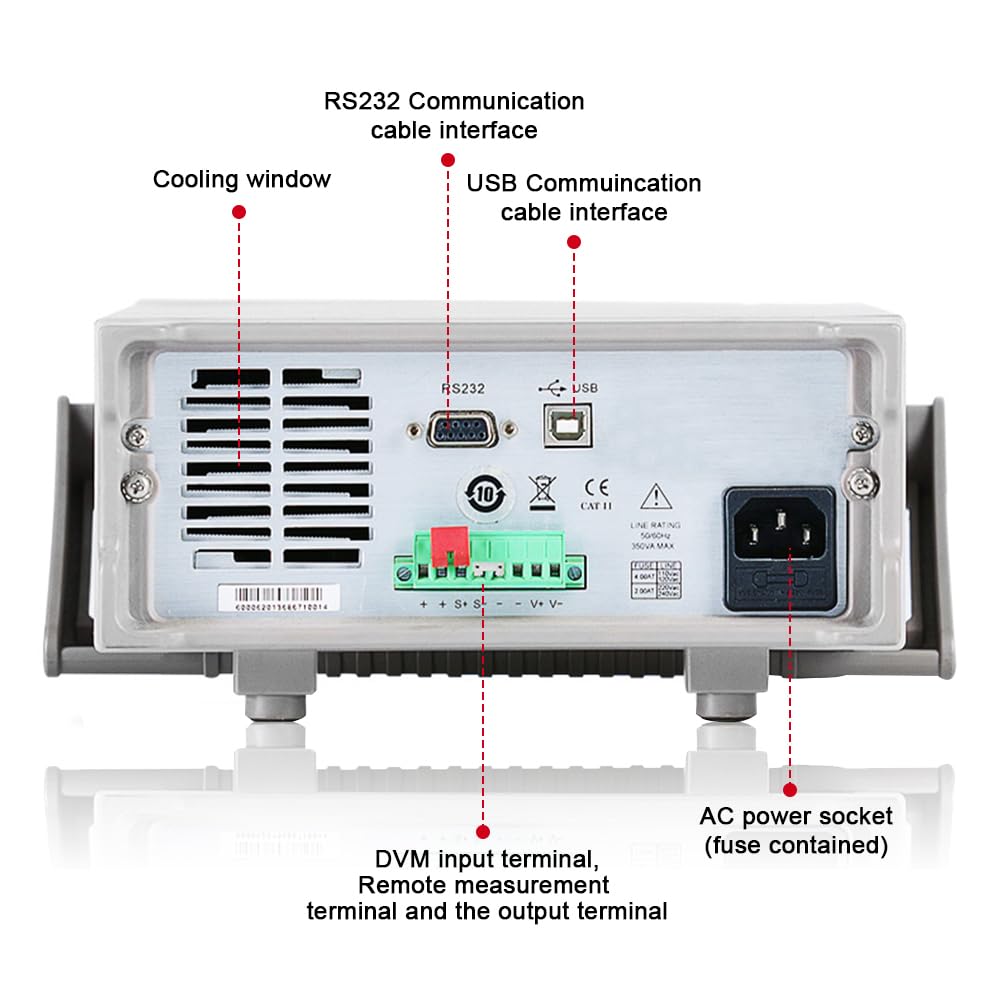
Figure 3.2: Rear Panel of IT6952A
The rear panel features the AC power socket (with integrated fuse), cooling windows for heat dissipation, an RS232 communication cable interface, a USB communication cable interface, and DVM input terminals along with remote measurement terminals and additional output terminals for specific applications.
4. الإعداد
اتبع هذه الخطوات للإعداد الأولي:
- فك التعبئة: أخرج وحدة تزويد الطاقة من غلافها بعناية. افحصها بحثًا عن أي علامات تلف أثناء النقل.
- الموقع: Place the unit on a stable, level surface with adequate ventilation around all sides. Do not block the cooling vents on the sides and rear.
- توصيل الطاقة: Connect the provided AC power cord to the AC power socket on the rear panel of the IT6952A. Plug the other end into a grounded electrical outlet.
- تشغيل الطاقة: Press the main power switch on the front panel to turn on the unit. The VFD display should illuminate.
- اتصال الإخراج: Connect your load to the output terminals on the front panel using appropriate test leads. Ensure correct polarity (positive to positive, negative to negative).
5. تعليمات التشغيل
This section covers basic operation of the IT6952A.
5.1 حجم الإعدادtagهـ والحالية
- تعيين المجلدtage: اضغط على مجموعة V زر. مستوى الصوتtage display will become active. Use the rotary knob to adjust the voltage, or use the number keys for direct input followed by يدخل.
- ضبط الوضع الحالي: اضغط على أضبط button. The current display will become active. Use the rotary knob to adjust the current limit, or use the number keys for direct input followed by يدخل.
- تفعيل الإخراج: بعد ضبط مستوى الصوت المطلوبtagاضغط على زر التشغيل/الإيقاف. تشغيل/إيقاف button to enable the output. The output indicator will illuminate.
- تعطيل الإخراج: لتعطيل الإخراج، اضغط على تشغيل/إيقاف الزر مرة أخرى.
5.2 Using Memory Functions (Save/Recall)
The IT6952A allows you to save and recall frequently used voltagه والإعدادات الحالية.
- حفظ الإعداد: اضبط المجلد المطلوبtage and current. Press the يحفظ button. Use the navigation keys or number keys to select a memory location (e.g., 0-9) and press يدخل to store the settings.
- Recall Setting: اضغط على يتذكر button. Use the navigation keys or number keys to select the desired memory location and press يدخل to load the stored settings.
6. الصيانة
Proper maintenance ensures the longevity and reliability of your power supply.
- تنظيف: Disconnect the power supply from the mains before cleaning. Use a soft, dry cloth to wipe the exterior. For stubborn dirt, a slightly damp cloth with mild detergent can be used, ensuring no liquid enters the unit.
- تهوية: Regularly check that the cooling vents are free from dust and obstructions. Use compressed air to clear dust if necessary.
- تخزين: When not in use for extended periods, store the power supply in a cool, dry, and dust-free environment.
7. استكشاف الأخطاء وإصلاحها
If you encounter issues with your IT6952A, refer to the following common problems and solutions:
| مشكلة | السبب المحتمل | حل |
|---|---|---|
| لا توجد قوة عند تشغيله | Power cord not connected; Blown fuse; No power from outlet | Check power cord connection; Replace fuse (refer to specifications for type); Test outlet with another device |
| لا يوجد مجلد إخراجtagه/الحالي | Output disabled; Overload protection activated; Incorrect settings | يضعط تشغيل/إيقاف to enable output; Reduce load or increase current limit; Verify voltagالإعدادات الإلكترونية/الحالية |
| Display shows 'Error' | Internal fault; Over-temperature | Turn off unit, wait 5 minutes, restart; Ensure proper ventilation, allow unit to cool down. If error persists, contact support. |
| قراءات غير دقيقة | Poor connection; Calibration needed | Check all connections; Contact ITECH support for calibration information. |
8. المواصفات
Key technical specifications for the ITECH IT6952A Programmable DC Power Supply:
| مواصفة | قيمة |
|---|---|
| ماركة | ايتك |
| نموذج | اي تي 6952ا |
| حجم الإخراجtage | 60 فولت |
| Ampإيراج | 25 Amps |
| انتاج واتtage | 600 واط |
| عامل الشكل | طاولة العمل |
| نوع الموصل | USB |
| مادة | معدن |
| لون | أحمر، أسود |
9. الضمان والدعم
ITECH products are designed for reliability and performance. For warranty information, technical support, or service inquiries, please refer to the warranty card included with your product or visit the official ITECH webالموقع. احتفظ بإيصال الشراء الخاص بك كإثبات للشراء في حالة مطالبات الضمان.
For further assistance, you may contact ITECH customer service through their official channels. Always provide your product model (IT6952A) and serial number when seeking support.
Ask a question about this manual
Ask about setup, troubleshooting, compatibility, parts, safety, or missing instructions. Manuals+ will review the question and use this page’s manual context to help answer it.