
ASUS PRIME Z590-P
دليل مستخدم اللوحة الأم ASUS Prime Z590-P
نموذج: PREMIUM Z590-P |العلامة التجارية: أسوس
1. المقدمة
This manual provides detailed instructions for the installation, operation, and maintenance of your ASUS Prime Z590-P motherboard. The ASUS Prime Z590-P is engineered to support 11th and 10th Gen Intel Core processors, offering robust power delivery, comprehensive cooling, and advanced connectivity options for a stable and high-performance computing experience.
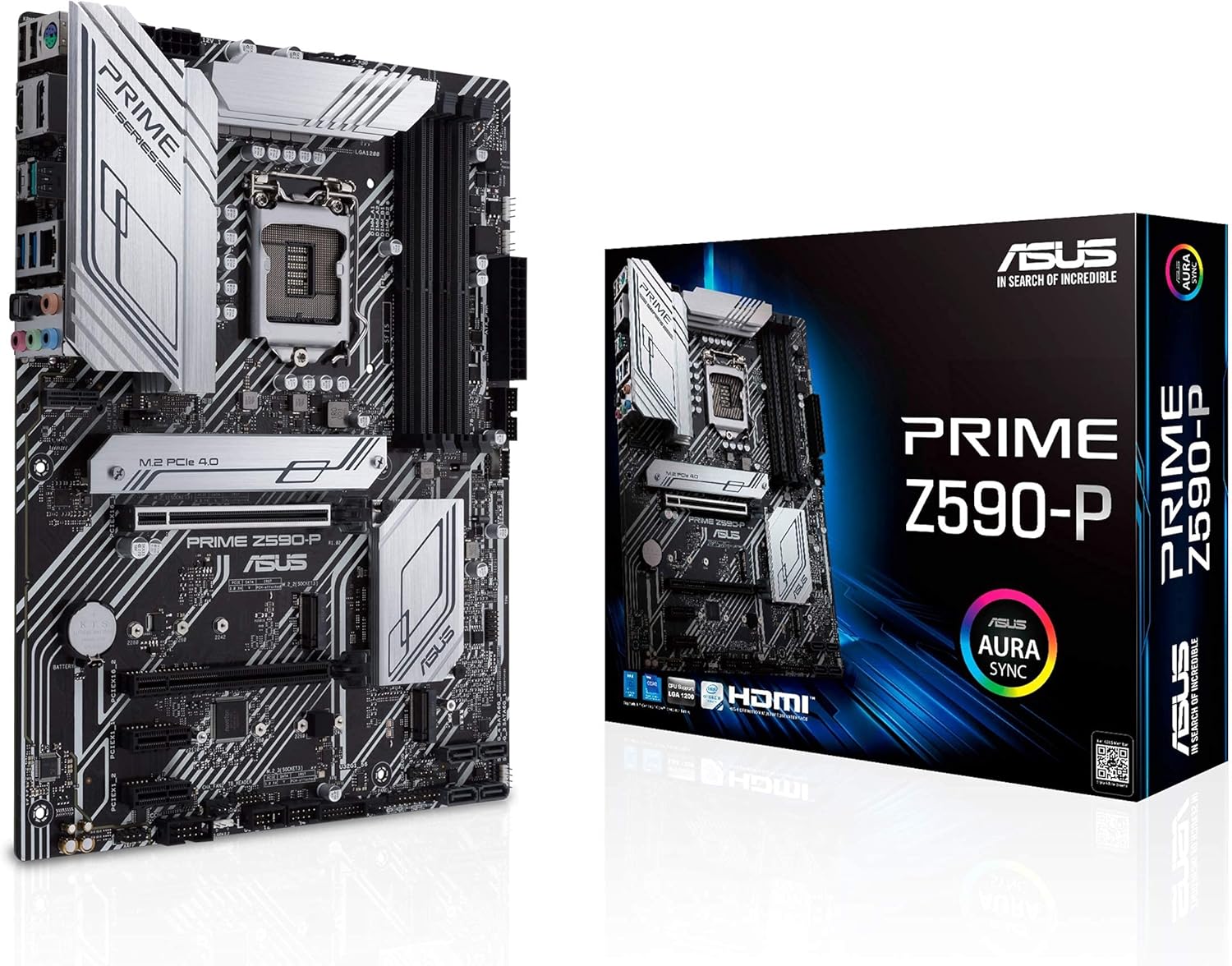
Figure 1.1: The ASUS Prime Z590-P motherboard alongside its retail packaging.
2. محتويات العبوة
تأكد من وجود جميع العناصر المذكورة أدناه في عبوة المنتج. في حال وجود أي عنصر مفقود أو تالف، يرجى الاتصال بالبائع.

Figure 2.1: Included accessories and documentation with the ASUS Prime Z590-P motherboard.
- لوحة أم ASUS Prime Z590-P
- درع لوحة الإدخال/الإخراج الخلفي
- دليل المستخدم
- Support DVD (Drivers and Utilities)
- SATA Cables (Quantity may vary)
- مجموعة براغي M.2
- M.2 Rubber Spacers
3. الإعداد والتثبيت
اتبع هذه الخطوات لتثبيت اللوحة الأم ومكوناتها بشكل صحيح.
3.1 مكون أكثرview

Figure 3.1: Key power delivery and cooling features on the motherboard.
The motherboard features 10+1 DrMOS power stages, VRM heatsinks, PCH heatsink, and multiple fan headers for comprehensive cooling and stable power delivery.
3.2 تثبيت وحدة المعالجة المركزية
The ASUS Prime Z590-P supports Intel LGA 1200 socket processors (11th/10th Gen Intel Core). Carefully align the CPU with the socket and gently lower it into place. Secure the retention arm.
3.3 تثبيت الذاكرة (RAM)

Figure 3.2: Memory (DIMM) and storage (M.2) slot locations.
This motherboard features 4 DIMM slots supporting up to 128GB of DDR4 memory at speeds up to 5133 MHz (OC). Ensure memory modules are installed in the correct slots for dual-channel operation as per the user manual. ASUS OptiMem II technology enhances memory stability and performance.
3.4 تركيب جهاز التخزين
The board includes 3 M.2 slots for NVMe SSDs (1x PCIe 4.0 x4, 2x PCIe 3.0 x4 & SATA) and multiple SATA ports for 2.5-inch/3.5-inch drives. Install M.2 drives into the designated slots and secure them with the provided screws and rubber spacers.
3.5 تركيب بطاقة التوسعة
Install your graphics card or other PCIe expansion cards into the PCIe 4.0 x16 slot or other available PCIe slots. Ensure the card is fully seated and secured with the case screw.
3.6 Connectivity and I/O Panel

Figure 3.3: Rear I/O panel and internal connectivity headers.
Connect peripherals to the rear I/O panel, which includes USB 2.0, USB 3.2 Gen 1, USB 3.2 Gen 2x2 Type-C, HDMI, DisplayPort, 2.5Gb LAN, and audio jacks. Ensure all necessary power cables (24-pin ATX, 8-pin CPU) are securely connected to the motherboard.

Figure 3.4: RGB and Audio features.
The motherboard also features Addressable Gen 2 RGB Headers for customizable lighting and dedicated audio shielding for enhanced sound quality.
3.7 التشغيل الأولي وإعداد BIOS
After assembling all components, connect your display and power on the system. Access the UEFI BIOS by pressing the designated key (usually DEL or F2) during startup. Configure boot order, enable XMP for memory, and adjust other settings as needed.
4. تشغيل اللوحة الأم
Once the operating system is installed, you can utilize ASUS's proprietary software for system optimization.
4.1 تثبيت برنامج التشغيل
It is crucial to install the latest drivers from the ASUS support website or the provided support DVD. Prioritize chipset, LAN, audio, and graphics drivers. Installing drivers before Windows Update can prevent potential conflicts and ensure optimal performance.
4.2 Software Utilities
ASUS provides various utilities for system management, including fan tuning/control, power management, and temperature monitoring. These tools allow for fine-tuning your system's performance and acoustics.
5. الصيانة
تساعد الصيانة المنتظمة على ضمان طول عمر اللوحة الأم وتشغيلها المستقر.
5.1 التنظيف
Periodically clean dust from the motherboard and components using compressed air. Ensure the system is powered off and unplugged before cleaning. Pay attention to heatsinks and fan blades to maintain effective cooling.
5.2 تحديثات BIOS
تحقق من دعم ASUS website regularly for BIOS updates. BIOS updates can improve system stability, compatibility, and performance. Follow the instructions provided by ASUS carefully when performing a BIOS update.
6. استكشاف الأخطاء وإصلاحها
يتناول هذا القسم المشكلات الشائعة التي قد تواجهها.
6.1 System Instability or Blue Screens
If your system experiences random blue screens or instability, ensure all drivers are correctly installed and up-to-date. Conflicting drivers, especially those automatically installed by Windows Update, can cause issues. It is recommended to install official ASUS drivers before connecting to the internet for the first time after an OS installation.
6.2 لا يوجد مخرج عرض
Verify that your monitor is correctly connected to the graphics card or integrated graphics port. Ensure all power cables to the motherboard and graphics card are securely seated. Reseat RAM modules and the graphics card.
6.3 لم يتم الكشف عن المكون
If a component (e.g., M.2 SSD, RAM, PCIe card) is not detected, ensure it is properly seated in its slot. Check the BIOS settings to confirm the component is enabled and recognized. For M.2 drives, be aware of potential lane sharing with SATA ports, which might disable certain SATA ports when an M.2 drive is in use.
7. المواصفات
| ميزة | مواصفة |
|---|---|
| ماركة | أسوس |
| اسم الموديل | PREMIUM Z590-P |
| مقبس وحدة المعالجة المركزية | إل جي إيه 1200 |
| المعالجات المتوافقة | 10th and 11th Generation Intel Core |
| نوع الشريحة | إنتل Z590 |
| تقنية ذاكرة الوصول العشوائي (RAM) | دي دي ار 4 |
| سرعة ساعة الذاكرة | يصل إلى 5133 ميجاهرتز (مع كسر السرعة) |
| سعة تخزين الذاكرة | 128 جيجابايت (كحد أقصى) |
| أبعاد المنتج | 9.6 × 2 × 12 بوصة (عامل الشكل ATX) |
| وزن العنصر | 2.6 رطل |
| فتحات PCIe | PCIe 4.0 x16, other PCIe slots |
| فتحات M.2 | 3 (1x PCIe 4.0 x4, 2x PCIe 3.0 x4 & SATA) |
| شبكة محلية | 2.5 جيجابت إيثرنت |
| منافذ USB | USB 2.0, USB 3.2 Gen 1, USB 3.2 Gen 2x2 Type-C |
| مخرج الفيديو | HDMI ، ديسبلايبورت |
| صوتي | 5x Audio Jacks, Optical S/PDIF Out |
| منصة | ويندوز 10 |
8. مقاطع فيديو رسمية للمنتج
There are no official product videos from the seller available for this product at this time. Please refer to the text and images for detailed information.
9. الضمان والدعم
9.1 معلومات الضمان
للحصول على معلومات مفصلة حول الضمان، يرجى الرجوع إلى بطاقة الضمان المرفقة مع المنتج أو زيارة موقع دعم ASUS الرسمي. webقد تختلف شروط وأحكام الضمان حسب المنطقة.
9.2 الدعم الفني
If you encounter any issues that cannot be resolved using this manual or the troubleshooting section, please contact ASUS technical support. You can find contact information on the official ASUS webموقع: www.asus.com/support/
Ask a question about this manual
Ask about setup, troubleshooting, compatibility, parts, safety, or missing instructions. Manuals+ will review the question and use this page’s manual context to help answer it.