
1. المقدمة
Thank you for choosing the Leopold FC650MDS 65% Mechanical Keyboard. This manual provides essential information for setting up, operating, and maintaining your new keyboard. The FC650MDS is designed for durability and a superior typing experience, featuring Cherry MX Black mechanical switches, high-quality PBT double shot keycaps, and a sound-absorbing pad for enhanced acoustics.
2. محتويات العبوة
- Leopold FC650MDS Mechanical Keyboard
- كابل USB-C إلى USB-A
- كيكاب بولير
- دليل المستخدم (هذا المستند)
3. انتهى المنتجview
The Leopold FC650MDS is a compact 65% layout mechanical keyboard, offering a balance between functionality and desk space. It features durable PBT double shot keycaps and Cherry MX Black switches for a linear, non-tactile typing feel. The keyboard also includes a sound-absorbing pad to reduce typing noise and Cherry System Stabilizers for consistent keypresses on larger keys.
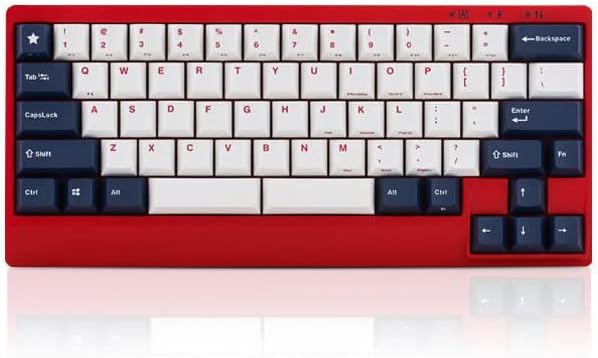
الشكل 1: الجبهة view of the Leopold FC650MDS keyboard. The keyboard features a red case with a 'White Blue Star PD' keycap set, consisting of white alphanumeric keys and dark blue modifier keys. The compact 65% layout is visible, including arrow keys and a few navigation keys on the right side.
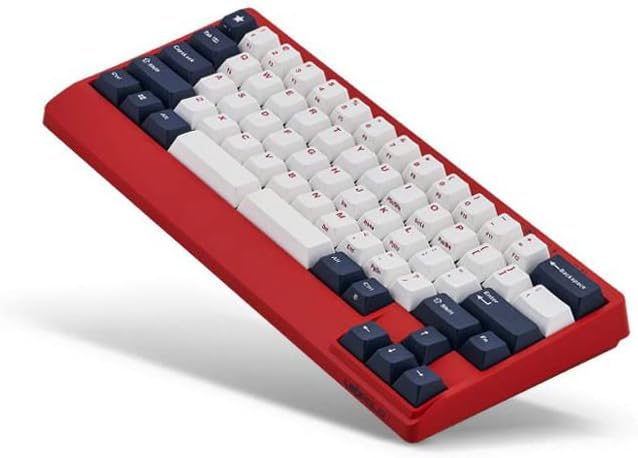
الشكل 2: بزاوية view of the Leopold FC650MDS keyboard, highlighting the ergonomic 'Step Sculpture 2' keycap profile. The red case and the white and dark blue PBT double shot keycaps are clearly visible, demonstrating the keyboard's build quality and design.
المميزات الرئيسية:
- Mini 65-key layout with double space bar support.
- 1.5mm thick PBT Double Shot keycaps for durability and legend longevity.
- Integrated sound-absorbing pad to enhance typing acoustics.
- Step Sculpture 2 ergonomic keycap profile للكتابة المريحة.
- Cherry System Stabilizers on larger keys (Shift, Space bar, Enter, Backspace) for consistent keypresses.
- Cherry MX Black mechanical switches.
4. الإعداد
- فك لوحة المفاتيح: قم بإزالة لوحة المفاتيح وملحقاتها من العبوة بعناية.
- قم بتوصيل كبل USB: Insert the USB-C end of the provided cable into the port on the back of the keyboard. Connect the USB-A end to an available USB port on your computer.
- تثبيت برنامج التشغيل: The keyboard is plug-and-play and typically does not require special drivers. Your operating system should automatically detect and install the necessary drivers.
- الموقع: Place the keyboard on a stable, flat surface. Adjust the keyboard feet on the underside for your preferred typing angle.
5. تعليمات التشغيل
Standard Key Functions:
The FC650MDS operates as a standard QWERTY keyboard for alphanumeric input. The 65% layout includes dedicated arrow keys and a few navigation keys (e.g., Delete, Page Up, Page Down) for convenience.
FN Key Combinations:
The 'FN' (Function) key, typically located near the right Ctrl key, allows access to secondary functions printed on the front or side of certain keycaps. Common FN key combinations on 65% keyboards include:
- FN + F-keys (F1-F12): Accessing F-key functionality (e.g., FN + 1 for F1, FN + 2 for F2, etc.).
- FN + Media Keys: Play/Pause, Stop, Previous Track, Next Track, Volume Up, Volume Down, Mute.
- FN + Brightness/Backlight Control: Adjusting keyboard backlight brightness or modes (if applicable, this model has single-color backlighting).
- FN + Home/End: Accessing Home and End functions.
Please refer to the legends on your specific keycaps for the exact FN key combinations available on your FC650MDS keyboard. Some functions may vary.
مفاتيح DIP:
Leopold keyboards often feature DIP switches on the underside to customize key functions (e.g., swapping Caps Lock and Left Ctrl, changing the position of the FN key). Consult the diagram on the underside of your keyboard or a separate quick start guide for specific DIP switch configurations and their effects.
6. الصيانة
تنظيف لوحة المفاتيح:
- النظافة العامة: استخدم قطعة قماش ناعمة وخالية من الوبر وامسحها برفق.ampened with water or a mild cleaning solution to wipe down the keyboard case. Avoid harsh chemicals.
- تنظيف غطاء المفاتيح: For deeper cleaning, you can remove the keycaps using the provided keycap puller. Wash keycaps with mild soap and water, rinse thoroughly, and ensure they are completely dry before reattaching.
- إزالة الغبار: Use compressed air to blow away dust and debris from between the keycaps and switches.
العناية العامة:
- تجنب سكب السوائل على لوحة المفاتيح.
- Do not expose the keyboard to extreme temperatures or direct sunlight for extended periods.
- تعامل مع كابل USB بعناية لمنع تلف الموصل.
7. استكشاف الأخطاء وإصلاحها
- لوحة المفاتيح لا تستجيب:
- تأكد من توصيل كابل USB بشكل آمن بكل من لوحة المفاتيح والكمبيوتر.
- حاول توصيل لوحة المفاتيح بمنفذ USB مختلف على جهاز الكمبيوتر الخاص بك.
- قم باختبار لوحة المفاتيح على جهاز كمبيوتر آخر لاستبعاد وجود مشكلة خاصة بالكمبيوتر.
- أعد تشغيل الكمبيوتر الخاص بك.
- مفاتيح محددة لا تعمل:
- Remove the keycap and check for any debris or obstruction around the switch. Use compressed air to clear it.
- إذا استمرت المشكلة ، فاتصل بدعم العملاء.
- مخرجات المفاتيح غير صحيحة:
- Check the DIP switch settings on the underside of the keyboard, as they can alter key functions.
- Ensure your operating system's keyboard layout settings are correct.
8. المواصفات
| ماركة | Leopold |
| رقم الموديل | FC650MDSS/EWBPD(R) |
| نوع لوحة المفاتيح | ميكانيكي |
| نوع المفتاح | Cherry MX Black |
| المواد Keycap | 1.5mm PBT Double Shot |
| تَخطِيط | 65% (Mini 65 keys) |
| الاتصال | يو اس بي-سي |
| المميزات الخاصة | Sound Absorbing Pad, Step Sculpture 2, Cherry System Stabilizer, Single Color Backlit |
| الأبعاد (الطول × العرض × الارتفاع) | 12.64 × 5.67 × 2.76 بوصة |
| وزن العنصر | 2.18 رطل |
| لون | Red case with White Blue Star PD keycaps |
9. الضمان والدعم
للحصول على معلومات الضمان والدعم الفني، يرجى الرجوع إلى الوثائق المرفقة مع عملية الشراء أو الاتصال بالبائع أو الشركة المصنعة مباشرةً. احتفظ بإثبات الشراء لتقديم مطالبات الضمان.