
1. المقدمة
Thank you for choosing the Sharp KD-GHB8S7GW2-DE Heat Pump Dryer. This appliance is designed to provide efficient and gentle drying for your laundry. With an 8 kg capacity, it is suitable for families of up to 4 people. Key features include the BubbleDrum for gentle drying with fewer wrinkles, integrated LED drum lighting, and 15 drying programs, including specialized options like 'Shirts 30'.
To ensure safe and optimal operation, please read this instruction manual thoroughly before using the appliance. Keep this manual for future reference.

الصورة 1.1: الجهة الأمامية اليمنى view of the Sharp KD-GHB8S7GW2-DE Heat Pump Dryer. This image shows the main body of the dryer, the control panel at the top, and the large circular door for loading laundry.
2. معلومات السلامة
التزم دائمًا بإجراءات السلامة التالية لمنع الإصابة الشخصية أو إتلاف الجهاز:
- السلامة الكهربائية: تأكد من توصيل المجفف بمأخذ كهربائي مؤرض بشكل صحيح وبجهد مناسب.tagهـ. لا تستخدم أسلاك تمديد أو محولات.
- الأطفال والأشخاص المعرضين للخطر: This appliance can be used by children aged 8 years and above and persons with reduced physical, sensory or mental capabilities or lack of experience and knowledge if they have been given supervision or instruction. Children should be supervised to ensure they do not play with the appliance.
- تهوية: تأكد من وجود تهوية كافية حول المجفف. لا تسد فتحات التهوية.
- المواد القابلة للاشتعال: Do not dry items that have been soiled with flammable substances (e.g., cooking oil, gasoline, dry-cleaning solvents).
- تثبيت: The dryer must be installed on a firm, level floor. Do not install the appliance behind a lockable door, a sliding door, or a door with a hinge on the opposite side to that of the tumble dryer, in such a way that a full opening of the tumble dryer door is restricted.
- صيانة: افصل الجهاز عن مصدر الطاقة قبل القيام بأي عملية تنظيف أو صيانة.
3. الإعداد
3.1 فك التعبئة
Carefully remove all packaging materials, including polystyrene blocks, plastic bags, and any tape. Check the appliance for any transport damage. Report any damage immediately to your retailer.
3.2 التنسيب
- Place the dryer on a solid, level surface to prevent vibrations and noise.
- Ensure there is sufficient space around the appliance for proper air circulation. Do not install in a confined space.
- تجنب وضع المجفف بالقرب من مصادر الحرارة أو في ضوء الشمس المباشر.
- أبعاد المنتج تقريبًا 63.8 سم (عمق) × 59.6 سم (عرض) × 84.5 سم (ارتفاع).
3.3 التوصيل الكهربائي
Connect the dryer to a dedicated, grounded power outlet. The electrical supply must match the specifications on the rating plate of the appliance. Do not overload the circuit.
3.4 الصرف
The dryer collects condensed water in a removable tank. Ensure the tank is correctly seated. For continuous drainage, an optional drain hose can be connected to a suitable drain point (refer to the detailed installation guide for specific instructions).
3.5 الاستخدام الأول
Before drying laundry for the first time, wipe the inside of the drum with a damp cloth. It is recommended to run an empty drying cycle (e.g., a short program with no laundry) to remove any manufacturing residues.

الصورة 3.1: بزاوية view of the Sharp KD-GHB8S7GW2-DE Heat Pump Dryer, highlighting its compact design and the front-loading door.
4. تعليمات التشغيل
4.1 انتهت لوحة التحكمview
The dryer features an intuitive control panel with a program knob, SoftTouch buttons, and an LED display for easy operation.
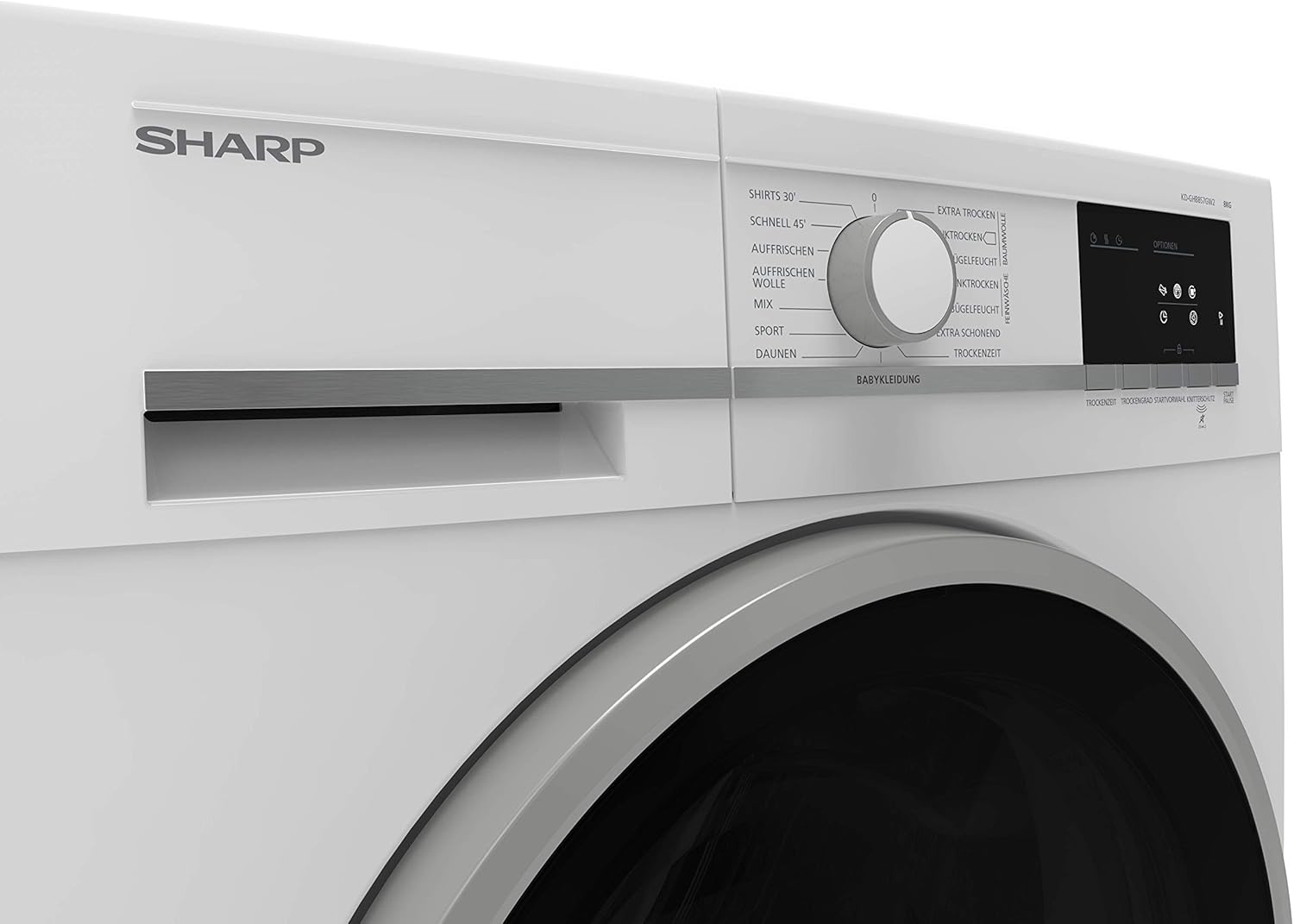
الصورة 4.1: عن قرب view of the control panel, showing the central program selection knob and various program names around it, such as 'Shirts 30', 'Schnell 45' (Quick 45), 'Auffrischen' (Refresh), 'Wolle' (Wool), 'Mix', 'Sport', 'Daunen' (Down), and 'Babykleidung' (Babywear).

الصورة 4.2: تفصيلية view of the right side of the control panel, featuring the LED display and SoftTouch buttons for 'Optionen' (Options), 'Trockenzeit' (Drying Time), 'Trockengrad' (Drying Level), 'Startvorwahl' (Delay Start), 'Knitterschutz' (Anti-crease), and 'Start/Pause'.
4.2 تحميل الغسيل
- Open the dryer door and load laundry loosely into the drum. Do not overload the dryer; respect the maximum 8 kg capacity.
- Ensure no items are caught in the door seal when closing the door.
- Separate laundry by fabric type and desired drying level for best results.
4.3 اختيار البرنامج
Turn the program knob to select one of the 15 available drying programs. Common programs include:
- Shirts 30: A 30-minute quick-dry program for shirts.
- مزج: للأحمال المختلطة من القطن والأقمشة الصناعية.
- رياضة: للملابس الرياضية.
- Babywear: Gentle drying for baby clothes.
- صوف: Special program for wool items.
- ينعش: To air and refresh clothes without full drying.
Use the SoftTouch buttons to adjust options such as drying time, drying level (e.g., 'Extra Trocken' (Extra Dry), 'Schranktrocken' (Cupboard Dry), 'Bügelfeucht' (Iron Dry)), delay start, or activate the anti-crease function.
4.4 بدء الدورة
Press the 'Start/Pause' button to begin the selected drying program. The LED display will show the remaining time.
4.5 نهاية الدورة
ستصدر المجففة إشارة عند انتهاء دورة التجفيف. أخرجي الغسيل فورًا لتقليل الخدوش.asing. The anti-crease function will periodically tumble the load after the cycle ends to prevent wrinkles if laundry is not removed immediately.
5. الصيانة
تضمن الصيانة الدورية طول عمر وكفاءة مجفف الملابس الخاص بك.
5.1 تنظيف فلتر الوبر
Clean the lint filter after every drying cycle. Open the door, pull out the filter, remove accumulated lint, and rinse under running water if necessary. Ensure it is completely dry before reinserting.
5.2 تفريغ خزان المكثفات
Empty the condensate tank after every drying cycle. The tank is typically located at the top-left or bottom-right of the appliance. Pull it out, empty the water, and push it back in until it clicks.
5.3 Cleaning the Heat Exchanger/Condenser
The heat exchanger (condenser) should be cleaned periodically, typically every few months, or as indicated by the appliance. Refer to the full user manual for specific instructions on accessing and cleaning the condenser unit for your model.
5.4 Cleaning the Exterior and Drum
امسح الجزء الخارجي من المجفف بقطعة قماش ناعمة دamp cloth. Do not use abrasive cleaners. Clean the interior of the drum with a damp cloth as needed. The integrated LED drum lighting assists in visibility.
6. استكشاف الأخطاء وإصلاحها
If you encounter issues with your dryer, consult the following common troubleshooting steps before contacting service.
- المجفف لا يبدأ: Check if the power cord is securely plugged in, the door is fully closed, and the 'Start/Pause' button has been pressed. Ensure the child lock is not activated.
- Laundry Not Drying Properly: Ensure the lint filter is clean and the condensate tank is empty. Check if the selected program is appropriate for the load and if the dryer is overloaded. Verify that the heat exchanger is not blocked.
- ضوضاء غير عادية: Check for foreign objects in the drum or lint filter. Ensure the dryer is level.
- رموز الخطأ: If an error code appears on the display, refer to the comprehensive user manual for a list of codes and their solutions.
If the problem persists after attempting these solutions, disconnect the dryer from the power supply and contact qualified service personnel.
7. المواصفات
| ميزة | مواصفة |
|---|---|
| ماركة | حاد |
| رقم الموديل | KD-GHB8S7GW2-DE |
| يكتب | مجفف مضخة الحرارة |
| سعة | 8 كجم |
| فئة كفاءة الطاقة | أ++ |
| عدد البرامج | 15 |
| الأبعاد (الارتفاع × العرض × العمق) | 84.5 سم × 59.6 سم × 63.8 سم |
| وزن | 51 كجم |
| مستوى الضوضاء | 65 dB (approximate, based on similar models) |
| نوع الطبلة | BubbleDrum with LED lighting |
| مفصلة الباب | يمين |
8. الضمان والدعم
This Sharp appliance comes with a manufacturer's warranty. Please refer to the warranty card included with your product for detailed terms and conditions, including the warranty period and coverage.
For technical support, service requests, or to order spare parts, please contact Sharp customer service. Contact information can typically be found in the warranty documentation or on the official Sharp website for your region. When contacting support, please have your model number (KD-GHB8S7GW2-DE) and serial number ready.