
1. المقدمة
This manual provides detailed instructions for the Blackweb SDVD1183-BW Portable Blu-ray/DVD Player. Please read this manual thoroughly before using the device to ensure proper operation and to maximize your viewing and listening experience. Keep this manual for future reference.
2. معلومات السلامة
- لا تعرض الجهاز للمطر أو الرطوبة أو درجات الحرارة العالية.
- تجنب إسقاط الجهاز أو تعريضه لصدمات قوية.
- لا تحاول تفكيك الجهاز أو إصلاحه بنفسك. قم بإحالة جميع أعمال الصيانة إلى فنيين مؤهلين.
- Use only the provided power adapters and accessories.
- تأكد من التهوية المناسبة؛ ولا تسد أي فتحات تهوية.
- التخلص من البطاريات وفقا للقوانين المحلية.
3. محتويات العبوة
تأكد من وجود جميع العناصر في الحزمة الخاصة بك:
- أسودweb SDVD1183-BW Portable Blu-ray/DVD Player
- محول التيار المتردد
- محول طاقة السيارة
- كابل الصوت والفيديو
- جهاز التحكم عن بعد
- دليل المستخدم (هذا المستند)
4. انتهى المنتجview
4.1 الجبهة View

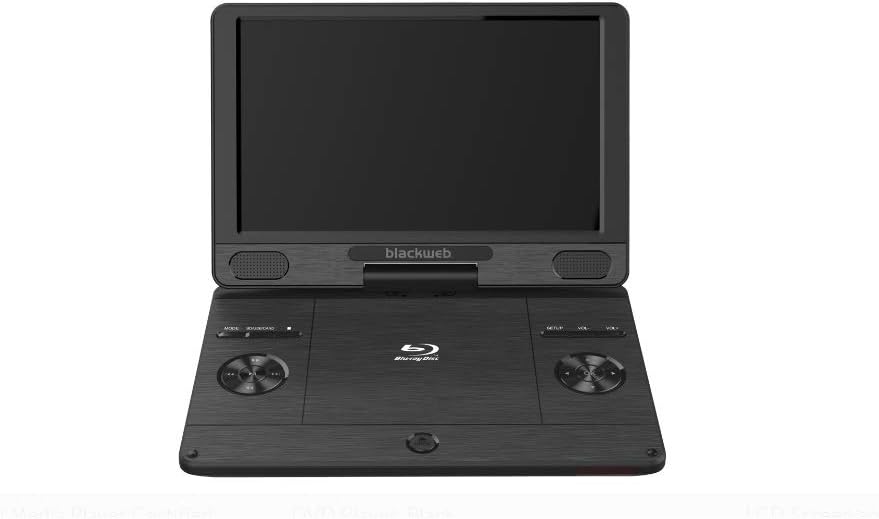
الصورة: الجبهة view من السودweb SDVD1183-BW Portable Blu-ray/DVD Player, showing the open 11.4-inch screen, integrated speakers, and control buttons on the base.
الجبهة view displays the 11.4-inch HD screen, stereo speakers, and essential control buttons on the player's base. These buttons typically include MODE, SOURCE/CARD, SETUP, and Volume controls (VOL+, VOL-).
4.2 Side/Rear View
الصورة: الجانب view من السودweb SDVD1183-BW Portable Blu-ray/DVD Player, closed, highlighting the various input/output ports.
The side and rear panels house various connectivity ports. These include the DC IN port for power, USB port for external storage, SD/MMC card slot, HDMI OUT for connecting to external displays, AV OUT for analog video/audio, a headphone jack, and an Ethernet port for network connectivity. A power ON/OFF switch is also located on the side.
5. الإعداد
5.1 شحن البطارية
Before first use, fully charge the player's internal Lithium Ion battery. Connect the AC power adapter to the DC IN port on the player and plug it into a wall outlet. The charging indicator light will illuminate, typically turning off or changing color when fully charged.
5.2 تشغيل/إيقاف التشغيل
To power on the player, slide the ON/OFF switch to the 'ON' position. To power off, slide the switch to the 'OFF' position.
5.3 Connecting to External Display (HDMI)
ل view content on a larger screen, connect an HDMI cable (not included) from the player's HDMI OUT port to an HDMI input on your TV or monitor. Select the corresponding HDMI input on your external display.
5.4 إدخال القرص
Gently open the disc compartment lid. Place a Blu-ray disc, DVD, or CD onto the spindle with the label side facing up. Press down gently on the center of the disc until it clicks into place. Close the lid firmly.
5.5 استخدام بطاقة USB/SD
Insert a USB flash drive into the USB port or an SD/MMC card into the card slot. The player should automatically detect the media. If not, use the SOURCE/CARD button to select the appropriate input source.
6. تعليمات التشغيل
6.1 التشغيل الأساسي
After inserting a disc or connecting USB/SD media, the player will typically begin playback automatically or display a menu. Use the navigation buttons on the player or remote control to select options and press the PLAY/PAUSE button to start or pause playback.
6.2 استخدام جهاز التحكم عن بعد
The included remote control provides full functionality for the player. Point the remote control directly at the player's IR sensor. Functions include: Play, Pause, Stop, Fast Forward, Rewind, Skip Track/Chapter, Menu, Setup, Volume Up/Down, and Mute.
6.3 Adjusting Volume and Screen
Use the VOL+ and VOL- buttons on the player or remote control to adjust the audio volume. Screen brightness, contrast, and other display settings can typically be adjusted through the SETUP menu.
6.4 تشغيل الوسائط
The player supports a wide range of media formats, including:
- الأقراص: CD-R/RW, DVD±R/RW, CD, Video CD, BD-R, BD-RE, Blu-ray Disc
- صوتي: WMA, DTS, Dolby Digital, Dolby Digital Plus, Dolby TrueHD
- فيديو: MPEG-1, MPEG-2, MPEG-4, WMV, H.264, VC-1
- الصور: GIF, JPEG, PNG
6.5 اتصال الشبكة (إيثرنت)
Connect an Ethernet cable to the player's Ethernet port for wired network access. This feature may be used for firmware updates or accessing online content if supported by the player's software.
7. الصيانة
7.1 تنظيف المشغل
Wipe the player's exterior with a soft, dry cloth. Do not use liquid cleaners, aerosols, or abrasive materials. For the screen, use a soft, lint-free cloth specifically designed for electronics displays.
7.2 العناية بالقرص
أمسك الأقراص من حوافها لتجنب بصمات الأصابع. حافظ على نظافة الأقراص وخلوها من الخدوش. خزّن الأقراص في علبها عند عدم استخدامها.
7.3 العناية بالبطارية
To prolong battery life, avoid fully discharging the battery frequently. Charge the battery regularly, even if the player is not used for extended periods. Avoid exposing the player to extreme heat or cold, which can degrade battery performance.
8. استكشاف الأخطاء وإصلاحها
إذا واجهت مشاكل مع مشغل الوسائط الخاص بك، فراجع المشاكل والحلول الشائعة التالية:
- لا يوجد طاقة: Ensure the AC adapter is securely connected and plugged into a working outlet. Check if the battery is charged. Verify the ON/OFF switch is in the 'ON' position.
- لا توجد صورة: If using an external display, ensure the HDMI cable is connected correctly and the TV/monitor is set to the correct input source. Check the player's screen brightness settings.
- لا يوجد صوت: Check the volume level on the player and any connected external audio devices. Ensure headphones are fully plugged in if used. Verify audio settings in the SETUP menu.
- القرص لا يعمل: Ensure the disc is inserted correctly and is clean and free of scratches. Verify the disc format is supported by the player (e.g., Blu-ray, DVD, CD). Some Blu-ray discs may have region coding; ensure it matches the player's region.
- بطاقة USB/SD غير مُتعرف عليها: Ensure the USB drive or SD card is formatted to a compatible file system (e.g., FAT32). Reinsert the media. Try a different USB port or SD card slot if available.
9. المواصفات
| ميزة | مواصفة |
|---|---|
| رقم الموديل | SDVD1183-BW |
| حجم الشاشة | 11.4 بوصة |
| نوع الوسائط | Blu-Ray, DVD, CD, USB, SD/MMC |
| التنسيقات القابلة للتشغيل | CD-R/RW, DVD±R/RW, CD, Video CD, BD-R, BD-RE, Blu-ray Disc, GIF, JPEG, PNG, WMA, DTS, MPEG-1, MPEG-2, MPEG-4, WMV, H.264, VC-1 |
| تكنولوجيا الاتصال | إيثرنت، HDMI، USB |
| أبعاد المنتج | 16 × 14.5 × 3.5 بوصة |
| وزن العنصر | 5.6 رطل |
| البطاريات | 1 بطارية ليثيوم أيون مطلوبة |
| لون | أسود |
10. معلومات الضمان
هذا الأسودweb product comes with a limited manufacturer's warranty. Please refer to the warranty card included in your original product packaging for specific terms, conditions, and duration of coverage. Keep your purchase receipt as proof of purchase for any warranty claims.
11. الدعم
For technical assistance, troubleshooting beyond this manual, or customer service inquiries, please refer to the contact information provided in your product packaging or visit the official Blackweb يدعم website. Have your model number (SDVD1183-BW) and purchase details ready when contacting support.