
جابرا توك 15
دليل مستخدم سماعة بلوتوث جابرا توك 15
مقدمة
This manual provides detailed instructions for the Jabra Talk 15 Bluetooth Headset. The Jabra Talk 15 is engineered for clear hands-free calls, featuring a high-quality microphone and speaker optimized for conversations. It also supports wireless streaming of GPS directions, music, and podcasts from your mobile phone. With up to 6 hours of talk time and 14 days of standby time, the headset offers reliable Bluetooth wireless communication throughout the day on a single charge.

الصورة: الجبهة view of the Jabra Talk 15 Bluetooth Headset.
ماذا يوجد في الصندوق
The Jabra Talk 15 package includes the following components:
- 1 Jabra Talk 15 headset
- 3 eargels (one pre-mounted standard eargel)
- 2 earhooks (Small & Large)
- 1 كابل شحن USB
- دليل البدء السريع
- Warning and warranty leaflets

Image: All components included with the Jabra Talk 15 headset.
سماعة فوقview
Familiarize yourself with the buttons and indicators on your Jabra Talk 15 headset:
- زر متعدد الوظائف: تشغيل/إيقاف الطاقة، الرد على المكالمات/إنهاؤها، تشغيل/إيقاف الصوت مؤقتًا.
- Volume buttons (+/-): Adjust call volume or media volume.
- مؤشر LED: Shows battery status, pairing status, and call status.
- ميكروفون: For clear voice transmission during calls.
- منفذ شحن مايكرو يو اس بي: لتوصيل كابل الشحن.
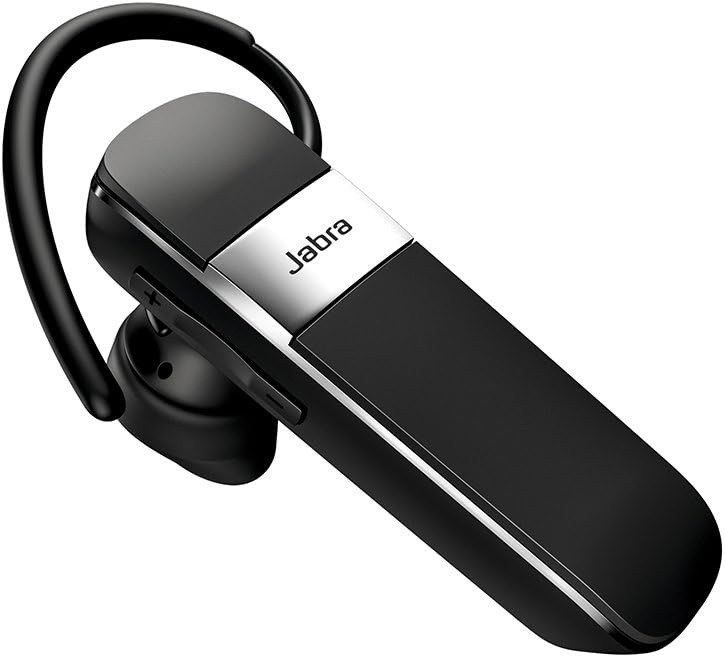
الصورة: الجانب view of the Jabra Talk 15 headset, highlighting the volume controls.
ارتداء سماعة الرأس
The Jabra Talk 15 can be worn with or without an earhook. Choose the eargel and earhook combination that provides the most comfortable and secure fit for your ear.
- Select an eargel size (small, medium, or large) that fits snugly in your ear canal.
- Attach the chosen earhook to the headset if desired. The earhook should loop over the back of your ear.
- Gently insert the eargel into your ear and adjust the earhook for stability.

Image: Man wearing the headset comfortably.

Image: Woman wearing the headset comfortably.
شحن سماعة الرأس
Before first use, fully charge your Jabra Talk 15 headset. A full charge takes approximately 6 hours.
- قم بتوصيل كابل الشحن USB المرفق بمنفذ Micro USB الموجود على سماعة الرأس.
- Connect the other end of the USB cable to a USB power source (e.g., computer USB port or wall charger).
- The LED indicator will show charging status. It will typically turn solid when fully charged.
The headset provides up to 6 hours of talk time and 14 days of standby time on a full charge.
الاقتران بجهاز
To use your Jabra Talk 15 headset, you must first pair it with your Bluetooth-enabled mobile device.
- قم بتشغيل سماعة الرأس: Slide the On/Off switch to the 'On' position. The LED indicator will flash blue.
- أدخل وضع الاقتران: If this is the first time using the headset, it will automatically enter pairing mode. If not, press and hold the Multi-function button for approximately 3 seconds until the LED flashes blue and announces "Pairing mode".
- قم بتفعيل البلوتوث على جهازك: Go to the Bluetooth settings on your smartphone or other device.
- Select Jabra Talk 15: From the list of available devices, select "Jabra Talk 15". If prompted for a passcode, enter "0000" (four zeros).
- Confirm pairing: Once paired, the headset will announce "Connected" and the LED will turn solid blue.
The headset can remember up to 8 paired devices. When turned on, it will automatically try to connect to the last connected device.
تشغيل سماعة الرأس
إجراء واستقبال المكالمات
- الرد/إنهاء المكالمة: اضغط على الزر متعدد الوظائف.
- رفض المكالمة: اضغط مع الاستمرار على الزر متعدد الوظائف لمدة ثانيتين.
- إجراء مكالمة: اتصل بالرقم الموجود على هاتفك. سيتم تحويل المكالمة تلقائيًا إلى سماعة الرأس.
- إعادة الاتصال بالرقم الأخير: Double-tap the Multi-function button.
- ضبط مستوى الصوت: Press the Volume + or Volume - buttons during a call.
بث صوتي
The Jabra Talk 15 allows you to stream audio such as music, podcasts, and GPS directions from your paired device.
- تشغيل/إيقاف الصوت مؤقتًا: اضغط على الزر متعدد الوظائف.
- ضبط مستوى الصوت: Press the Volume + or Volume - buttons to control media volume.
مساعد صوتي
Activate your smartphone's voice assistant (e.g., Siri, Google Assistant) directly from the headset.
- تنشيط مساعد الصوت: Press and hold the Multi-function button for 1 second when not on a call or streaming audio.
صيانة
لضمان طول عمر سماعة Jabra Talk 15 وأدائها الأمثل، اتبع إرشادات الصيانة التالية:
- تنظيف: Regularly wipe the headset with a soft, dry cloth. Avoid using harsh chemicals or abrasive materials.
- تخزين: قم بتخزين سماعة الرأس في مكان بارد وجاف بعيدًا عن درجات الحرارة القصوى وأشعة الشمس المباشرة.
- الشحن: Do not leave the headset connected to a charger for extended periods after it is fully charged.
- التعرض للماء: While the headset is water-resistant, avoid submerging it in water or exposing it to heavy rain.
استكشاف الأخطاء وإصلاحها
If you encounter issues with your Jabra Talk 15, try the following troubleshooting steps:
| مشكلة | حل |
|---|---|
| Headset will not turn on. | Ensure the headset is charged. Connect it to a power source using the USB cable. |
| لا يمكن الاقتران بالجهاز. |
|
| لا يوجد صوت أو جودة الصوت رديئة. |
|
| Difficulty with On/Off switch. | The On/Off switch is located on the back of the device. It may be easier to operate before placing the headset on your ear. |
تحديد
| ميزة | التفاصيل |
|---|---|
| اسم الموديل | محادثة 15 |
| رقم موديل العنصر | 100-92200900-02 |
| تكنولوجيا الاتصال | بلوتوث، لاسلكي |
| نسخة البلوتوث | 5.0 |
| تكنولوجيا الاتصالات اللاسلكية | بلوتوث |
| عمر البطارية (وقت التحدث) | تصل إلى 6 ساعة |
| وقت الاستعداد | حتى 14 يوما |
| وقت الشحن | حوالي 6 ساعات |
| التحكم في الضوضاء | إلغاء الضوضاء النشط |
| ميكروفون | متضمن |
| مستوى مقاومة الماء | مقاوم للماء |
| أبعاد | 4.19 × 1.28 × 6.94 بوصة |
| وزن العنصر | 1.44 أونصات |
| رمز المنتج الموحد | 615822010856 |
الضمان والدعم
Jabra products are designed for reliability and performance. For detailed warranty information, please refer to the warranty leaflet included in your product packaging or visit the official Jabra webموقع.
For further assistance, technical support, or to download the full user guide, please visit the Jabra support page or refer to the provided PDF documents: