1. المقدمة
This manual provides essential information and instructions for the safe and efficient use of your Nokia 8 Sirocco TA-1005 smartphone. Please read this guide thoroughly before operating your device to ensure optimal performance and longevity. This device is designed for use with GSM, 3G, and 4G LTE networks. Compatibility with CDMA networks, including Verizon, Sprint, and US Cellular, is not supported. Verify network compatibility with your service provider prior to use.
2. ماذا يوجد في الصندوق
Upon unboxing your Nokia 8 Sirocco TA-1005, verify that all components are present:
- Nokia 8 Sirocco TA-1005 Device
- كابل USB Type-C
- محول الطاقة
- سماعة الرأس
- أداة قاذف SIM
- دليل البدء السريع
- معلومات السلامة والضمان
3. تخطيط الجهاز
Familiarize yourself with the physical components of your Nokia 8 Sirocco TA-1005.
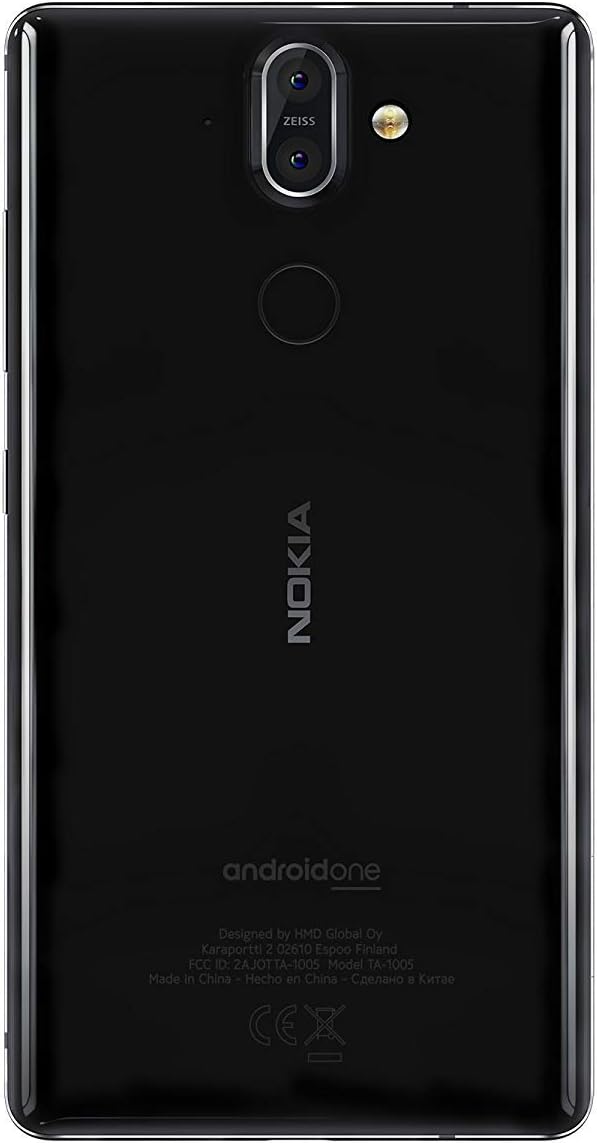
الشكل 3.1: مؤخرة view of the Nokia 8 Sirocco TA-1005. This image displays the dual camera setup with ZEISS optics, the circular fingerprint sensor below the camera, and the Nokia logo centrally placed. The 'androidone' branding is visible towards the bottom.
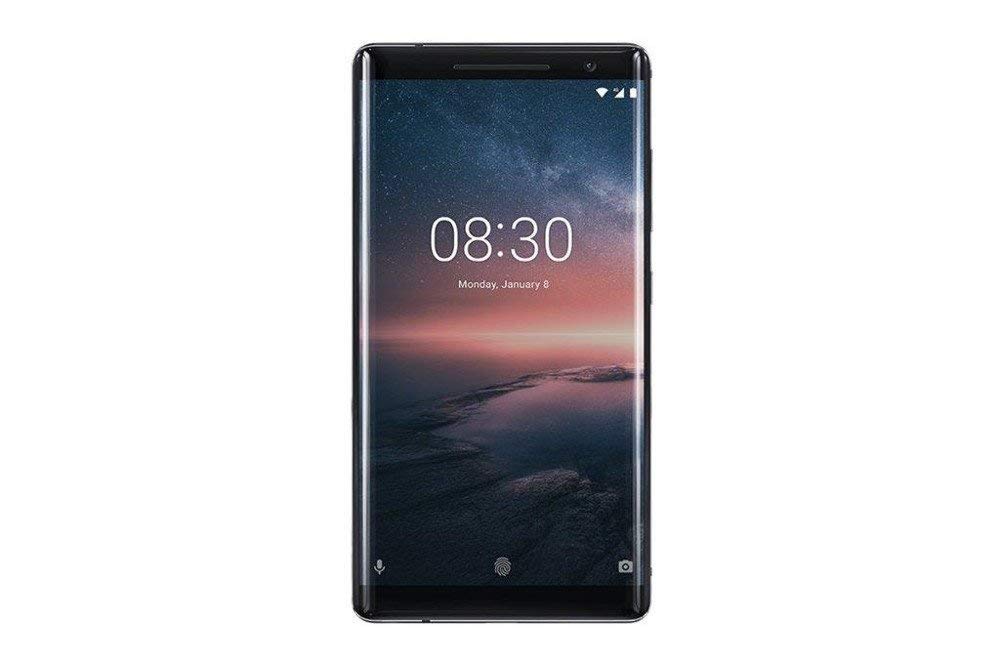
الشكل 3.2: أمام view of the Nokia 8 Sirocco TA-1005. The image highlights the 5.5-inch P-OLED curved display, the front-facing camera at the top, and the on-screen navigation buttons. The device features minimal bezels.

الشكل 3.3: جانب view of the Nokia 8 Sirocco TA-1005. This image illustrates the slim profile of the device, with the power button and volume rocker located on the right side for easy access.
المكونات الرئيسية:
- الكاميرا الأمامية: تقع في الجزء العلوي من الشاشة.
- سماعة الأذن: لإجراء المكالمات، يوجد الجهاز أعلى الشاشة.
- عرض: 5.5-inch P-OLED capacitive touchscreen.
- أزرار التحكم في الصوت: On the right side, to adjust audio levels.
- زر الطاقة/القفل: On the right side, to power on/off or lock/unlock the screen.
- منفذ USB من النوع C: في الأسفل، للشحن ونقل البيانات.
- ميكروفون: يقع في الأسفل والأعلى.
- المتحدث: موجود في الأسفل.
- درج بطاقة SIM/الذاكرة: On the side, for inserting SIM cards.
- الكاميرات الخلفية: Dual cameras with ZEISS optics on the back.
- فلاش: Dual-tone flash next to the rear cameras.
- ماسح البصمات: On the back, below the rear cameras.
4. الإعداد
4.1. إدخال بطاقة SIM
- حدد مكان درج بطاقة SIM على جانب جهازك.
- أدخل أداة إخراج شريحة SIM في الفتحة الصغيرة الموجودة على الدرج لفتحه.
- Place your Nano-SIM card(s) into the designated slot(s) on the tray, ensuring the gold contacts face downwards.
- ادفع الدرج بعناية إلى داخل الجهاز حتى يستقر في مكانه.
ملحوظة: This device does not support external memory cards.
4.2. التشغيل وإيقاف التشغيل
- لتشغيل: Press and hold the Power/Lock button until the Nokia logo appears.
- لإيقاف التشغيل: Press and hold the Power/Lock button until the power options menu appears, then select "Power off".
4.3. الإعداد الأولي
Upon first power-on, the device will guide you through the initial setup process. This includes selecting your language, connecting to a Wi-Fi network, setting up your Google account, and configuring security features like fingerprint unlock or a PIN/pattern.
5. تعليمات التشغيل
5.1. إجراء المكالمات
- افتح تطبيق "الهاتف".
- أدخل رقم الهاتف باستخدام لوحة الاتصال أو حدد جهة اتصال من دفتر العناوين الخاص بك.
- اضغط على أيقونة الاتصال لبدء المكالمة.
5.2. إرسال الرسائل
- Open the "Messages" application.
- اضغط على أيقونة "بدء الدردشة" أو "رسالة جديدة".
- أدخل رقم المستلم أو اختر من جهات الاتصال.
- اكتب رسالتك في حقل النص.
- اضغط على أيقونة الإرسال.
5.3. استخدام الكاميرا
- افتح تطبيق "الكاميرا".
- ضع إطارًا لموضوعك على الشاشة.
- اضغط على زر الغالق لالتقاط صورة.
- Switch between photo and video modes, or access advanced settings like portrait mode or panorama, as desired.
5.4. الاتصال بالإنترنت
- واي فاي: اذهب الى الإعدادات > الشبكة والإنترنت > Wi-Fi. Turn Wi-Fi on and select an available network. Enter the password if required.
- بيانات الجوال: اذهب الى الإعدادات> الشبكة والإنترنت> شبكة الهاتف المحمولتأكد من تمكين "بيانات الهاتف المحمول".
5.5. ميزات الأمان
Your Nokia 8 Sirocco TA-1005 offers various security options:
- فتح بصمة: سجل بصمات أصابعك عبر Settings > Security & Location > Fingerprint.
- قفل الشاشة: Set a PIN, pattern, or password via Settings > Security & Location > Screen lock.
6. الصيانة
6.1. تنظيف الجهاز
Use a soft, lint-free cloth to clean your device. Avoid using harsh chemicals or abrasive materials, which can damage the screen or finish.
6.2. العناية بالبطارية
- Charge your device using only Nokia-approved chargers and cables.
- تجنب تعريض الجهاز لدرجات حرارة شديدة.
- لا تسمح للبطارية بالتفريغ الكامل بشكل متكرر.
6.3. تحديثات البرامج
تحقق بانتظام من تحديثات البرامج وثبّتها لضمان حصول جهازك على أحدث الميزات وتصحيحات الأمان وتحسينات الأداء. انتقل إلى الإعدادات > النظام > تحديث النظام.
7. استكشاف الأخطاء وإصلاحها
إذا واجهت مشاكل مع جهازك، فراجع الحلول الشائعة التالية:
| مشكلة | حل |
|---|---|
| الجهاز لا يعمل | تأكد من شحن البطارية. وصلها بالشاحن لمدة 30 دقيقة على الأقل. في حال عدم استجابة الجهاز، قم بإعادة تشغيل إجباري بالضغط على زر التشغيل لمدة 10-15 ثانية. |
| إشارة شبكة ضعيفة | Check SIM card insertion. Move to an area with better network coverage. Restart the device. Verify network settings in الإعدادات> الشبكة والإنترنت> شبكة الهاتف المحمول. |
| Applications are crashing | مسح ذاكرة التخزين المؤقت للتطبيق (الإعدادات > التطبيقات والإشعارات > [اسم التطبيق] > التخزين والذاكرة المؤقتة > مسح الذاكرة المؤقتةحدّث التطبيق من متجر جوجل بلاي. إذا استمرت المشكلة، فألغِ تثبيت التطبيق وأعد تثبيته. |
| تستنزف البطارية بسرعة | Reduce screen brightness. Close unused background apps. Disable Wi-Fi, Bluetooth, and GPS when not in use. Check battery usage in الإعدادات> البطارية لتحديد التطبيقات التي تستهلك الطاقة. |
| الجهاز لا يستجيب | Perform a force restart by holding the Power button for 10-15 seconds. If the issue continues, consider a factory reset (الإعدادات > النظام > خيارات إعادة الضبط > مسح جميع البيانات (إعادة ضبط المصنع)). تحذير: A factory reset will erase all data on your device. Back up important data before proceeding. |
8. المواصفات
Detailed technical specifications for the Nokia 8 Sirocco TA-1005:
| ميزة | التفاصيل |
|---|---|
| اسم الموديل | 8 Sirocco |
| رقم الموديل | TA-1005 |
| نظام التشغيل | أندرويد 8.0 (أوريو) |
| المعالج | Qualcomm MSM8998 Snapdragon 835, Octa-core (4x2.5 GHz Kryo & 4x1.8 GHz Kryo) |
| وحدة معالجة الرسوميات | ادرينو 540 |
| كبش | 6 جيجا بايت |
| التخزين الداخلي | 128 جيجا بايت |
| عرض | 5.5 inches, P-OLED capacitive touchscreen, 1440 x 2560 pixels, Corning Gorilla Glass 5 |
| الكاميرا الخلفية | 12MP Wide (f/1.7) + 13 MP Tele (f/2.6), dual-tone flash |
| الكاميرا الأمامية | 5 ميجا بكسل |
| سعة البطارية | 3250 مللي أمبير |
| الشحن | دعم الشحن السريع |
| الاتصال | Wi-Fi 802.11a/b/g/n, Bluetooth, USB Type-C |
| أبعاد | 43.36 × 43.17 × 0.75 سم |
| وزن | 181 جرام |
| نوع الشريحة | شريحة نانو سيم |
| دعم الشبكة | 2G GSM, 3G, 4G LTE (Note: Not compatible with CDMA networks) |
9. Safety and Warranty Information
9.1. إرشادات السلامة
- Do not use the device in prohibited areas, such as aircraft or hospitals.
- تجنب تعريض الجهاز للماء أو الرطوبة الزائدة.
- استخدم الملحقات الأصلية أو المعتمدة فقط.
- لا تحاول تفكيك الجهاز أو إصلاحه بنفسك.
- تخلص من الجهاز وبطاريته بطريقة مسؤولة وفقًا للوائح المحلية.
9.2. معلومات الضمان
Your Nokia 8 Sirocco TA-1005 is covered by a limited manufacturer's warranty. Please refer to the separate warranty document included in your product packaging or visit the official Nokia support webللاطلاع على الشروط والأحكام التفصيلية، احتفظ بإيصال الشراء لتقديم مطالبات الضمان.


