
مقدمة
This instruction manual provides essential information for the safe operation, maintenance, and care of your BLACK+DECKER 20V MAX Cordless Drill/Driver Kit, model BDCDD120C. Please read this manual thoroughly before using the tool to ensure proper function and to prevent injury.
تعليمات السلامة الهامة
تحذير: اقرأ جميع تحذيرات وتعليمات السلامة. قد يؤدي عدم اتباع التحذيرات والتعليمات إلى التعرض لصدمة كهربائية أو نشوب حريق و/أو إصابة خطيرة.
- ارتدي دائمًا وسائل حماية العين.
- حافظ على منطقة العمل نظيفة ومضاءة جيدًا.
- لا تقم بتشغيل الأدوات الكهربائية في أجواء قابلة للانفجار، مثل وجود سوائل قابلة للاشتعال أو غازات أو غبار.
- احتفظ بالأطفال والمارة بعيدًا أثناء تشغيل أداة كهربائية.
- استخدم الأداة الصحيحة لتطبيقك.
- افصل مجموعة البطارية عن الأداة قبل إجراء أي تعديلات أو تغيير الملحقات أو تخزين الأدوات الكهربائية.
- قم بتخزين الأدوات الكهربائية الخاملة بعيدًا عن متناول الأطفال.
- صيانة الأدوات الكهربائية. تحقق من عدم محاذاة أو ربط الأجزاء المتحركة ، وانكسار الأجزاء ، وأي حالة أخرى قد تؤثر على تشغيل الأداة الكهربائية.
- Use power tool, accessories and tool bits etc. in accordance with these instructions, taking into account the working conditions and the work to be performed.
تحذير بشأن الاقتراح 65: يحتوي هذا المنتج على مواد كيميائية معروفة في ولاية كاليفورنيا بأنها تسبب السرطان والعيوب الخلقية أو غيرها من الأضرار التناسلية.
Product Components and Key Features
Your BLACK+DECKER BDCDD120C Cordless Drill/Driver Kit includes the following:
- (1) 20V MAX* Cordless Drill/Driver
- (1) 20V MAX* Lithium-Ion Battery
- (1) شاحن البطارية
- (1) Double Ended Bit
المميزات الرئيسية:
- الأداء العالي: Delivers 115 inch-pounds of torque and up to 650 RPM for various drilling and driving tasks.
- تصميم خفيف الوزن: Weighs approximately 2.5 pounds (tool only) for reduced user fatigue.
- قابض ذو 11 وضعية: Provides precision control to prevent stripping screws and over-drilling.
- تشاك بدون مفتاح: يُتيح تغيير البتات بسرعة وسهولة.
- ضوء العمل LED: يضيء منطقة العمل لتحسين الرؤية في ظروف الإضاءة المنخفضة.

Image: The BLACK+DECKER 20V MAX Cordless Drill/Driver, model BDCDD120C, with its battery pack attached. The drill features an orange and black design, a keyless chuck, and an ergonomic handle.
الإعداد والاستخدام الأولي
شحن حزمة البطارية
- قم بتوصيل الشاحن بمأخذ كهربائي قياسي.
- Insert the battery pack fully into the charger. The green charging light will blink continuously, indicating that charging is in progress.
- Charging is complete when the green light remains continuously ON. The battery pack can then be removed or left in the charger.
- ملحوظة: The charger will not charge a faulty battery pack. If the red light blinks rapidly, take the charger and battery pack to an authorized service center. If the light stays OFF or red light rapidly blinks, refer to the label near the charging light on the charger for blink patterns.
تأخير الحزمة الساخنة / الباردة: If the charger detects a battery pack that is too hot or too cold, it automatically starts a Hot/Cold Pack Delay, suspending charging until the battery pack reaches an appropriate temperature. This feature ensures maximum battery life. A cold battery pack may charge at a slower rate than a warm battery pack.
نظام الحماية الإلكترونية: تم تصميم أدوات Li-Ion بنظام حماية إلكتروني يحمي حزمة البطارية من التحميل الزائد أو السخونة الزائدة أو التفريغ العميق. سيتم إيقاف تشغيل الأداة تلقائيًا وستحتاج حزمة البطارية إلى إعادة الشحن.
تركيب وإزالة حزمة البطارية
- To install the battery pack, align the battery pack with the rails inside the tool's handle and slide it into the handle until the battery pack is firmly seated in the tool and ensures it does not disengage.
- لإزالة حزمة البطارية من الأداة، اضغط على زر التحرير واسحب حزمة البطارية بقوة من مقبض الأداة. أدخلها في الشاحن كما هو موضح في قسم الشاحن في هذا الدليل.

Image: Diagram illustrating the process of charging the battery and installing/removing it from the drill handle. Includes charger indicator light explanations.
Operating Your Drill/Driver
إدخال وإزالة لقم الثقب
- تأكد من إزالة حزمة البطارية من الأداة.
- Grasp the rear half of the chuck with one hand and rotate the front half counter-clockwise until the chuck jaws are wide enough to accept the bit.
- Insert the drill bit or screwdriver bit into the chuck.
- Grasp the rear half of the chuck and rotate the front half clockwise until the bit is securely tightened.
Clutch Settings (Torque Control)
The 11-position clutch ring allows you to select the appropriate torque setting for your application. Rotate the clutch ring to align the desired number with the indicator arrow. Lower numbers are for driving small screws or working with soft materials, while higher numbers are for driving large screws or drilling into harder materials. The drill symbol setting is for drilling applications.
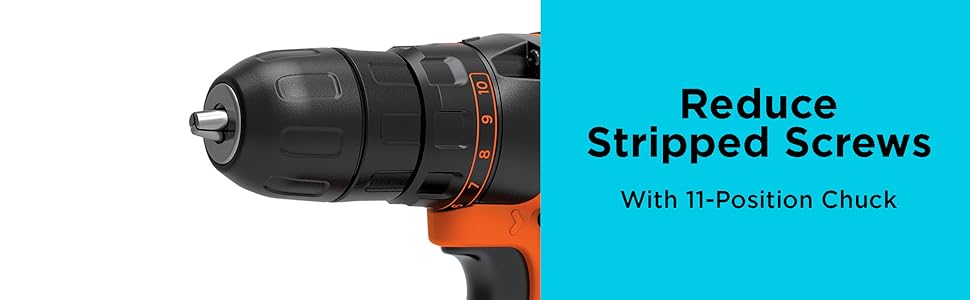
الصورة: عن قرب view of the drill's chuck and adjustable 11-position clutch ring, designed to prevent stripped screws.
Variable Speed Trigger and Direction Control
- مشغل السرعة المتغيرة: The trigger switch controls the speed of the drill. Pressing the trigger further increases the speed.
- زر للأمام / للخلف: Located above the trigger, this button allows you to select forward (clockwise) or reverse (counter-clockwise) rotation. Push the button to the left for forward and to the right for reverse. Center position locks the trigger for safety.
نصائح عامة عن التشغيل
- Always hold the drill firmly with both hands, especially when drilling large holes or driving long screws.
- استخدم ضغطًا ثابتًا ومتساويًا. لا تضغط بقوة على المثقاب.
- For drilling, start with a slow speed to prevent the bit from walking, then increase speed as needed.
- When driving screws, use the clutch setting to prevent over-tightening or stripping the screw head.

Image: A person wearing safety glasses is using the BLACK+DECKER drill to create a pilot hole in a wooden fence post.
صيانة
تضمن الصيانة المنتظمة الأداء الأمثل وتطيل عمر أداةك.
- تنظيف: استخدم فقط الصابون المعتدل وamp cloth to clean the tool. Never let any liquid get inside the tool. Never immerse any part of the tool into liquid.
- تشحيم: Your power tool is lubricated for life and requires no additional lubrication.
- العناية بالبطارية: Store battery packs in a cool, dry place. Do not store in temperatures exceeding 105°F (40°C). Do not charge battery packs when the temperature is below 40°F (4.5°C) or above 105°F (40°C).
- Accessory Changes: Always remove the battery pack before changing accessories or performing any maintenance.
استكشاف الأخطاء وإصلاحها
| مشكلة | السبب المحتمل | حل |
|---|---|---|
| لا تبدأ الأداة. | Battery pack not installed correctly. Battery pack not charged. | تأكد من تثبيت البطارية بشكل كامل. اشحن البطارية. |
| Battery pack does not charge. | Battery pack too hot or too cold. Charger not plugged in. Faulty battery pack. | Allow battery to reach room temperature. Ensure charger is plugged into a working outlet. Contact service center if faulty. |
| ينزلق مثقاب الحفر في ظرف التثبيت. | ظرف المثقاب غير مشدود جيدًا. ساق المثقاب متسخة أو تالفة. | أحكم ربط ظرف المثقاب جيداً. نظف أو استبدل الريشة. |
| Screws are stripped or over-driven. | Clutch setting is too high. | Adjust clutch to a lower setting. |
المواصفات الفنية
| ميزة | مواصفة |
|---|---|
| رقم الموديل | BDCDD120C |
| المجلدtage | 20 فولت كحد أقصى * |
| سرعة عدم التحميل | 0-650 دورة في الدقيقة |
| أقصى عزم دوران | 115 رطل |
| تشاك الحجم | 3/8 بوصة (10 مم) بدون مفتاح |
| إعدادات القابض | 11 |
| وزن الأداة (بدون بطارية) | حوالي 2.5 رطلاً |
| نوع البطارية | ليثيوم أيون |
| سعة البطارية | 1.5 آه |
| مصدر الطاقة | تعمل بالبطارية |
| أبعاد المنتج | 10 بوصة طول × 3 بوصة عرض × 8 بوصة ارتفاع |
* الحد الأقصى لحجم البطارية الأوليtage (مقاسة بدون حمل عمل) هي 20 فولت. الجهد الاسميtagهـ هو 18 فولت.
معلومات الضمان
هذا المنتج من بلاك+ديكر مشمول بضمان ضمان محدود لمدة سنة واحدة from the date of purchase. This warranty covers defects in material or workmanship. For full warranty terms and conditions, please refer to the warranty card included with your product or visit the official BLACK+DECKER webموقع.
دعم العملاء
For technical assistance, service, or replacement parts, please contact BLACK+DECKER customer service. You can find contact information on the official BLACK+DECKER webالموقع أو على عبوة المنتج.
الموارد المتاحة على الإنترنت: www.blackanddecker.com