
مقدمة
This manual provides instructions for the setup, operation, maintenance, and troubleshooting of your Soundcandy Rave Ball Light Show Bluetooth Speaker. Please read this manual thoroughly before using the device to ensure proper function and longevity.
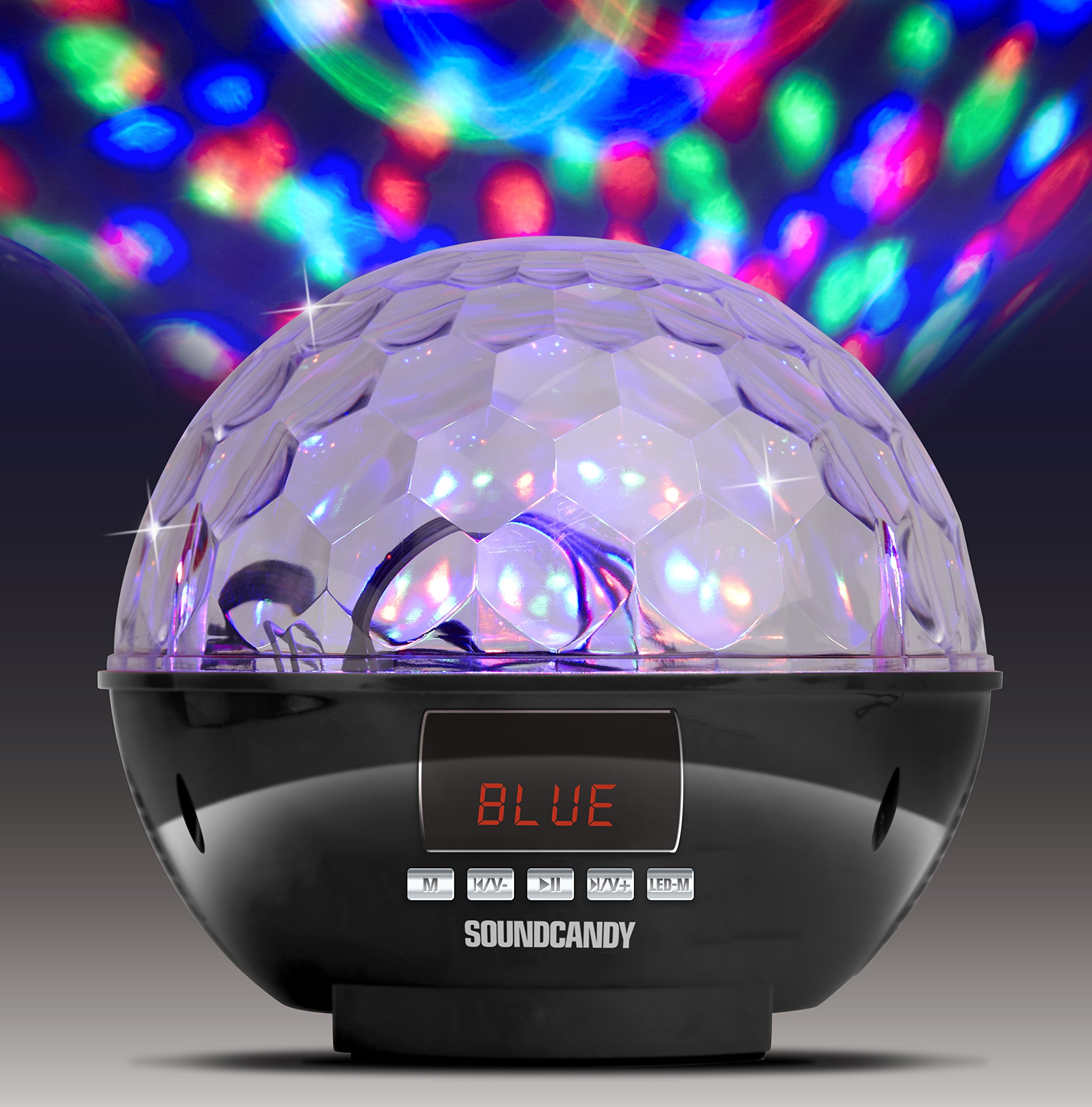
Image: The Soundcandy Rave Ball Light Show Bluetooth Speaker, a spherical device with a faceted top surface designed to project light patterns. The base contains control buttons and input ports.
ماذا يوجد في الصندوق
عند فتح الصندوق، يرجى التأكد من وجود جميع المكونات:
- المتحدث الهذيان الكرة
- كابل شحن USB (Note: Some packages may not include this cable.)
- 3.5mm Audio Cable (Note: Some packages may not include this cable.)
If any items are missing, please contact customer support.
يثبت
1. شحن مكبر الصوت
- حدد موقع منفذ الشحن على مكبر الصوت.
- Connect the provided USB charging cable to the speaker and a compatible USB power adapter (not included) or computer USB port.
- سيضيء مؤشر الشحن. يستغرق الشحن الكامل حوالي 2-3 ساعات.
- توفر الشحنة الكاملة ما يصل إلى 4 ساعات من وقت التشغيل.
2. تشغيل / إيقاف التشغيل
- لتشغيل الجهاز، اضغط مع الاستمرار على زر التشغيل حتى يتم تنشيط الجهاز.
- To power off, press and hold the Power button again until the device shuts down.
تعليمات التشغيل
1. اقتران بلوتوث
- Ensure the speaker is powered on and in Bluetooth mode (indicated by a specific light or display).
- على جهازك المحمول، قم بتمكين Bluetooth وابحث عن الأجهزة المتاحة.
- Select "Soundcandy Rave Ball" from the list of devices.
- Once paired, the speaker will emit an audible confirmation, and you can begin playing audio from your device.
2. Playing Music from USB Drive or Micro SD Card
- Insert a USB drive or Micro SD card containing MP3 audio files في المنفذ المقابل على مكبر الصوت.
- سيقوم مكبر الصوت تلقائيًا باكتشاف جهاز التخزين والبدء في تشغيل الموسيقى.
- Use the control buttons on the speaker to navigate tracks (next/previous) and adjust volume.
3. Using Aux-in Connection
- Connect one end of a 3.5mm audio cable (if included) to the Aux-in port on the speaker.
- Connect the other end of the cable to the headphone jack or audio output of your external device (smartphone, radio, etc.).
- The speaker will automatically switch to Aux-in mode. Play audio from your external device.
4. تشغيل راديو FM
- قم بتحويل مكبر الصوت إلى وضع راديو FM.
- Use the control buttons to scan for available radio stations. The digital LCD display will show the station frequency.
- اضبط مستوى الصوت حسب الحاجة.
5. أوضاع عرض الإضاءة
- The speaker features a built-in rotation motor that creates a spinning light effect.
- There are four different light modes with various rotating lighting effects and colors.
- Press the "Light Mode" button (or similar, refer to device markings) to cycle through the available light patterns.
- The light effects are designed to fill a room with dynamic visuals.
صيانة
تنظيف
للحفاظ على مظهر ووظيفة مكبر الصوت الخاص بك:
- امسح الأسطح الخارجية بقطعة قماش ناعمة وجافة.
- لا تستخدم المنظفات الكاشطة أو المذيبات أو المواد الكيميائية القاسية.
- تجنب دخول الرطوبة إلى أي فتحات.
العناية بالبطارية
- لإطالة عمر البطارية، تجنب تفريغ البطارية بالكامل بشكل متكرر.
- إذا كنت ستقوم بتخزين السماعة لفترة طويلة، قم بشحنها إلى حوالي 50% كل بضعة أشهر.
استكشاف الأخطاء وإصلاحها
| مشكلة | السبب المحتمل | حل |
|---|---|---|
| لا يوجد طاقة | تم تفريغ البطارية. | قم بشحن السماعة باستخدام كابل الشحن USB. |
| لا يمكن الاقتران عبر البلوتوث | مكبر الصوت ليس في وضع الاقتران أو بعيدًا جدًا عن الجهاز. | Ensure speaker is in Bluetooth mode. Move device closer to speaker. Restart both devices. |
| لا يوجد صوت | Volume too low, incorrect input mode, or faulty connection. | Increase volume on both speaker and connected device. Verify correct input mode (Bluetooth, USB, Aux, FM). Check cable connections. |
| عرض الإضاءة لا يعمل | Light mode is off or device malfunction. | Press the "Light Mode" button to activate or change patterns. If issue persists, contact support. |
تحديد
| ميزة | التفاصيل |
|---|---|
| رقم الموديل | SC3002BKB-BT |
| ماركة | حلوى |
| لون | فضي |
| شكل | دائري |
| مادة | بلاستيك |
| نوع التشطيب | فضي معدني |
| نوع مصدر الضوء | الصمام الثنائي الباعث للضوء (LED) |
| مصدر الطاقة | يعمل بالبطارية ، سلك كهربائي |
| نوع البطارية | 1 بطارية ليثيوم بوليمر (متضمنة) |
| عمر البطارية | تصل إلى 4 ساعات من اللعب |
| نوع التركيب | جبل التوصيل |
| المميزات الخاصة | Light Modes, FM Radio, Rechargeable Battery, Bluetooth Connectivity, USB/Micro SD Playback, Aux-in |
| عدد مصادر الضوء | 4 |
| وزن العنصر | 1.2 رطل |
| الشركة المصنعة | Gluten Free Palace - HPC |
| رمز المنتج الموحد | 814092020231 |
| ASIN | B017DV02P6 |
الضمان والدعم
معلومات الضمان
This product comes with a standard manufacturer's warranty. Please retain your proof of purchase for warranty claims. For specific warranty terms and conditions, refer to the documentation included with your purchase or contact the manufacturer directly.
دعم العملاء
If you encounter any issues not covered in the troubleshooting section or require further assistance, please contact Soundcandy customer support. Contact details can typically be found on the product packaging or the official Soundcandy webموقع.