دليل مستخدم مكبر الصوت المحمول من سيلفانيا المزود بتقنية بلوتوث
Model: PSP328-SILVER_CP1_AMZ | Brand: SYLVANIA
مقدمة
This manual provides detailed instructions for the setup, operation, maintenance, and troubleshooting of your SYLVANIA Portable Speaker with Bluetooth. Please read this manual thoroughly before using the product to ensure proper function and longevity.
ماذا يوجد في الصندوق
- SYLVANIA Portable Speaker
- USB Recharge Cable
- 3.5 mm AUX Audio Cable (50 cm)
المنتج انتهىview
The SYLVANIA Portable Speaker is designed for robust audio performance with its double subwoofer and heavy bass capabilities, making it suitable for various events. It features Bluetooth connectivity for seamless pairing with smartphones, tablets, and other Bluetooth-enabled devices, along with an AUX input for wired connections.
الميزات الرئيسية
- SUPER SOUND: Features a huge stereo sound with 2 X 4-Inch Hi-Fi speakers, offering adjustable treble, bass, and volume controls.
- STYLISH: Equipped with cool blue LED lights around the speakers for enhanced visual appeal.
- إمكانية الوصول: Easily connects to iPhone, iPad, Android, and any Bluetooth-enabled device. AUX Input is available for non-Bluetooth devices.
- إعداد سهل: Simply turn on the speaker to enter pairing mode, then select it from your device's Bluetooth menu to start streaming music.
أبعاد المنتج
The speaker measures approximately 8 inches (Depth) x 7 inches (Width) x 15 inches (Height) and weighs 1 pound.

This image displays the front of the SYLVANIA Portable Bluetooth Speaker in silver, featuring two large speaker grilles with illuminated blue LED lights, and control knobs for bass and treble at the top.
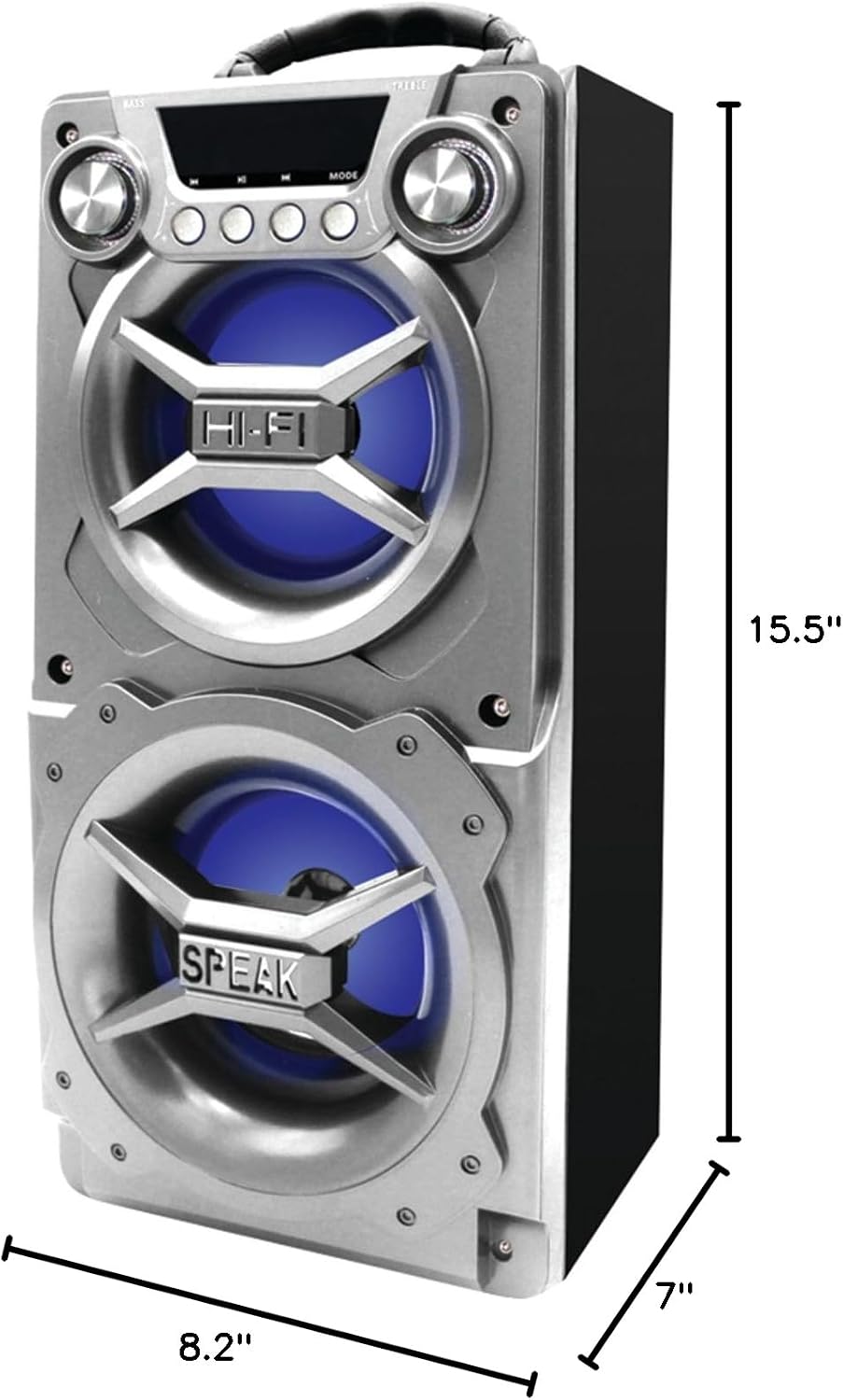
This image provides a side and front view of the SYLVANIA Portable Bluetooth Speaker, clearly indicating its dimensions: approximately 15.5 inches in height, 8.2 inches in width, and 7 inches in depth, highlighting its portable design.
يثبت
شحن السماعة
Before first use, fully charge the speaker. Connect the provided USB Recharge Cable to the DC 5V port on the speaker and plug the other end into a compatible USB charging block (not included). The Charging LED will indicate the charging status.
تشغيل/إيقاف التشغيل
Locate the ON/OFF switch on the top panel of the speaker. Slide the switch to the 'ON' position to power on the device. Slide it to the 'OFF' position to power off.
بلوتوث الاقتران
- Ensure the speaker is powered on. The Working Mode LED (blue) will flash, indicating it is in Bluetooth pairing mode.
- على هاتفك الذكي أو جهازك اللوحي أو أي جهاز آخر يدعم تقنية Bluetooth، انتقل إلى إعدادات Bluetooth.
- بحث عن available devices and select 'SYLVANIA' (or similar name) from the list.
- Once connected, the Working Mode LED will stop flashing and remain solid blue. You are now ready to stream audio.
تعليمات التشغيل
تشغيل الصوت
The speaker supports audio playback via Bluetooth and AUX input.
- وضع البلوتوث: After successful pairing, play audio directly from your connected device. Use the play/pause, next/previous track buttons on the speaker or your device.
- وضع إدخال AUX: Connect an external audio device using the 3.5mm AUX Audio Cable to the 'AUX IN' port. Press the 'MODE' button on the speaker until the Working Mode LED turns red, indicating AUX mode. Play audio from your connected device.
عناصر التحكم
- التحكم في مستوى الصوت: Use the '+VOLUME-' slider on the top panel to adjust the overall volume.
- التحكم في الجهير: Rotate the 'BASS' knob to increase or decrease the bass output.
- التحكم في الترددات العالية: Rotate the 'TREBLE' knob to increase or decrease the treble output.
- زر الوضع: Press the 'MODE' button to switch between Bluetooth and AUX input modes.
صيانة
To ensure optimal performance and longevity of your speaker, follow these maintenance guidelines:
- تنظيف: استخدم قطعة قماش ناعمة وجافة لتنظيف الجزء الخارجي من السماعة. لا تستخدم المنظفات الكاشطة أو الشمع أو المذيبات.
- تخزين: قم بتخزين السماعة في مكان بارد وجاف بعيدًا عن أشعة الشمس المباشرة ودرجات الحرارة القصوى عندما لا تكون قيد الاستخدام.
- التعرض للماء: هذه السماعة غير مقاومة للماء. تجنب تعريضها للماء أو المطر أو الرطوبة الزائدة.
- التعامل: تعامل مع السماعة بحرص. تجنب إسقاطها أو تعريضها لصدمات قوية.
استكشاف الأخطاء وإصلاحها
| مشكلة | السبب المحتمل | حل |
|---|---|---|
| لا يتم تشغيل مكبر الصوت. | نفدت طاقة البطارية. | Connect the speaker to a power source using the USB Recharge Cable and allow it to charge. |
| لا يمكن الاتصال عبر البلوتوث. | السماعة ليست في وضع الاقتران أو أن تقنية البلوتوث في الجهاز معطلة. | Ensure the speaker is powered on and the blue Working Mode LED is flashing. Turn off and on your device's Bluetooth. Move closer to the speaker. |
| الصوت مشوه أو غير واضح. | Volume too high or audio source quality is low. | Reduce the volume on both the speaker and your connected device. Adjust Bass and Treble knobs. Try a different audio source. |
| لا يوجد صوت من مدخل AUX. | تم اختيار وضع غير صحيح أو لم يتم إدخال الكابل بالكامل. | Press the 'MODE' button until the Working Mode LED is red. Ensure the AUX cable is securely connected to both the speaker and the audio device. |
تحديد
| ميزة | مواصفة |
|---|---|
| اسم الموديل | PSP328-SILVER_CP1_AMZ |
| نوع السماعة | في الهواء الطلق |
| تكنولوجيا الاتصال | بلوتوث، يو اس بي |
| الأجهزة المتوافقة | الهاتف الذكي والكمبيوتر اللوحي |
| قطر الصبووفر | 4 بوصة |
| وضع إخراج الصوت | ستيريو |
| لون | فضي |
| أبعاد المنتج | 8 بوصة عمق × 7 بوصة عرض × 15 بوصة ارتفاع |
| وزن العنصر | 1 رطل |
| مقاوم للماء | خطأ شنيع |
| سعة البطارية | 1200 مللي أمبير |
| مدى البلوتوث | 10 مترا |
| الشركة المصنعة | كورتيس الدولية المحدودة |
| بلد المنشأ | الصين |
| رمز المنتج الموحد | 058465795931 |
معلومات الضمان
This product comes with a 90-day limited warranty. For specific details regarding warranty coverage and claims, please refer to the documentation included with your purchase or contact SYLVANIA customer support.
يدعم
For further assistance or to download the official User Manual in PDF format, please visit the following link: دليل المستخدم (PDF)