
مقدمة
This manual provides essential information for the safe and effective use of your Sony Cyber-shot DSC-WX50 digital camera. Please read it thoroughly before operating the camera and retain it for future reference. The DSC-WX50 is a compact digital camera featuring a 16.2 MP Exmor R CMOS sensor, 5x optical zoom, and Full HD 1080/60i video recording capabilities.
ماذا يوجد في الصندوق
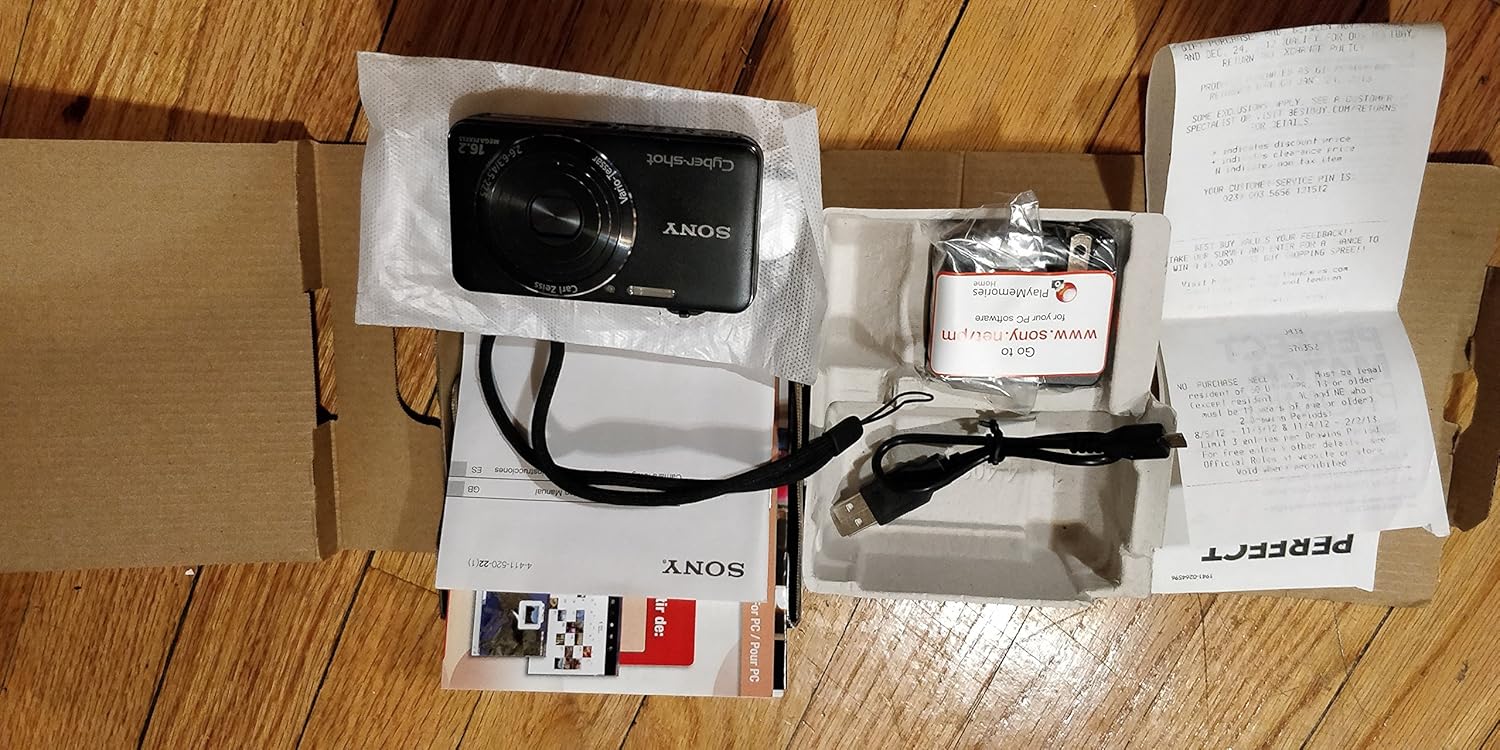
Carefully unpack your camera and ensure all items are present. The standard package contents include:
- Sony Cyber-shot DSC-WX50 Digital Camera
- حزمة بطارية قابلة لإعادة الشحن
- محول التيار المتردد
- كابل توصيل USB
- حزام المعصم
- كتيبات التعليمات والوثائق
- HDMI Cable (Built-in Media)

Image: All contents of the Sony Cyber-shot DSC-WX50 package, including the camera, cables, and documentation, laid out.

الصورة: أقرب view of the included accessories, such as the charger and USB cable, within their packaging.
يثبت
1. شحن البطارية
Before first use, fully charge the supplied battery pack. Connect the camera to the AC adaptor using the USB cable, then plug the AC adaptor into a wall outlet. The charge lamp will light up during charging and turn off when complete.
2. إدخال البطارية وبطاقة الذاكرة
Open the battery/memory card cover on the bottom of the camera. Insert the charged battery pack firmly until it locks into place. Insert a compatible memory card (SD/SDHC/SDXC or Memory Stick Duo/Pro Duo/Pro-HG Duo) into the memory card slot until it clicks. Close the cover securely.

الصورة: الجبهة view of the Sony Cyber-shot DSC-WX50 camera, showing the lens and flash.
3 الإعدادات الأولية
When you turn on the camera for the first time, you will be prompted to set the date, time, and time zone. Follow the on-screen instructions to complete these settings.
تشغيل الكاميرا
تشغيل/إيقاف الطاقة
اضغط على قوة زر لتشغيل الكاميرا أو إيقاف تشغيلها. ستتمدد العدسة عند تشغيلها.
Basic Still Image Shooting (Intelligent Auto Mode)
- قم بتشغيل الكاميرا.
- اضبط قرص الوضع على تلقائي ذكي (green camera icon).
- Frame your subject on the 2.7-inch LCD screen.
- اضغط زر الغالق حتى المنتصف للتركيز. سيتحول مؤشر التركيز إلى اللون الأخضر عند تحقيق التركيز.
- اضغط على زر الغالق بالكامل لالتقاط الصورة.
الصورة: الخلفية view of the Sony Cyber-shot DSC-WX50, highlighting the 2.7-inch LCD screen and control buttons.
وظيفة التكبير
Use the zoom lever around the shutter button to adjust the focal length. The camera features 5x optical zoom and Clear Image Zoom for enhanced magnification without significant quality loss.
Video Recording (Full HD 1080/60i)
To record movies, press the dedicated فيلم button. Press it again to stop recording. The camera supports Full HD 1080/60i video in AVCHD format, allowing for high-quality video capture with Optical SteadyShot Active Mode for reduced blur.
Special Shooting Modes and Features
- الوضع التلقائي المتفوق: Automatically detects 33 scenes and optimizes settings for dynamic pictures with reduced noise and improved clarity.
- Intelligent Sweep Panorama HR: Capture wide panoramic images by sweeping the camera. The camera stitches multiple frames automatically.
- صورة ثابتة ثلاثية الأبعاد وبانوراما ثلاثية الأبعاد: Create 3D images for viewعلى شاشات ثلاثية الأبعاد المتوافقة.
- تأثير الصورة: Apply creative filters to your photos, such as Toy Camera, Pop Color, Partial Color, and more.
- إزالة التركيز من الخلفية: Blurs the background to emphasize your subject, similar to DSLR effects.
- وضع البشرة الناعمة: Enhances portraits by reducing the appearance of blemishes and wrinkles.
- Face Detection & Smile Shutter: Automatically detects faces and can trigger the shutter when a smile is detected.
- وظيفة منع الرمش: Helps prevent photos with subjects blinking by capturing multiple shots.
- فلاش طبيعي: Corrects colors for more lifelike images when using flash.
- كشف الحركة: Adjusts ISO and shutter speed to reduce blur in moving subjects.
- وضع المسح متعدد الزوايا: Captures 15 images at different angles to create a 3D-like view on the camera's LCD when tilted.
صيانة
تنظيف الكاميرا
- جسم الكاميرا: امسح بقطعة قماش ناعمة وجافة. لإزالة الأوساخ العنيدة، استخدم قطعة قماش مبللة برفق.ampاغسلها بالماء أو بمنظف معتدل، ثم جففها.
- عدسة: استخدم فرشاة العدسات لإزالة الغبار، ثم امسح برفق بقطعة قماش تنظيف العدسات. تجنب لمس سطح العدسة بأصابعك.
- شاشة LCD: امسح برفق بقطعة قماش ناعمة وجافة. تجنب الضغط بقوة على الشاشة.
العناية بالبطارية
لإطالة عمر البطارية، تجنب تعريضها لدرجات حرارة عالية. خزّن البطارية في مكان بارد وجاف عند عدم استخدامها. إذا لم تُستخدم الكاميرا لفترة طويلة، فأخرج البطارية.
Memory Card Care
Always format new memory cards in the camera before first use. Avoid removing the memory card while the camera is writing data (indicated by a flashing access lamp) to prevent data corruption.
استكشاف الأخطاء وإصلاحها
إذا واجهت مشكلات مع الكاميرا، فراجع الحلول الشائعة التالية:
| مشكلة | حل |
|---|---|
| الكاميرا لا تعمل. |
|
| "Writing to Memory card was incomplete" error. |
|
| الصور ضبابية. |
|
| الفلاش لا يعمل. |
|
For further assistance, please contact Sony customer support.
تحديد
| ميزة | التفاصيل |
|---|---|
| دقة ثابتة فعالة | 16.2 ميجا بكسل |
| تقنية مستشعر الصور | بي إس آي سي إم أو إس |
| التكبير البصري | 5x |
| تقريب رقمي | 20x |
| حجم الشاشة | 2.7 بوصة |
| نوع العرض | شاشة الكريستال السائل |
| تثبيت الصورة | التثبيت البصري |
| دقة الفيديو | Full HD 1080p (1080/60i AVCHD) |
| مدعوم File شكل | JPEG (Exif 2.3), 3D: MPF, Video: MPEG-4, AVCHD |
| التوافق مع بطاقة الذاكرة | بطاقات الذاكرة SD/SDHC/SDXC، وMemory Stick Duo/Pro Duo/Pro-HG Duo |
| الاتصال | اتش دي ام اي، يو اس بي |
| الطول البؤري الأدنى | 25 مليمتر |
| الطول البؤري الأقصى | 125 مليمتر |
| الفتحة القصوى | ف/6.3 |
| الحد الأدنى لسرعة الغالق | ثانيتين |
| الحد الأقصى لسرعة الغالق | 1/1600 ثانية |
| وزن العنصر | 0.26 رطل |
الضمان والدعم
للحصول على معلومات الضمان ودعم العملاء، يرجى الرجوع إلى الوثائق المرفقة مع المنتج أو زيارة موقع دعم سوني الرسمي. webالموقع. احتفظ بإثبات الشراء الخاص بك لتقديم مطالبات الضمان.
الدعم الرسمي لشركة Sony: www.sony.com/electronics/support