
1. መግቢያ
Thank you for choosing the DazzlingStage 60W 9LED RGBW Stage Wall Wash Bar Light. This manual provides essential information for the safe and effective operation of your lighting fixture. Please read it thoroughly before installation and use, and retain it for future reference.
ይህ ኤስtage light bar features 9 high-power RGBW LEDs, offering a wide spectrum of colors and dynamic lighting effects suitable for various events and venues.

ምስል 1.1፡ አልቋልview of the DazzlingStage 60W 9LED RGBW Stage Wall Wash Bar Lights in various colors.
2. የደህንነት መመሪያዎች
- የኤሌክትሪክ ደህንነት; የኃይል አቅርቦቱን ጥራዝ ያረጋግጡtage matches the specifications of the fixture. Always disconnect power before cleaning, servicing, or moving the unit.
- መጫን፡ Install the fixture in a well-ventilated area, away from heat sources. Ensure secure mounting to prevent accidental falls.
- ተግባር፡- Do not look directly into the light source when the fixture is operating, as it can cause eye damage. Avoid operating the unit in wet or damp ሁኔታዎች.
- ጥገና፡- Refer all servicing to qualified personnel. Do not attempt to repair the unit yourself.
- ልጆች፡- መሣሪያውን ልጆች በማይደርሱበት ቦታ ያስቀምጡት.
3. የጥቅል ይዘቶች
ከማሸጊያው በኋላ፣ እባኮትን ከዚህ በታች የተዘረዘሩት እቃዎች በሙሉ የተካተቱ እና በጥሩ ሁኔታ ላይ መሆናቸውን ያረጋግጡ፡-
- DazzlingStage 60W 9LED RGBW Stage Wall Wash Bar Light (x1 per pack)
- Power Cord (x1 per pack)
- Remote Control (x1 per pack)
- Mounting Bracket (x1 per pack)
- Knobs (x2 per pack)
- Black Gaskets (x2 per pack)
- Instruction Manual (x1 per pack)

ምስል 3.1፡ በምርት ፓኬጁ ውስጥ የተካተቱ ይዘቶች።
4. የምርት ክፍሎች
Familiarize yourself with the main components of the light bar:
- የኤልኢዲ ድርድር፡ 9 RGBW LEDs for color mixing.
- የቁጥጥር ፓነል Features a 4-digit LED display and control buttons (MENU, UP, DOWN, ENTER) for mode selection and parameter adjustment.
- DMX IN/OUT Ports: For connecting to a DMX controller or linking multiple units.
- Power IN/OUT: For power connection and daisy-chaining power to other units.
- የመጫኛ ቅንፍ፡ Adjustable bracket for floor standing or truss mounting.
- የሙቀት ማጠቢያ; Integrated cooling system to maintain optimal operating temperature.

Image 4.1: Key components and dimensions of the light bar.
5. ማዋቀር እና መጫን
The DazzlingStage Wall Wash Bar Light offers flexible installation options:
5.1 ቅንፍ መጫን
Attach the included mounting bracket to the light bar using the provided knobs and gaskets. Ensure the bracket is securely fastened.
5.2 የምደባ አማራጮች
- የወለል ንጣፍ The bracket allows the light bar to stand upright on a flat surface. Adjust the angle as needed.
- የትራስ መጫኛ፡ ተገቢውን cl ይጠቀሙamps (not included) to attach the bracket to a lighting truss. Ensure the truss and clamps can support the weight of the fixture.
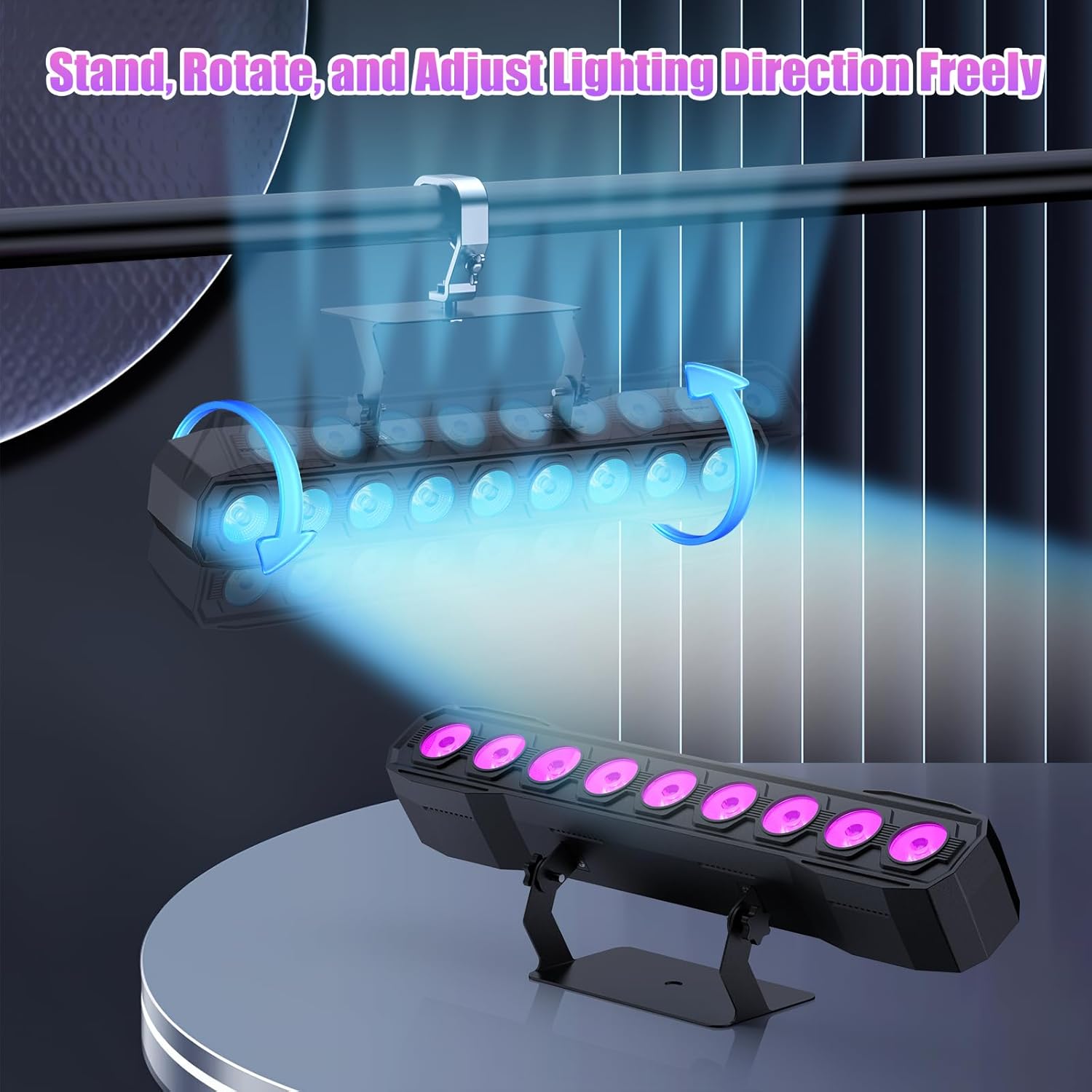
Image 5.1: Illustration of mounting and angle adjustment options.
5.3 የኃይል ግንኙነት
Connect the power cord to the Power IN port on the back of the fixture and then to a suitable power outlet. Multiple units can be daisy-chained using the Power OUT port to simplify wiring for larger setups.
6. የአሠራር ዘዴዎች
The DazzlingStage Wall Wash Bar Light supports several control modes:
- DMX512 መቆጣጠሪያ፡- For professional control via a DMX console.
- ራስ-ሁናቴ አስቀድሞ የተነደፉ የብርሃን ቅደም ተከተሎች።
- Sound-Activated Control: መብራቶች ለአካባቢው ድምጽ ምላሽ ይሰጣሉ።
- የርቀት መቆጣጠሪያ፡- Convenient wireless control using the included remote.
- ማስተር-ባሪያ ሁነታ፡- Link multiple units where one acts as a master and others as slaves, synchronizing effects.
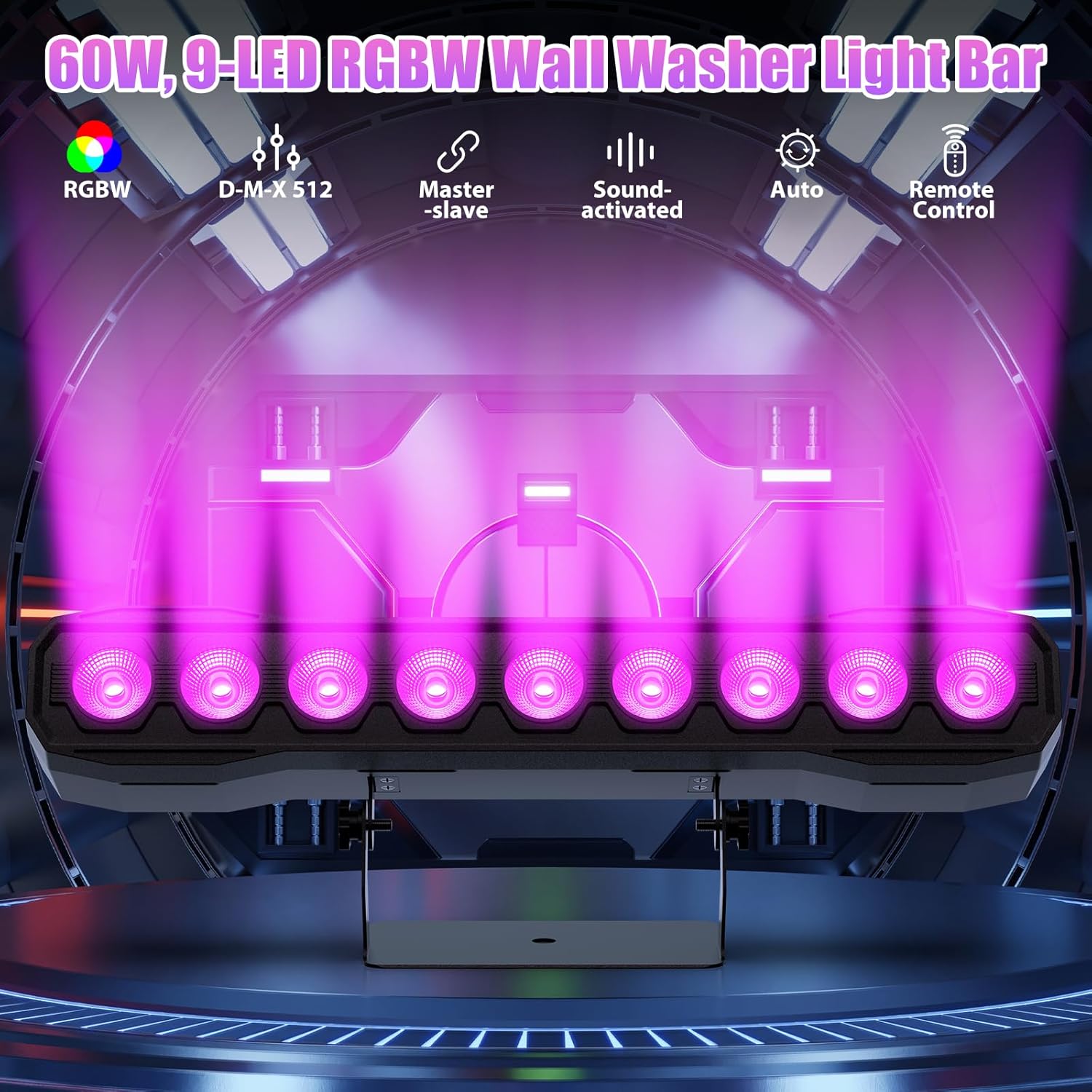
ምስል 6.1፡ አልቋልview of available control modes.
6.1 Display Panel Operation
Use the buttons on the back of the fixture to navigate the menu and select modes:
- መኑ በዋና ምናሌ አማራጮች በኩል ዑደቶች።
- ላይ ታች: Adjusts values or navigates sub-menus.
- ግባ ምርጫን ያረጋግጣል።
6.2 የመብራት ውጤቶች
The fixture supports various dynamic effects:
- የቀለም ድብልቅ; Over 16.7 million color combinations with 0-100% linear dimming.
- ጭረት Flashing effect.
- ዝለል፡ Instant color changes.
- ደብዛዛ በቀለሞች መካከል ለስላሳ ሽግግር።
- የልብ ምት፡- Gradual changing effects.
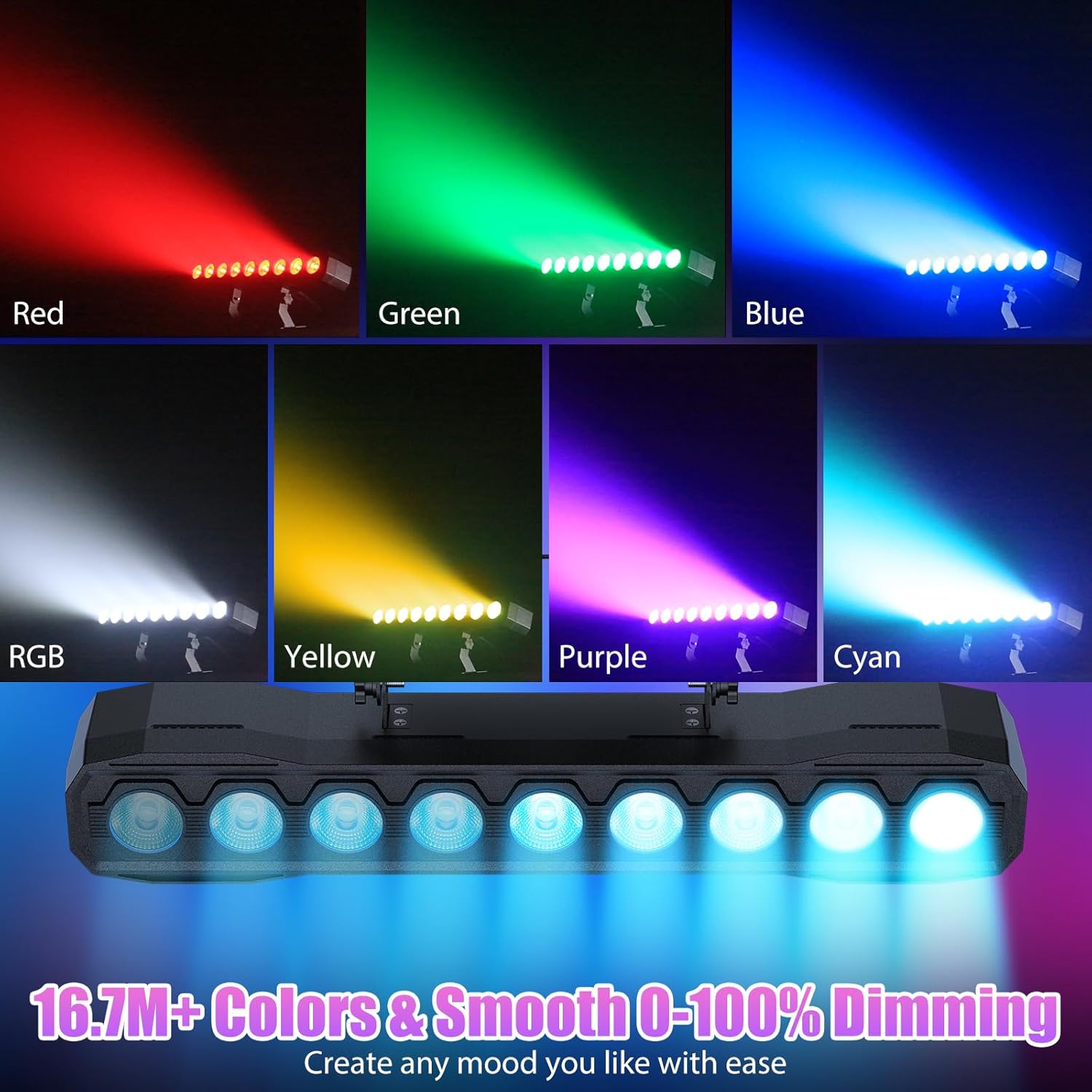
ምስል 6.2፡ ዘጸamples of color mixing and dimming capabilities.

Image 6.3: Visual representation of Strobe, Jump, Fade, and Pulse effects.
7. የርቀት መቆጣጠሪያ ተግባራት
የተካተተው የርቀት መቆጣጠሪያ ለተለያዩ ተግባራት ምቹ መዳረሻን ይሰጣል-
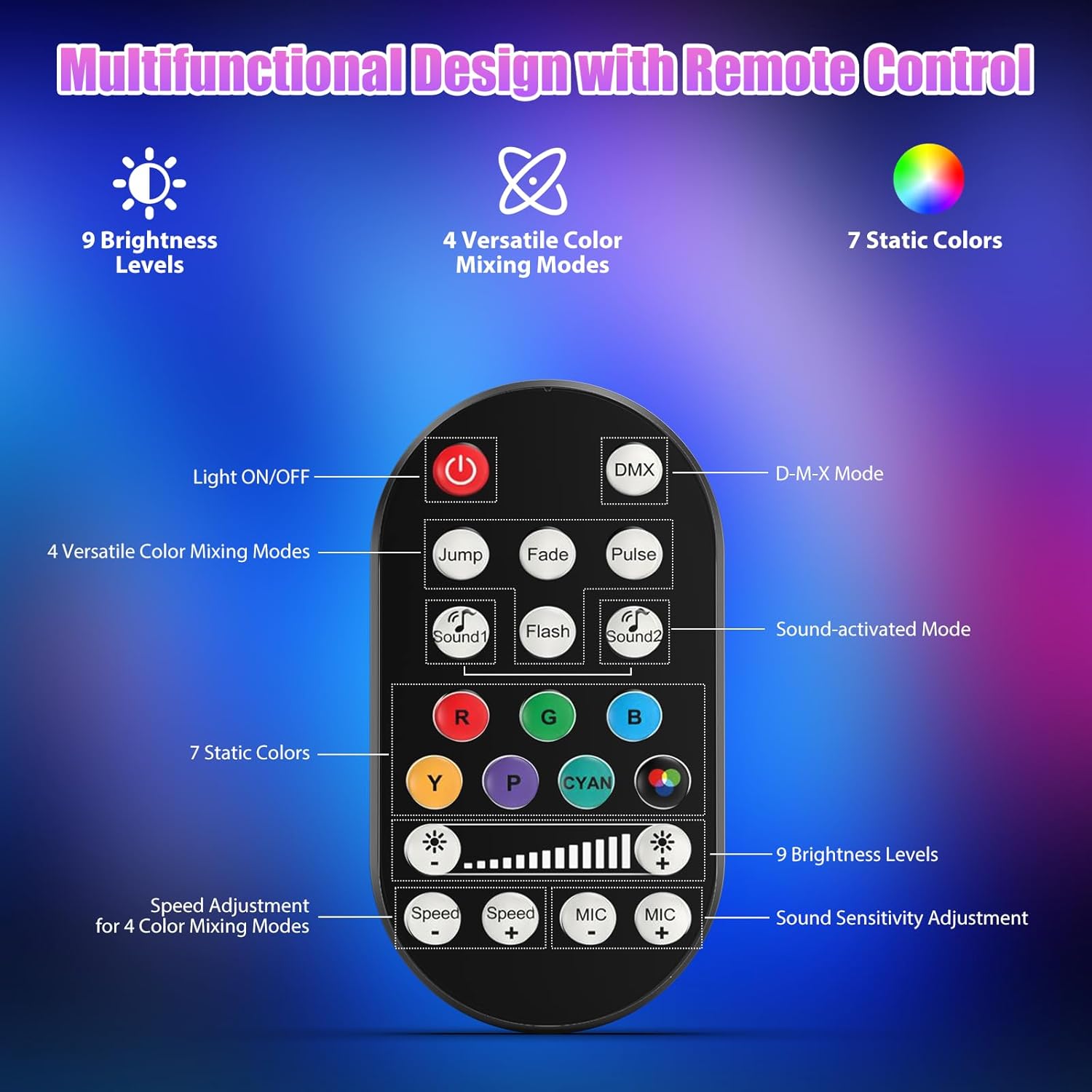
ምስል 7.1: የርቀት መቆጣጠሪያ አቀማመጥ እና ተግባራት.
- አብራ/አጥፋ፡ ክፍሉን ያበራል ወይም ያጠፋል።
- ዲኤምኤክስ Activates DMX control mode.
- Jump, Fade, Pulse, Flash: Selects different color mixing modes.
- Sound1, Sound2: Activates sound-activated modes with different sensitivities.
- R, G, B, Y, P, Cyan, White: Selects static colors.
- የብሩህነት ደረጃዎች; Adjusts the overall intensity of the light (9 levels).
- ፍጥነት +/-: ተለዋዋጭ ተፅእኖዎችን ፍጥነት ያስተካክላል.
- ማይክ +/-: Adjusts the sound sensitivity for sound-activated modes (15 levels).
8. DMX512 Control
For advanced control, connect the fixture to a DMX512 controller. The light bar typically uses 4 or 8 DMX channels. Refer to the display panel for DMX address setting and channel assignments.
8.1 DMX Address Setting
Use the MENU, UP, DOWN, and ENTER buttons on the fixture's display panel to set the DMX starting address. The display will show 'AXXX' where XXX is the address (e.g., A001).
8.2 DMX Channel Functions (Example - 8 Channel Mode)
| ቻናል | ተግባር | የእሴት ክልል | መግለጫ |
|---|---|---|---|
| CH1 | መምህር ዲሜር | 0-255 | አጠቃላይ ብሩህነት (0% እስከ 100%) |
| CH2 | ቀይ ጥንካሬ | 0-255 | Red LED brightness (0% to 100%) |
| CH3 | አረንጓዴ ጥንካሬ | 0-255 | Green LED brightness (0% to 100%) |
| CH4 | ሰማያዊ ጥንካሬ | 0-255 | Blue LED brightness (0% to 100%) |
| CH5 | ነጭ ጥንካሬ | 0-255 | White LED brightness (0% to 100%) |
| CH6 | Strobe/Effect | 0-255 | 0-10: No function; 11-255: Strobe speed (slow to fast) |
| CH7 | ራስ-ሰር ፕሮግራም | 0-255 | Selects and controls speed of built-in auto programs |
| CH8 | ድምፅ ገባሪ | 0-255 | Activates sound mode and adjusts sensitivity |
ሠንጠረዥ 8.1፡ ዘጸample DMX Channel Functions (may vary slightly by firmware version).
9. ጥገና
መደበኛ ጥገና ከፍተኛ አፈፃፀምን ያረጋግጣል እና የመሳሪያውን ዕድሜ ያራዝማል።
- ማጽዳት፡ Periodically clean the lens and housing with a soft, lint-free cloth. Do not use abrasive cleaners or solvents. Ensure the fixture is powered off and cool before cleaning.
- ምርመራ፡- Regularly check power cables, DMX cables, and mounting hardware for any signs of wear or damage. Replace damaged components immediately.
- ማከማቻ፡ When not in use for extended periods, store the fixture in a dry, dust-free environment.
10. መላ መፈለግ
ችግሮች ካጋጠሙዎት የሚከተሉትን የተለመዱ ችግሮች እና መፍትሄዎች ይመልከቱ።
| ችግር | ሊሆን የሚችል ምክንያት | መፍትሄ |
|---|---|---|
| ኃይል የለም | Power cable disconnected; No power from outlet; Blown fuse | Check power cable connection; Test outlet with another device; Replace fuse if necessary |
| ምንም የብርሃን ውጤት የለም | Dimmer channel at 0%; Incorrect mode selected; DMX signal issue | Increase dimmer level; Select desired operating mode; Check DMX cable and address settings |
| Incorrect colors/effects | Incorrect DMX channel values; Remote control interference | Verify DMX channel settings; Ensure remote is pointed directly at the sensor; Check for other IR interference |
| በድምፅ የነቃ ሁነታ አይሰራም | Microphone sensitivity too low; No sound input | Increase MIC sensitivity via remote or display; Ensure sufficient sound is present near the fixture |
| ቋሚ ሙቀት መጨመር | Poor ventilation; Blocked heat sink | Ensure adequate airflow around the unit; Clean any dust or debris from the heat sink fins |
11. ዝርዝሮች
| ባህሪ | ዝርዝር |
|---|---|
| የምርት ስም | DazzlingStage |
| የሞዴል ቁጥር | ZQ06190 |
| የብርሃን ምንጭ | 9 x 60 ዋ RGBW LEDs |
| የቀለም ድብልቅ | RGBW 4-in-1, 16.7 million colors |
| መፍዘዝ | 0-100% መስመራዊ ኤሌክትሮኒካዊ ማደብዘዝ |
| የጨረር አንግል | 35° ሰፊ አንግል |
| የመቆጣጠሪያ ሁነታዎች | DMX512, Auto, Sound-Activated, Remote Control, Master-Slave |
| የዲኤምኤክስ ቻናሎች | 4 or 8 Channels (selectable) |
| ማሳያ | ባለ 4-አሃዝ LED ማሳያ |
| ቁሳቁስ | አሲሪሎኒትሪል ቡታዲየን ስቲሪን (ኤቢኤስ) |
| የምርት ልኬቶች | 18.1 x 5.5 x 5.1 ኢንች (46 x 14 x 13 ሴሜ) |
| የእቃው ክብደት | በግምት. 1.98 ፓውንድ (0.9 ኪ.ግ) |
| የኃይል ግቤት | AC 100-240V፣ 50/60Hz |
| አምራች | Shenzhen Zhuoqiong Technology Co., Ltd. |
12. ዋስትና እና ድጋፍ
DazzlingStage products are designed for reliability and performance. For warranty information, please refer to the terms and conditions provided at the time of purchase or contact your retailer.
If you require technical assistance or have questions not covered in this manual, please contact DazzlingStage customer support through the retailer's platform or the official brand website. Please have your model number (ZQ06190) and purchase details ready when contacting support.