
1. መግቢያ
This manual provides essential information for setting up, operating, maintaining, and troubleshooting your realme Note 70T smartphone. Please read this guide thoroughly to ensure optimal performance and longevity of your device.
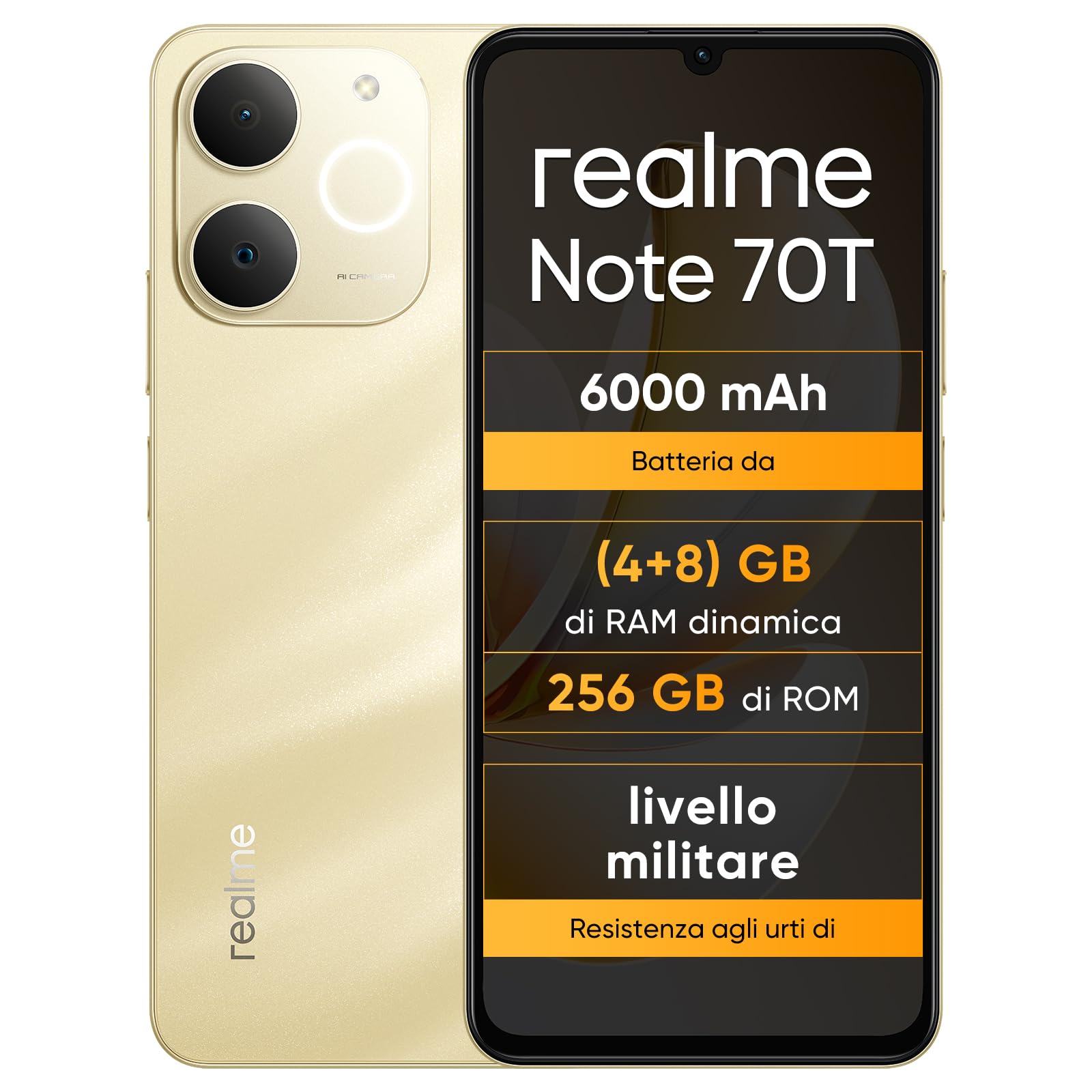
ምስል፡ ፊትና ጀርባ view of the realme Note 70T smartphone.
2. የማዋቀር መመሪያ
2.1 የጥቅል ይዘቶች
ጥቅልዎ የሚከተሉትን ንጥሎች መያዙን ያረጋግጡ፡-
- realme Note 70T Smartphone
- የዩኤስቢ ገመድ
- የስልክ መያዣ
- መከላከያ ፊልም
2.2 ሲም ካርድ ማስገባት እና በማብራት ላይ
- Locate the SIM card tray on the side of the device. Use the provided SIM ejector tool to open the tray.
- Carefully place your Nano-SIM card(s) and/or microSD card into the tray, ensuring correct orientation. The realme Note 70T supports Dual SIM.
- ትሪውን ከስልኩ አካል ጋር እስኪታጠብ ድረስ ቀስ ብለው ወደ ማስገቢያው ይግፉት።
- Press and hold the Power button (located on the right side) until the realme logo appears on the screen.

ምስል: ጎን view of the realme Note 70T, illustrating the location of the SIM card tray.
2.3 የመጀመሪያ ደረጃ መሙላት
ለመጀመሪያ ጊዜ ከመጠቀምዎ በፊት መሳሪያዎን ሙሉ በሙሉ መሙላት ይመከራል። የዩኤስቢ ገመዱን ከስልኩ የዩኤስቢ-ሲ ወደብ እና ሌላኛውን ጫፍ ከተኳሃኝ የኃይል አስማሚ (ያልተካተተ) ወይም ከኮምፒዩተር የዩኤስቢ ወደብ ጋር ያገናኙ።

ምስል፡ ከታች view of the realme Note 70T, highlighting the USB-C charging port.
3. የአሠራር መመሪያዎች
3.1 መሰረታዊ ተግባራት
- ማብራት/ማጥፋት፡ የኃይል አዝራሩን ተጭነው ይያዙ። 'ፓወር አጥፋ' ወይም 'ዳግም አስጀምር' የሚለውን ይምረጡ።
- የድምጽ መቆጣጠሪያ፡- በመሳሪያው ጎን ላይ ያሉትን የድምጽ መጨመሪያ እና የድምጽ መቀነሻ ቁልፎችን ይጠቀሙ።
- የስክሪን መቆለፊያ/መክፈቻ፡ ማያ ገጹን ለመቆለፍ ወይም ለመክፈት የኃይል አዝራሩን በአጭሩ ይጫኑ።
- የፊት ለይቶ ማወቅ; Configure facial recognition in Settings for quick and secure unlocking.

ምስል: ጎን view of the realme Note 70T, showing the power and volume buttons.
3.2 የማሳያ ባህሪያት
The realme Note 70T features a 6.75-inch Eye Comfort Display with a 90Hz refresh rate. This provides smooth visuals and reduces eye strain. The display offers vivid clarity and comfortable viewing

Image: The realme Note 70T display showcasing its 90Hz refresh rate and eye comfort features with a vibrant beach scene.
3.3 የካሜራ ተግባራት
Capture every moment with the 13MP rear camera and 5MP front camera. The device includes advanced AI features to enhance your photography:
- የ AI ግልጽ ፊት፡ Improves blurry portraits for sharper results.
- AI ማጥፊያ፡ Removes unwanted elements from photos.
- AI Image Matting: Allows you to easily remove subjects from backgrounds.

Image: Demonstration of the AI Clear Face feature, showing a blurry portrait before and after AI enhancement.

Image: Demonstration of the AI Eraser feature, showing an object removed from a photo.

Image: Demonstration of the AI Image Matting feature, showing a person isolated from the background.
3.4 የባትሪ አስተዳደር
The 6000mAh battery provides up to two days of usage on a single charge. It supports extended standby and includes 38 levels of charging protection for long-term battery health.

Image: Illustration of the realme Note 70T's 6000mAh battery capacity and estimated usage times for various activities.
3.5 Performance and Audio
Powered by an octa-core chipset with speeds up to 1.8 GHz, the realme Note 70T ensures smooth performance for gaming and applications. It supports fast app launch times and keeps up to 16 apps active in the background.
Experience enhanced audio with 300% ultra volume and AI Call 2.0, which provides intelligent noise reduction for clear calls.

Image: Visual representation of the realme Note 70T's octa-core processor.

Image: Illustration of the AI Call 2.0 feature, demonstrating noise reduction during calls.
4. ጥገና
4.1 የውሃ እና አቧራ መቋቋም (IP54)
The realme Note 70T is rated IP54 for water and dust resistance, protecting against splashes and dust ingress. The speaker vibrates at a specific frequency to expel accumulated water. This feature ensures the device remains functional in various daily situations.

Image: The realme Note 70T being splashed with water, demonstrating its IP54 water resistance.
4.2 ArmorShell Protection
The device features ArmorShell protection, having passed the MIL-STD 810H military-grade shock resistance test. This includes multi-angle drop tests and high-intensity impact tests, ensuring durability against accidental drops from up to 1.8 meters.

Image: The realme Note 70T being dropped onto a rocky surface, illustrating its military-grade resistance.
4.3 አጠቃላይ እንክብካቤ
- መሳሪያውን ለስላሳና ደረቅ ጨርቅ በመጠቀም ንጹህ ያድርጉት። ሻካራ ቁሳቁሶችን ያስወግዱ።
- ስልኩን ለረጅም ጊዜ ለከፍተኛ ሙቀት ወይም ቀጥተኛ የፀሐይ ብርሃን ከማጋለጥ ይቆጠቡ።
- Do not attempt to disassemble or repair the device yourself, as this may void the warranty and cause damage.
5. መላ መፈለግ
5.1 የተለመዱ ጉዳዮች እና መፍትሄዎች
- መሳሪያ አይበራም ባትሪው መሙላቱን ያረጋግጡ። ከኃይል መሙያ ጋር ይገናኙ እና እንደገና ይሞክሩ።
- ማያ ገጽ ምላሽ የማይሰጥ፡ የኃይል አዝራሩን ለረጅም ጊዜ (ብዙውን ጊዜ ከ10-15 ሰከንዶች) በመያዝ መሳሪያውን እንደገና ያስጀምሩ።
- መተግበሪያዎች እየሰበሩ ወይም ቀርፋፋ አፈፃፀም፦ Close background applications. Utilize the AI Optimization feature to improve app smoothness.

Image: Screenshot of the AI Optimization feature on the realme Note 70T, showing options to improve app smoothness.
5.2 የፋብሪካ ዳግም ማስጀመር
ችግሮች ከቀጠሉ የፋብሪካ ዳግም ማስጀመር ሊያስቡበት ይችላሉ። ማስጠንቀቂያ፡- This will erase all data on your device. Back up important information before proceeding. Navigate to ቅንብሮች > ስርዓት > አማራጮችን ዳግም አስጀምር > ሁሉንም ውሂብ ደምስስ (የፋብሪካ ዳግም ማስጀመር).
6. ዝርዝሮች
| ባህሪ | ዝርዝር መግለጫ |
|---|---|
| የምርት ስም | ሪልሜ |
| የሞዴል ስም | realme Note 70T |
| ስርዓተ ክወና | አንድሮይድ 15 |
| የ RAM መጠን | 4 ጊባ |
| የማከማቻ አቅም | 256 ጊባ |
| የስክሪን መጠን | 6.75 ኢንች |
| ጥራት | 720 x 1600 |
| የማደስ ደረጃ | 90 Hz |
| ሴሉላር ቴክኖሎጂ | 4G |
| የግንኙነት ቴክኖሎጂ | ብሉቱዝ |
| ቀለም | አሸዋማ ወርቅ |
| Number of SIM Card Slots | ድርብ ሲም |
| የኃይል መሙያ ወደብ አይነት | ዩኤስቢ-ሲ |
| Biometric Identification Features | የፊት ለይቶ ማወቅ |
| የውሃ መቋቋም ደረጃ | የውሃ መቋቋም (IP54) |
| የጆሮ ማዳመጫ ጃክ | No 3.5 mm Jack |
| Maximum Supported Flash Memory Size | 256 ጊባ |
| Front Camera Sensor Resolution | 5 ሜፒ |
| Rear Camera Sensor Resolution | 13 ሜፒ |
| Number of Rear Cameras | 1 |
| Number of Front Cameras | 1 |
| ከፍተኛው የባትሪ ኃይል | 6000 ሚሊampኤር-ሰዓት (mAh) |
| የንጥል መጠኖች | 15.7 x 7.4 x 0.9 ሴ.ሜ |
| አማካይ የባትሪ ህይወት | 2 ቀናት |
| የቪዲዮ ቀረጻ ጥራት | 1080 ፒ |
| የፍሬም መጠን | 30 fps |
| GPS and Georeferencing Features | እውነት ነው። |
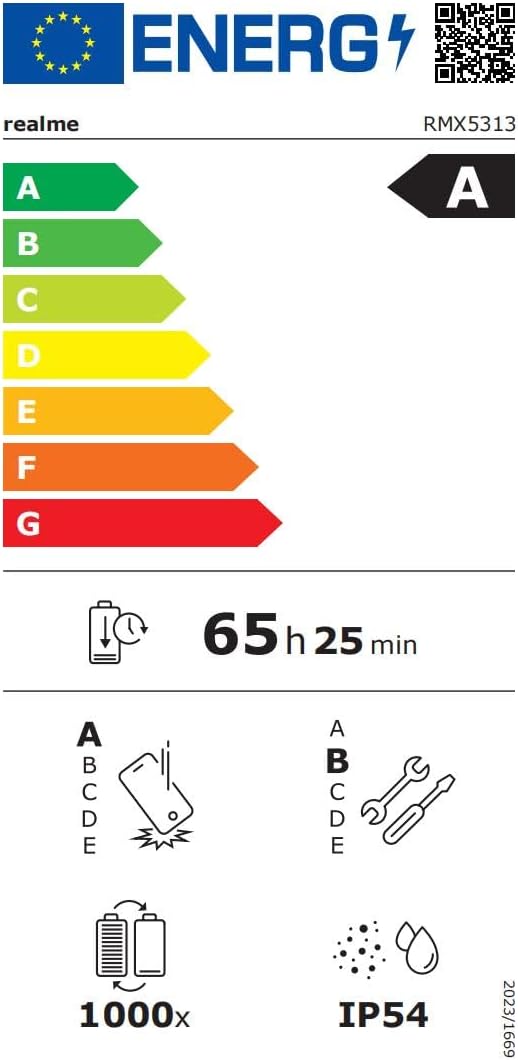
Image: EU Energy Label for realme Note 70T, showing energy efficiency, battery life, and IP54 rating. For more details, visit eprel.ec.europa.eu/qr/2361473.
7. የዋስትና መረጃ
Your realme Note 70T smartphone comes with a limited manufacturer's warranty. Please refer to the warranty card included in your package or visit the official realme webየዋስትና ሽፋን፣ የቆይታ ጊዜ እና የአገልግሎት ሂደቶችን በተመለከተ ለዝርዝር ውሎች እና ሁኔታዎች ጣቢያ።
8. የደንበኛ ድጋፍ
For further assistance, technical support, or service inquiries, please contact realme customer support through their official website or the contact information provided in your product documentation. You can also find FAQs and troubleshooting tips on the realme support portal.
Additional resources, including a Data Transparency Declaration, can be found እዚህ.