
1. መግቢያ
Thank you for choosing the HyperGear 30W USB-C Charger Block. This compact and powerful wall charger is designed to provide rapid and efficient charging for a wide range of devices, including smartphones, tablets, and laptops. Featuring Power Delivery (PD) and Programmable Power Supply (PPS) technologies, it ensures optimal charging speeds while protecting your device's battery health. Please read this manual carefully to understand the product's features and ensure safe operation.

Image 1.1: The HyperGear 30W USB-C PD Fast Wall Charger, highlighting its features such as USB-C PD Output, Super Fast Charging, PPS technology, Universal Compatibility, MagSafe Compatibility, and Travel Friendly Design.
2. ማዋቀር
Setting up your HyperGear 30W USB-C Charger Block is straightforward:
- ከኃይል መውጫ ጋር ይገናኙ፡ Plug the charger block into a standard wall power outlet (Type A - 2 pin, North American). Ensure the outlet is easily accessible.
- የኃይል መሙያ ገመድን ያገናኙ; Insert a compatible USB-C charging cable (not included) into the USB-C port on the charger block.
- ከመሳሪያ ጋር ተገናኝ፡ Connect the other end of the charging cable to your smartphone, tablet, or laptop. The device should indicate that it is charging.

Image 2.1: The compact HyperGear 30W charger plugged into a wall outlet, demonstrating its ability to charge a laptop efficiently.
3. የአሠራር መመሪያዎች
The HyperGear 30W USB-C Charger Block utilizes advanced charging technologies for optimal performance:
- 30W USB-C Power Delivery (PD): This technology allows for faster, more flexible charging. It can deliver higher power levels to compatible devices, significantly reducing charging times.
- PPS Technology: Programmable Power Supply (PPS) dynamically adjusts the voltage and current in real-time during charging. This minimizes conversion loss, reduces heat generation, and extends battery lifespan by providing the exact power level a device needs at any given moment.
- ፈጣን የኃይል መሙላት ችሎታዎች;
- ዘመናዊ ስልኮች፡ Charge compatible iPhones, Android, and Pixel phones from 0% to 50% in under 30 minutes.
- ታብሌቶች፡- Provides full-speed charging for iPad Pro, iPad Air, and Samsung Galaxy Tabs.
- ላፕቶፖች፡ Capable of full-speed charging for MacBook Air and other compatible USB-C laptops.
- ሁለንተናዊ ተኳኋኝነት The charger is designed to work seamlessly with a wide array of USB-C powered devices, adapting its output to suit their specific charging requirements.

Image 3.1: Visual comparison demonstrating the speed advantage of 30W fast charging over 5W standard charging for mobile phones.
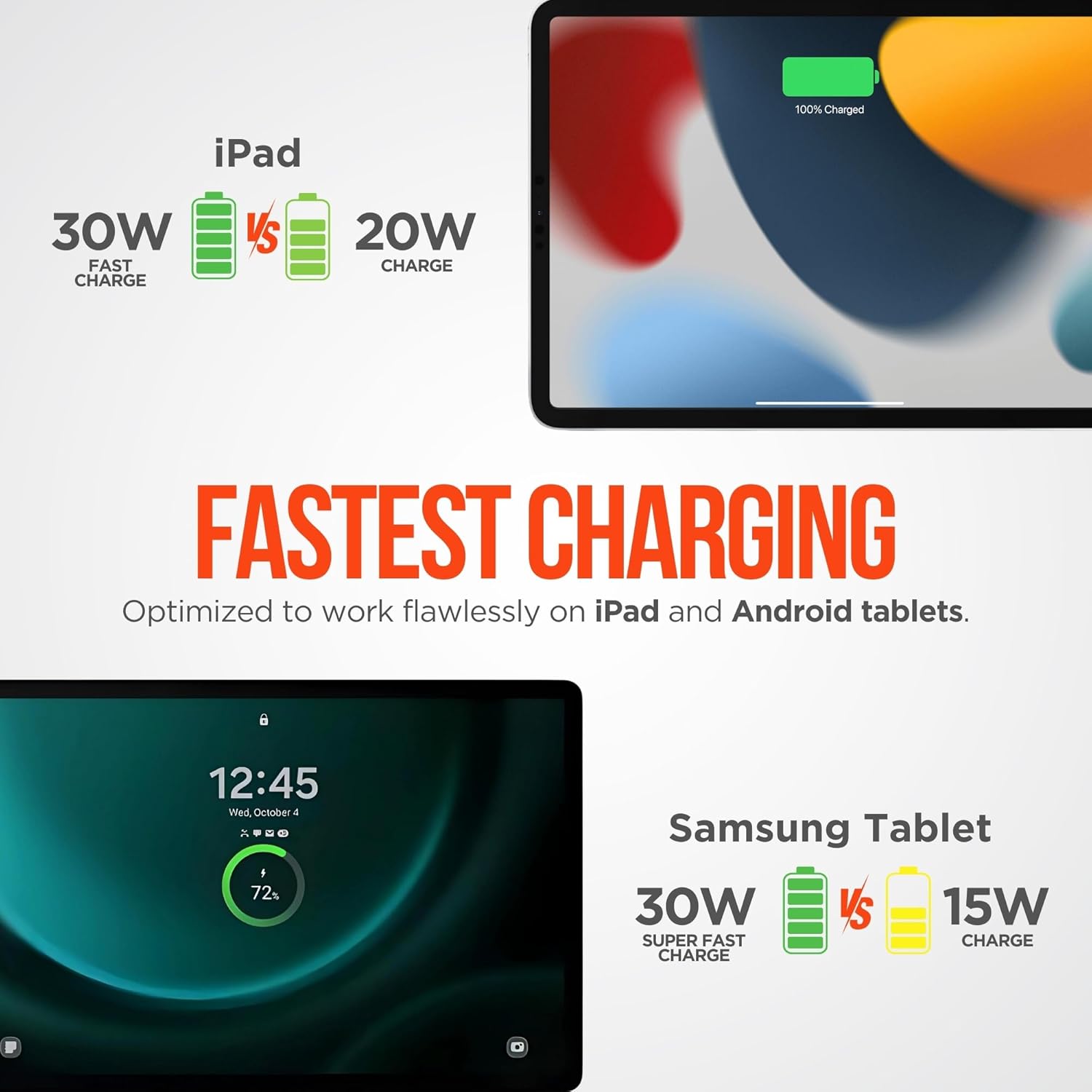
Image 3.2: Illustrates the faster charging performance of the 30W charger for iPads and Samsung tablets compared to lower wattagኢ ባትሪ መሙያዎች.

Image 3.3: The charger's compact and slim profile, making it ideal for travel and everyday use.
4. የደህንነት ባህሪያት
The HyperGear 30W USB-C Charger Block is equipped with smart chip safety features to protect your devices and ensure safe operation:
- ከመጠን በላይ መከላከያ Prevents damage to your device's battery by stopping charging once it reaches full capacity.
- ከመጠን በላይ መጨናነቅtagሠ ጥበቃ፡ ከመጠን በላይ ጥራዝ መከላከያዎችtage input that could harm your device.
- የአጭር ዙር ጥበቃ፡- Automatically cuts off power in case of a short circuit to prevent damage to the charger and connected devices.
- የሙቀት መቆጣጠሪያ; Monitors and controls the charger's temperature to prevent overheating during operation.

Image 4.1: Visual representation of the charger's built-in smart chip safety features, including overcharge, overvoltage, short circuit protection, and temperature regulation.
5. ጥገና
የኃይል መሙያዎ ረጅም ጊዜ እና ጥሩ አፈጻጸም ለማረጋገጥ የሚከተሉትን የጥገና መመሪያዎች ይከተሉ፡
- ማድረቅ; Avoid exposing the charger to water or excessive moisture.
- ከፍተኛ የሙቀት መጠንን ያስወግዱ; Do not use or store the charger in environments with extremely high or low temperatures.
- በቀስታ አጽዳ; Use a soft, dry cloth to clean the charger. Do not use harsh chemicals or abrasive materials.
- በጥንቃቄ ይያዙ; ቻርጀሩን ከመጣል ወይም ለጠንካራ ተጽእኖ ከማጋለጥ ይቆጠቡ።
6. መላ መፈለግ
በኃይል መሙያዎ ላይ ችግሮች ካጋጠሙዎት የሚከተሉትን የተለመዱ ችግሮች እና መፍትሄዎች ይመልከቱ፡
- መሳሪያ እየሞላ አይደለም፡
- ቻርጀሩ በሚሰራ የግድግዳ ሶኬት ውስጥ ደህንነቱ በተጠበቀ ሁኔታ መሰካቱን ያረጋግጡ።
- የዩኤስቢ-ሲ ገመድ ከኃይል መሙያው እና ከመሳሪያዎ ጋር በጥብቅ የተገናኘ መሆኑን ያረጋግጡ።
- የተበላሸ ገመድ እንዳይኖር ለማድረግ የተለየ የዩኤስቢ-ሲ ገመድ ለመጠቀም ይሞክሩ።
- የኃይል መሙያውን ተግባር ለማረጋገጥ የኃይል መሙያውን በተለየ መሳሪያ ይሞክሩት።
- የተለየ የግድግዳ መውጫ ይሞክሩ።
- ቀስ ብሎ መሙላት፡
- Ensure your device and cable support USB Power Delivery (PD) for optimal fast charging.
- አንዳንድ መሳሪያዎች ከፍተኛ አገልግሎት ላይ ከሆኑ ወይም ባትሪያቸው ሊሞላ ሲል የኃይል መሙያ ፍጥነታቸውን ሊገድቡ ይችላሉ።
- Verify that the cable used is rated for the appropriate power delivery (e.g., 30W or higher).
- የኃይል መሙያ ከመጠን በላይ ማሞቅ;
- It is normal for chargers to become slightly warm during operation.
- If the charger becomes excessively hot, unplug it immediately. Ensure it is used in a well-ventilated area and not covered.
- ከመጠን በላይ ሙቀት ከቀጠለ፣ መጠቀም ያቁሙ እና የደንበኞች ድጋፍን ያነጋግሩ።
7. ዝርዝሮች
| ባህሪ | ዝርዝር መግለጫ |
|---|---|
| የምርት ስም | HyperGear |
| የሞዴል ቁጥር | HYP-PD30-3000 |
| ቀለም | ነጭ |
| ጠቅላላ የዩኤስቢ ወደቦች | 1 (ዩኤስቢ-ሲ) |
| ዋትtage | 30 ዋት (ከፍተኛ) |
| የፒዲ ውፅዓት | 5V/3A፣ 9V/3A፣ 15V/2A፣ 20V/1.5A (30W ከፍተኛ) |
| የPPS ውፅዓት | 3.3-11V/3A (30W ከፍተኛ) |
| የአሁኑ ደረጃ አሰጣጥ | 3 Amps |
| የኃይል ምንጭ | AC Wall Power (Type A - 2 pin) |
| የመጫኛ አይነት | የግድግዳ ተራራ |
| መጠኖች | 1.7 x 1.6 x 1 ኢንች |
| ክብደት | 1.7 አውንስ |
| የደህንነት ማረጋገጫ | ኢ.ቲ.ኤል |
| ዩፒሲ | 633755157585 |
8. ዋስትና እና ድጋፍ
This HyperGear 30W USB-C Charger Block comes with a የአንድ ዓመት ዋስትና የተወሰነ. This warranty covers defects in materials and workmanship under normal use for one year from the date of purchase.
For warranty claims, technical support, or any questions regarding your product, please contact HyperGear customer service through their official website or the retailer from whom you purchased the product. Please retain your proof of purchase for warranty validation.