
መግቢያ
The TCL 32" Class HD (720P) Roku Smart LED TV (32S321) offers a comprehensive entertainment experience, providing access to a vast library of movies and TV episodes, along with connectivity for your cable box, gaming console, and other devices all from its intuitive interface. Its user-friendly remote simplifies content access in high definition. This manual provides essential information for setting up, operating, and maintaining your new television.
በሣጥኑ ውስጥ ያለው
- TCL 32" Class HD (720P) Roku Smart LED TV (32S321)
- የርቀት መቆጣጠሪያ
- TV Stand Legs (if not wall-mounting)
- የኃይል ገመድ
- ፈጣን ጅምር መመሪያ
ማዋቀር
አካላዊ ቅንብር
Your TCL Roku TV can be set up on a stand or wall-mounted. Ensure proper ventilation around the TV.

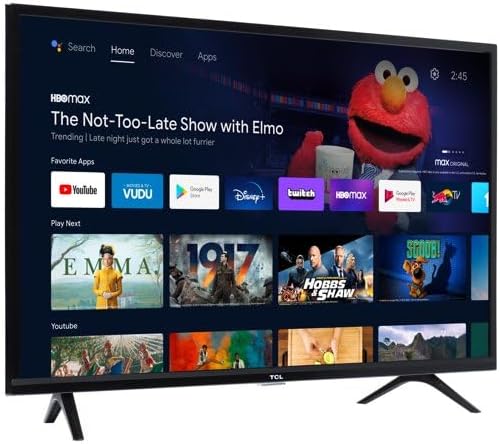
ምስል 1: የፊት view of the TCL 32S321 Roku TV.
መሣሪያዎችን በማገናኘት ላይ
The TV features multiple input ports for various devices. Connect your cable box, gaming console, or other media players using HDMI cables. For older devices, an AV input is available. The TV also includes a USB port for media playback and a built-in tuner for over-the-air HD content via an antenna.
ምስል 2: የኋላ view of the TCL 32S321 TV showing input ports.
የመጀመሪያ የኃይል ማብራት እና የአውታረ መረብ ማዋቀር
After connecting the power cable, press the power button on the remote control. Follow the on-screen instructions to select your language, connect to your Wi-Fi network, and activate your Roku account. This process will enable access to streaming features and app downloads.
በመስራት ላይ
የርቀት መቆጣጠሪያ አጠቃቀም
The included remote control is designed for simplicity and ease of use. It features dedicated buttons for popular streaming services like Netflix, Disney+, Apple TV+, and Prime Video, allowing quick access to your favorite content. The directional pad and 'OK' button are used for navigating menus and making selections.
የRoku በይነገጽን በማሰስ ላይ
The Roku TV interface provides a centralized hub for all your entertainment. From the home screen, you can access:
- ቤት፡ Your main dashboard with recommended content and installed apps.
- የቀጥታ ቲቪ፡ Access to over-the-air channels via antenna or live streaming services.
- ምን እንደሚታይ፡- Curated content suggestions.
- የዥረት ማከማቻ፡ Browse and download new streaming channels (apps) such as Hulu, Tubi, HBO Max, Peacock, and CBS Sports.
- ፈልግ፡ Find movies, TV shows, actors, or channels across various platforms.
- ቅንብሮች፡- Adjust TV and network configurations.
Use the directional arrows on your remote to move between options and the 'OK' button to select.
ጥገና
የ TCL Roku ቲቪዎን ረጅም ዕድሜ እና ጥሩ አፈፃፀም ለማረጋገጥ የሚከተሉትን የጥገና መመሪያዎች ይከተሉ፡
- ማጽዳት፡ ስክሪኑን በቀስታ ለስላሳ እና ደረቅ ማይክሮፋይበር ጨርቅ ይጥረጉ። ለግትር ማጭበርበሮች በትንሹ መampጨርቁን በውሃ. ኃይለኛ ኬሚካሎችን ወይም ገላጭ ቁሳቁሶችን ያስወግዱ.
- የአየር ማናፈሻ; በቴሌቪዥኑ ዙሪያ በቂ የአየር ዝውውርን ያረጋግጡ። የአየር ማናፈሻ ክፍተቶችን አያግዱ.
- ኃይል፡- በመብረቅ አውሎ ንፋስ ጊዜ ወይም ለረጅም ጊዜ ክትትል ሳይደረግበት ሲቀር ቴሌቪዥኑን ከኃይል ማሰራጫው ያላቅቁት።
መላ መፈለግ
If you encounter issues with your TCL Roku TV, refer to the following common solutions:
| ችግር | ሊሆን የሚችል ምክንያት / መፍትሄ |
|---|---|
| ኃይል የለም | Ensure the power cable is securely plugged into both the TV and a working electrical outlet. Check if the outlet has power. |
| ፎቶ/ድምፅ የለም | Verify that the correct input source is selected. Check all cable connections (HDMI, AV, Antenna). Restart connected devices. |
| የርቀት ምላሽ የማይሰጥ | በርቀት መቆጣጠሪያው ውስጥ ያሉትን ባትሪዎች ይተኩ. በርቀት መቆጣጠሪያው እና በቴሌቪዥኑ IR ዳሳሽ መካከል ምንም እንቅፋቶች አለመኖራቸውን ያረጋግጡ። |
| ከWi-Fi ጋር መገናኘት አልተቻለም | Check your Wi-Fi password. Restart your router and modem. Ensure the TV is within range of your Wi-Fi signal. Some users have reported intermittent Wi-Fi issues; a TV restart or network reset may help. |
| ቀርፋፋ አፈጻጸም / መዘግየት | Close unused applications. Restart the TV by unplugging it for 30 seconds and plugging it back in. Ensure your internet connection is stable and fast enough for streaming. |
| No Over-the-Air Channels | Ensure an antenna is properly connected to the "CABLE/ANT" input. Perform a channel scan in the TV's settings. Adjust antenna position or consider a stronger antenna if signals are weak. |
ዝርዝሮች
| ባህሪ | ዝርዝር |
|---|---|
| የምርት ስም | TCL |
| የሞዴል ቁጥር | 32S321 (Note: Some documentation may refer to 32D310) |
| የስክሪን መጠን | 32 ኢንች |
| የማሳያ ቴክኖሎጂ | LED |
| ጥራት | 1366 x 768 (720P HD) |
| የማደስ ደረጃ | 60 Hz |
| የምርት ልኬቶች | 28.9 x 7.2 x 19.2 ኢንች (ከቁም ጋር) |
| የእቃው ክብደት | 8.6 ፓውንድ £ |
| የግንኙነት ቴክኖሎጂ | USB, HDMI (3 inputs) |
| የውጤት ዋትtage | 5 Watts (Audio) |
| ሁነታ ላይ የኃይል ፍጆታ | 44.00 ዋት |
ዋስትና እና ድጋፍ
የዋስትና መረጃ ለማግኘት፣ እባክዎን ከምርትዎ ጋር የተካተተውን የዋስትና ካርድ ይመልከቱ ወይም ኦፊሴላዊውን የቲሲኤል ድጋፍ ይጎብኙ website. For technical assistance, troubleshooting, or service inquiries, please contact TCL customer support. Keep your purchase receipt and product serial number handy for faster service.
የመስመር ላይ ድጋፍ www.tcl.com/us/en/support