
መግቢያ
This manual provides instructions for the HyperGear HYG-14590 Wireless Fast Charging Car Dash Mount. This device is designed to securely hold and wirelessly charge Qi-enabled smartphones in your vehicle, offering hands-free navigation and communication.
የጥቅል ይዘቶች
ሁሉም እቃዎች በጥቅሉ ውስጥ መኖራቸውን ያረጋግጡ፡-
- Telescopic Mount
- Fast Charge Car Adapter
- የማይክሮ ዩኤስቢ ገመድ
- የተጠቃሚ መመሪያ (ይህ ሰነድ)
የማዋቀር መመሪያዎች
- የመጫኛ ቦታን ይምረጡ፡- Select a clean, flat surface on your dashboard or windshield. Ensure the location does not obstruct your view ወይም በተሽከርካሪ መቆጣጠሪያዎች ላይ ጣልቃ መግባት.
- ተራራውን ያያይዙ፡
- Clean the chosen surface thoroughly.
- Remove the protective film from the sticky gel suction cup.
- የመምጠጫ ጽዋውን መሬት ላይ በደንብ ይጫኑት.
- Engage the 2-step locking lever to secure the mount in place.
- የግንኙነት ኃይል;
- Insert the Micro USB cable into the charging port on the mount.
- Plug the other end of the Micro USB cable into the Fast Charge Car Adapter.
- Insert the Fast Charge Car Adapter into your vehicle's 12V power outlet (cigarette lighter socket).
- Adjust the Mount:
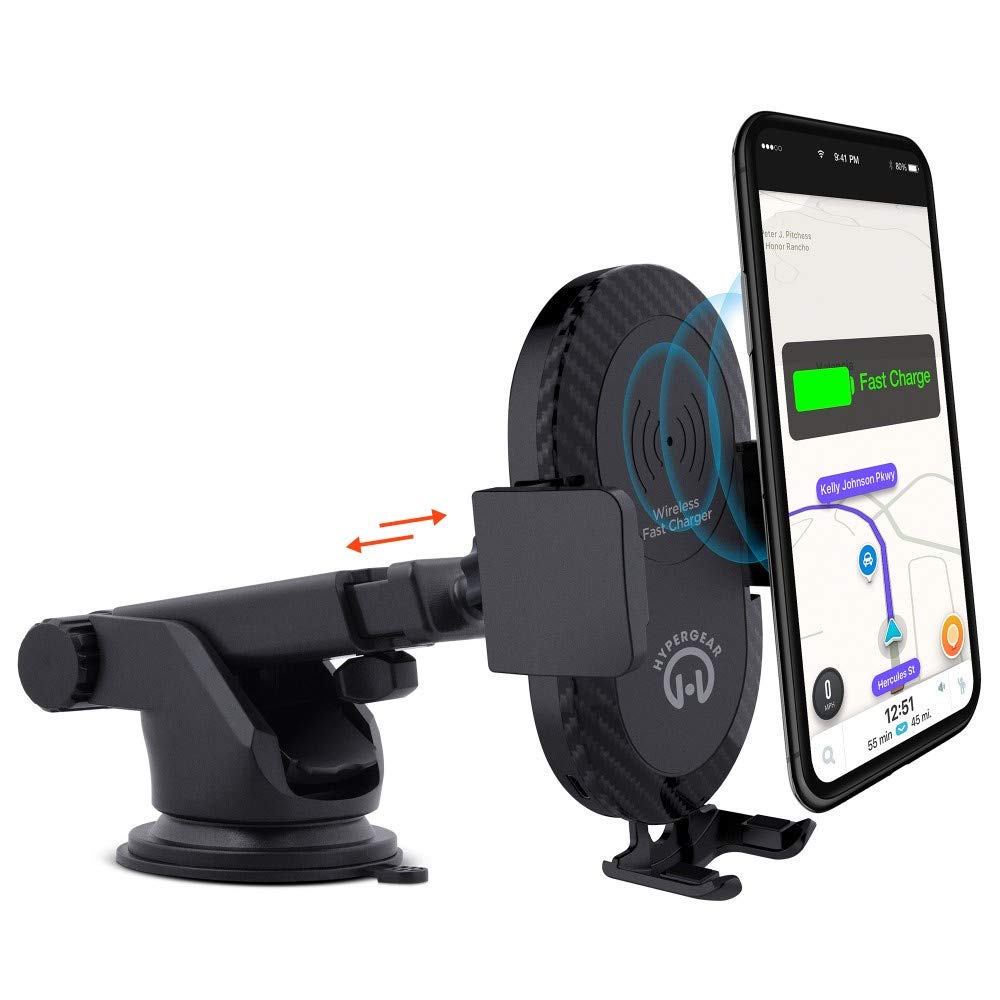
- Extend the telescopic arm up to 8 inches as needed.
- Pivot the arm up to 230° to achieve the desired angle.
- Rotate the cradle head 360° to switch between portrait and landscape orientation.
የአሠራር መመሪያዎች
- መሳሪያዎን ማስቀመጥ፦ Gently open the adjustable padded cradle grips and place your Qi-enabled smartphone into the mount. The grips will automatically secure the device.
- ገመድ አልባ ባትሪ መሙላት; Once your device is placed in the mount and the mount is powered, wireless charging will begin automatically. Ensure your device is centered on the charging pad for optimal performance.
- መሣሪያዎን ማስወገድ; To remove your device, gently open the cradle grips and lift your smartphone out.
- ከእጅ-ነጻ አጠቃቀም; The mount allows for hands-free use of navigation, calls, and other applications while driving. Always ensure your device is positioned safely and does not obstruct your view የመንገዱን.
ጥገና
- ማጽዳት፡ ማሰሪያውን ለማጽዳት ለስላሳና ደረቅ ጨርቅ ይጠቀሙ። የማጽጃ ማጽጃዎችን ወይም ማሟሟቶችን አይጠቀሙ።
- የመጠጫ ዋንጫ እንክብካቤ; If the sticky gel suction cup loses adhesion, rinse it with warm water and let it air dry. This can help restore its stickiness.
- ማከማቻ፡ ለረጅም ጊዜ ጥቅም ላይ በማይውልበት ጊዜ፣ ማሰሪያውን ከፀሐይ ብርሃን በቀጥታ ራቅ ባለ ቀዝቃዛና ደረቅ ቦታ ያስቀምጡት።
መላ መፈለግ
- መሳሪያ በገመድ አልባ ባትሪ እየሞላ አይደለም፡-
- Ensure your smartphone is Qi-enabled or has a Qi-enabled receiver.
- Verify the Micro USB cable is securely connected to both the mount and the car adapter.
- Check that the car adapter is firmly seated in the vehicle's 12V power outlet.
- Ensure your phone is centered on the charging pad of the mount.
- በገመድ አልባ ባትሪ መሙላት ላይ ጣልቃ ሊገቡ የሚችሉ ወፍራም የስልክ መያዣዎችን ያስወግዱ።
- Mount not sticking to surface:
- Clean the dashboard or windshield surface thoroughly before attachment.
- Ensure the 2-step locking lever is fully engaged.
- Rinse the sticky gel suction cup with warm water and air dry to restore adhesion.
- በተሸካራ ወይም ቀዳዳ ባላቸው ቦታዎች ላይ ከመጫን ይቆጠቡ።
- Phone not held securely:
- Ensure the adjustable padded cradle grips are properly closed around your device.
- Verify that your phone's size is compatible with the mount's adjustable range.
ዝርዝሮች
| የሞዴል ቁጥር | HYG-14590 |
| የምርት ስም | HyperGear |
| የግንኙነት ቴክኖሎጂ | ገመድ አልባ |
| የማገናኛ አይነት | ዩኤስቢ ፣ ገመድ አልባ |
| ተስማሚ መሣሪያዎች | ተንቀሳቃሽ ስልኮች (Qi-enabled) |
| ተስማሚ የስልክ ሞዴሎች | iPhone X/8/8 Plus, Samsung Galaxy S9/S9+, S8/S8+, Note 8, and other Qi-enabled devices |
| ልዩ ባህሪ | ፈጣን ባትሪ መሙላት፣ ገመድ አልባ ባትሪ መሙላት |
| ዋትtage | 10 ዋት |
| የኃይል ምንጭ | Vehicle 12V Power Outlet |
| ዋና የኃይል ማገናኛ አይነት | USB Type C (for car adapter) |
| የእቃው ክብደት | 11.84 አውንስ |
| የማቀፊያ ቁሳቁስ | Gel (suction cup) |
| ቀለም | ጥቁር |
| ዩፒሲ | 633755145902 |
የዋስትና መረጃ
This HyperGear product comes with a የ 30 ቀን ዋስትና from the date of purchase. This warranty covers manufacturing defects. Please retain your proof of purchase for warranty claims. For further details or to initiate a claim, please refer to the HyperGear official webጣቢያ ወይም የደንበኛ ድጋፍን ያግኙ።
የደንበኛ ድጋፍ
For technical assistance, product inquiries, or warranty support, please visit the official HyperGear webየደንበኛ አገልግሎት ክፍላቸውን ድህረ ገጽ ወይም ያነጋግሩ። የእውቂያ መረጃ በተለምዶ በምርቱ ማሸጊያ ወይም በብራንዱ ኦፊሴላዊ የመስመር ላይ መገኘት ላይ ይገኛል።