1. Introduction
Thank you for choosing the FOXSUR Smart Car Battery Charger. This intelligent 12V 7A charger is designed to efficiently charge and maintain various types of 12V batteries, including AGM, GEL, LiFePO4, and traditional lead-acid batteries. It features advanced multi-stage charging, pulse repair capabilities, and comprehensive safety protections to ensure optimal battery performance and longevity. Please read this manual carefully before use to ensure safe and effective operation.
2. Safety Information
WARNING: Read all safety warnings and instructions before using this product. Failure to follow the warnings and instructions may result in electric shock, fire, and/or serious injury.
- Always wear eye protection and protective clothing when working with batteries.
- Ensure adequate ventilation when charging batteries to prevent the accumulation of explosive gases.
- Do not smoke or allow sparks or flames in the vicinity of the battery or charger.
- Disconnect the AC power supply before connecting or disconnecting the DC output clamps to the battery.
- Never charge a frozen battery.
- Keep the charger away from water, rain, or excessive moisture.
- Do not operate the charger if it has received a sharp blow, been dropped, or otherwise damaged.
- This charger is designed for 12V batteries only. Do not attempt to charge other voltage batteries.
3. Product Features
- Smart Charging Technology: 7-stage automatic charging process for optimal battery health.
- Pulse Repair Function: Advanced repair mode for idle or old batteries, helping to desulfate and restore battery capacity.
- Digital LCD Display: Clear display of voltage, current, and charging status.
- Multiple Charging Modes: Dedicated modes for Car, Motorcycle, AGM/LiFePO4, and Repair.
- Comprehensive Protection: Includes over current, overcharge, overheat, short circuit, reverse polarity, fire materials, cooling system, and high voltage protection.
- Wide Application: Suitable for 12V 4Ah-140Ah batteries used in cars, motorcycles, SUVs, RVs, boats, lawn mowers, and more.
- Microprocessor Control: Intelligent chip for precise control, automatic stop when fully charged, and intelligent detection.

Figure 3.1: FOXSUR Smart Car Battery Charger Overview

Figure 3.2: Charger Protection Features
4. Specifications
| Attribute | Value |
|---|---|
| Brand Name | FOXSUR |
| Model | FBC1207E |
| Certification | CE, UKCA, FCC |
| Input Voltage | 100-240VAC, 50/60Hz |
| Input Current | 0.4A@230VAC, 0.8A@110VAC |
| Input Power under No Load | 2.5W |
| Output Voltage | 12V |
| Bulk Charge Current | Max. 7A |
| Charging Voltage | 14.7V ±0.3V |
| Minimum Start Voltage | 8.0V |
| Operate Temperature | -20℃ to +45℃ |
| Thermal Protection | 65℃ +/- 5℃ |
| Battery Capacity Range | 4Ah - 140Ah |
| Efficiency | Approx. 85% |
| Dimension (L×W×H) | 158×85×63mm |
| Weight | 440g |

Figure 4.1: Product Dimensions and Key Parameters
5. Setup Instructions
Follow these simple steps to set up your FOXSUR Smart Car Battery Charger:
- Step 1: Connect to Power Supply
Plug the AC power cord of the charger into a standard household 100-240V AC power outlet. The charger's display will light up. - Step 2: Select Battery Type Mode
Press the 'MODE' button on the charger to cycle through the available battery types (Car, Moto, AGM/LiFePO4, Repair). Select the appropriate mode that matches your battery type. - Step 3: Connect to Battery
Connect the red positive (+) clamp to the positive terminal of the battery. Connect the black negative (-) clamp to the negative terminal of the battery. Ensure a secure connection.
Once connected, the charger will automatically begin the charging process according to the selected mode.

Figure 5.1: Simple Operation Steps
6. Operating Modes
The FOXSUR Smart Car Battery Charger offers multiple operating modes to suit different battery types and conditions:
- Car Mode: Most commonly used for standard 12V car batteries (dry battery, water battery, lead acid, maintenance-free battery).
- Motorcycle Mode (Moto): Designed for charging smaller capacity 12V motorcycle lead-acid batteries.
- AGM + LiFePO4 Mode: Specifically for AGM and LiFePO4 batteries, which have different charging requirements. LiFePO4 batteries offer a lifespan 3-5 times that of regular batteries.
- Repair Mode: An advanced mode to address challenges like battery feeding inability or high internal resistance, often found in idle or old batteries. This mode uses pulse repair technology to desulfate the battery.
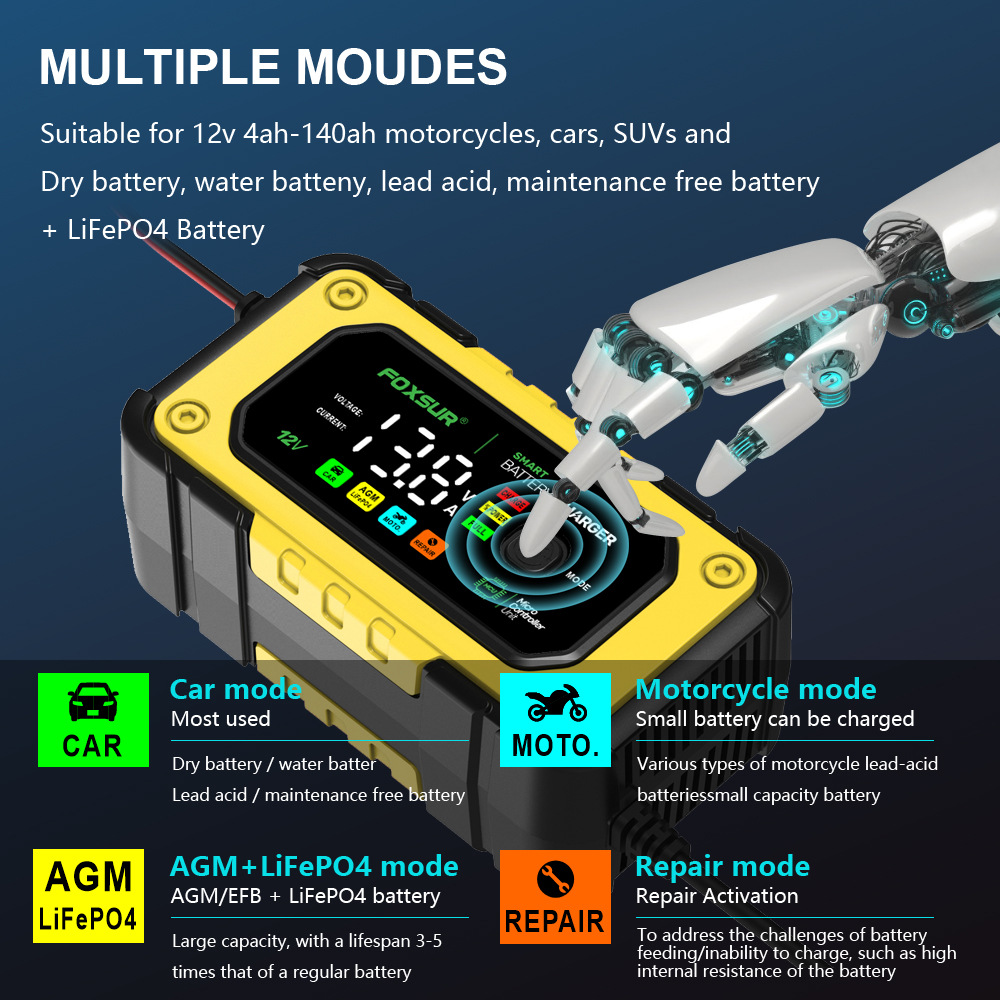
Figure 6.1: Multiple Charging Modes
7. Maintenance
- Keep the charger clean and dry. Wipe the casing with a soft, damp cloth. Do not use harsh chemicals or abrasives.
- Inspect the charging cables and clamps regularly for any signs of damage, wear, or corrosion. Replace if necessary.
- Store the charger in a cool, dry place when not in use, away from direct sunlight and extreme temperatures.
- Ensure the cooling fan is free from obstructions to maintain proper airflow.
8. Troubleshooting
| Problem | Possible Cause | Solution |
|---|---|---|
| Charger not turning on | No AC power; faulty power cord. | Check AC outlet; ensure power cord is securely plugged in. |
| Charger not charging | Incorrect battery connection; battery too low (below 8.0V); incorrect mode selected. | Verify correct polarity of clamps; ensure battery voltage is above 8.0V; select the correct battery type mode. |
| Error message on display | Short circuit; reverse polarity; over-temperature. | Check for short circuits; ensure clamps are connected correctly; allow charger to cool down if overheated. |
| Battery not fully charged | Battery capacity too large for charger; battery is faulty. | Ensure battery capacity is within 4-140Ah range; test battery health. |
9. User Tips
- Always double-check the battery type and select the corresponding mode on the charger for optimal and safe charging.
- For deeply discharged or older batteries, try using the 'Repair Mode' to potentially restore some capacity before regular charging.
- If the charger indicates a full charge but the battery still seems weak, consider having the battery professionally tested.
10. Warranty and Support
For warranty information, technical support, or service inquiries, please contact the seller or manufacturer directly. Keep your purchase receipt as proof of purchase.


