

Huawei FreeBuds Instruction Manual
1. In the Box
2 x FeeBuds
1 x Charging Case
4 x EarTips ( L, M, S, XS )
1 x USB-C Charging Cable
1 x Quick Start Guide
1 x Warranty Card
2 x Skin-friendly Silicone ring ( include L & R)
* Microphone Decoration surface is covered by installing coating
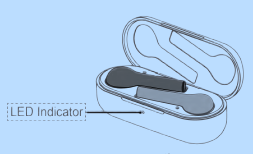


Put both FeeBuds inside and Close the charging case to sleep & Charge.
Bluetooth Paring
1. 1st Time Pairing
• Open the charging case (with both FreeBuds inside). Press and hold the function button for 2s to start Bluetooth pairing (the indicator will blink in blue).
• Enable Bluetooth on your smartphone, select “HUAWEI FreeBuds” from the Bluetooth device list, and tap to connect.
Due to the characteristics of all Bluetooth headsets, electromagnetic waves from close vicinities may interfere with your Bluetooth connection, causing your
FreeBuds to become silent or disconnected.
2. Auto Reconnect
• Reopen the charging case, the FreeBuds will reconnect to your previous device(s) automatically.
Smart Control
1. Call Function
• Double-tap either FreeBud to answer an incoming call & double-tap again to end it.
Ensure to wear your FreeBuds properly. If you experience an abnormality during a call, adjust your headset to the proper position.
2. Music Function
• Double-tap your right FreeBud to play / pause music, or simply take out either
FreeBud to pause music.
3. Voice Assistant
• Double-tap your left FreeBud to activate voice assistant (requires voice
assistant enabled smartphone).
Sleep & Charge
• Put both FreeBuds inside and close the charging case to sleep & charge.
• If the indicator remains red, it indicates that it is still charging; if the indicator turns green, it indicates that it is fully charged.
Restore Factory Settings
• Open the charging case, put both FreeBuds inside. Press and hold the function
button for 10s to reset.
• The indicator will blink in red, green, and blue alternatively for 3 times.
Safety Information
Before you use the device, read the following precautions carefully to ensure
optimal product performance and to avoid danger or violation of laws and
regulations.
To prevent possible hearing damage, do not listen at high volume levels
for long periods.
• Do not use the device at locations where the use of wireless devices is prohibited due to potential interference with other electronic devices, which may cause safety hazards.
• In clinics and hospitals where the use of wireless devices is prohibited, please comply with the regulations and power off your device.
• Some wireless devices may interfere with implantable medical devices and other
medical equipment, such as pacemakers, cochlear implants, and hearing aids.
Consult the manufacturer of your medical equipment for more information.
• When using the device, keep a minimum distance of 15 cm between this device
and implantable medical devices (such as pacemakers or cochlear implants).
• Do not set the volume on your earbuds too high in order to prevent damage to
your hearing. Prolonged exposure to high audio volumes may cause irreversible
hearing damage.
• Using your earbuds while driving may cause you to become distracted.
Questions about your Huawei FreeBuds ? Post in the comments!
Download Huawei FreeBuds Manual [PDF]
References
- User Manualmanual.tools
How can I turn the volume down on the device?
Wie kann ich am Gerät leiser stellen?
Wie kann ich am Gerät leiser stellen?
How can I turn the volume down on the Huawei FreeBuds?
Based on the instruction manual for the original Huawei FreeBuds, there are no built-in touch controls to adjust the volume directly on the earbuds themselves. The smart controls are limited to:
To turn the volume down, you must use the volume controls on your connected smartphone or paired Bluetooth device. Alternatively, you can double-tap the left earbud to activate your Voice Assistant and ask it to "lower the volume."
Read the full Q&A page
my left freebud is not working. Is there a way to reset these?
mijn linker freebud doet het niet. Is er een manier om deze te resetten?
mijn linker freebud doet het niet. Is er een manier om deze te resetten?
How do I reset my Huawei FreeBuds because the left earbud is not working?
To reset your Huawei FreeBuds and restore factory settings, follow these steps:
After resetting, you will need to pair the earbuds with your device again by holding the function button for 2 seconds until the indicator blinks blue, then selecting 'HUAWEI FreeBuds' from your smartphone's Bluetooth menu.
Read the full Q&A page