

FAQSWISS LED Panel

Specifications
- Product Name: FAQTM LED Panel
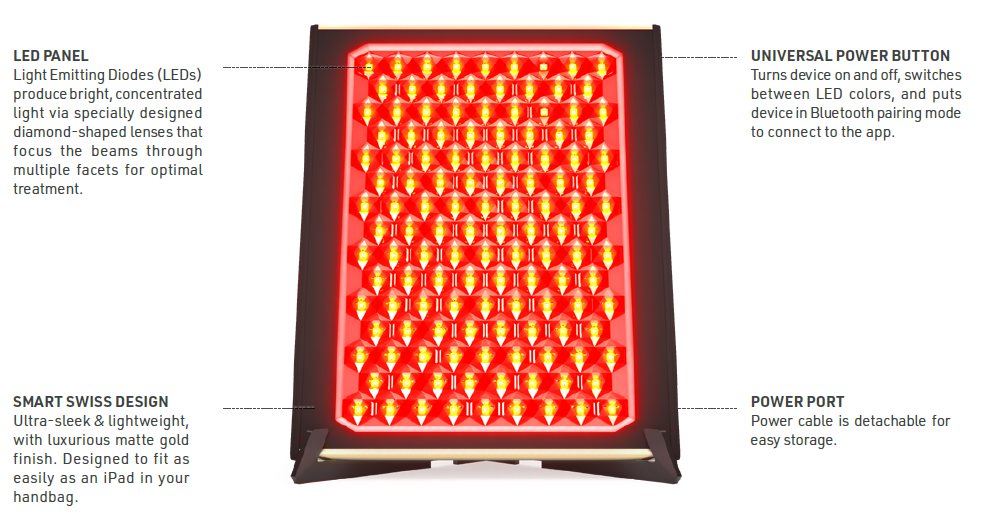
- Light Source: LED Panel Light Emitting Diodes (LEDs)
- Power Button: Universal power button
- Design: Smart Swiss Design
- Color: Matte gold finish
- Usage Time: Up to 15 mins per session
Product Usage Instructions
Unlocking Your Device:
Before using the device, register it via the FAQTM Swiss app by following the steps provided.
How to Use:
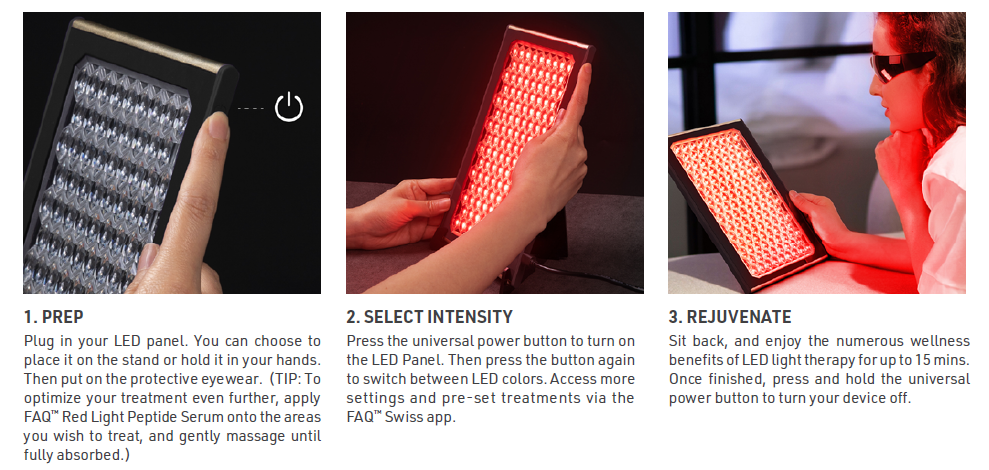
- PREP: Plug in the LED panel, place it on the stand or hold it, wear protective eyewear, and apply FAQTM Red Light Peptide Serum if desired.
- SELECT INTENSITY: Turn on the LED Panel using the universal power button, switch between LED colors, and access additional settings through the app.
- REJUVENATE: Enjoy LED light therapy for up to 15 mins, then turn off the device by pressing and holding the power button.
Cleaning Instructions:
After each use, switch off and unplug the device. Wipe the surface with a damp cloth or towel. Do not wash under running water or use alcohol-based cleaning products.
Warnings:
For optimum safety and support, visit faqswiss.com/support.
GETTING STARTED
Congratulations on taking the first step into a new era of skincare with the FAQ™ LED Panel. Before you begin to enjoy all the benefits of professional technology in the comfort of your home, please take a few moments to carefully read the instructions in this manual.
Please READ ALL INSTRUCTIONS BEFORE USE and utilize this product only for its intended use as described in this manual.
WARNING: NO MODIFICATION OF THIS EQUIPMENT IS ALLOWED.
FAQ™ LED PANEL OVERVIEW
Delivering the 5 most clinically studied wavelengths to address signs of aging and blemishes. This breakthrough innovation in light therapy features unique, patented diamond-shaped lenses that disperse extremely focused light through multiple facets – for deeper penetration, maximum coverage, and overall enhanced results.
GETTING TO KNOW FAQ™ LED PANEL
PACKAGING INCLUDES

PRODUCT DETAILS
HOW TO USE FAQ™ LED PANEL
UNLOCK YOUR DEVICE
Before using your device for the first time, you must unlock it. You can do this automatically by registering your device via the FAQ™ Swiss app for the first time. Simply follow the steps below:
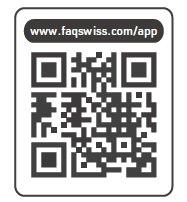
- Download the FAQ™ Swiss app on your mobile phone by scanning the QR code.
- Log in to your existing account, or sign up for a new one.
- Add device (on the top of your screen).
- Choose the device series.
- Follow the instructions on the app and fill in the purchase information.
And your device is ready to use!
HOW TO USE
Recommended usage: 5-15 mins, 3-5 times per week.
WARNINGS
FOR OPTIMUM SAFETY:
- Treatments with FAQ™ LED Panels should be comfortable. If you experience any discomfort, prolonged skin redness, or temporary changes in skin color (lightening or darkening), discontinue use immediately and consult a physician.
- Do not use the device if you have a known sensitivity to sunlight (photosensitivity) or are taking medication that makes the skin more sensitive and causes photosensitivity, e.g., Retin A, Accutan, and/ or other topical retinoids. Always check the instruction leaflet that comes with your medicinal product to see if photosensitivity is listed as a side effect, and seek medical advice before use of the device, as use may harm the skin.
- This device is not intended for the treatment of medical conditions.
- Consult your doctor or dermatologist before using the device over any suspicious or cancerous lesions.
- Do not use the device if you have unburnt or inflamed skin, or have any other form of injured or damaged skin, such as chapped skin and open trauma, wound ulceration, post-operative wounds, skin diseases, skin allergies (such as severe acne or skin infections, etc.).
- Do not use the device if you have any skin condition in the treatment area, including psoriasis, vitiligo, eczema, herpes simplex, or active infections or wounds.
- Do not use the device if you have any existing medical conditions such as epilepsy, a hemorrhagic disease, cancer, tumors, or perceptual disturbance.
- If you have recently had a laser treatment, chemical peel, fillers, Botox, or cosmetic surgery, wait at least 30 days and consult your physician before use.
- If you have a skin condition or any medical concerns, consult your physician before use.
- Do not stare directly at the LED panel or LED lights when the device is switched on.
- There may be a perception of flashing lights during the use of your device, resulting from the stimulation of your optic nerve. If you notice this condition constantly without the use of your device, consult your physician.
- Do not exceed the usage specified in the treatment regime. Damage to the skin may occur after prolonged or repeated application to one site.
- Children or persons with reduced physical, sensory, or mental capabilities should not use, play with, maintain, or clean the device.
- Avoid leaving the device in direct sunlight and never expose it to extreme heat or boiling water.
- Discontinue use if the device or power cable is not working properly or appears damaged in any way. Use the power cable supplied with your device only.
- Do not use the device if it is overheating or if you suspect that it is malfunctioning.
- Before using, make sure that the plug and socket are completely dry. Failure to do so may result in electric shock, short circuit, or fire.
- Do not tamper with or attempt to disassemble the product, as this may cause damage to the unit.
- Do not use while driving or operating heavy machinery.
- Do not insert any object into any opening of the device.
- The device contains no serviceable parts.
- Use this device only for its intended use as described in this manual. Any harmful consequences resulting from misuse, connection to improper voltage sources, or any other improper applications are not the responsibility of FAQ™ Swiss.
- If you do not find the answer to your specific question, or if you have any other questions regarding the device’s operation, please visit faqswiss.com/support
CLEANING YOUR FAQ™ LED PANEL
After treatment, always switch off the device. Then unplug the power supply from the device and the electrical outlet. Use a damp, lint-free cloth or towel to thoroughly wipe the device surface.
NOTE: This product is not 100% waterproof, so do not wash it under running water. Be careful to avoid getting water in any openings in the device. Never use cleaning products containing alcohol, petro, or acetone.
TROUBLESHOOTING
Precautions to be taken in the event of changes in the performance othe f the FAQ™ LED Panel.
If the FAQ™ LED Panel cannot be switched on or off, and/or the universal button does not respond:
- Make sure the power supply is plugged in
- Unplug the device, then plug it back in.
- The microprocessor is temporarily malfunctioning. Press and hold the universal button to restart the device.
If the FAQ™ LED Panel won’t sync to the FAQ™ Swiss app:
- Switch your Bluetooth off and then on again to try reconnecting.
- Close the FAQ™ Swiss app and then reopen it to start the process over.
- Check to see if the app needs to be updated in your mobile device’s app store.
WARRANTY TERMS & CONDITIONS
REGISTER WARRANTY
To activate your 2-Year Limited Warranty, register through the FAQ™ Swiss app, or visit faqswiss.com/product-registration for more information.
2-YEAR LIMITED WARRANTY
- FAQ™ Swiss warrants this device for a period of TWO (2) YEARS after the original date of purchase against defects due to faulty workmanship or materials arising from Normal Use of the device. The warranty covers working parts that affect the function of the device. It does NOT cover cosmetic deterioration caused by fair wear and tear, or damage caused by accident, misuse, or neglect. Any attempt to open or take apart the device (or its accessories) will void the warranty.
- If you discover a defect and notify FAQ™ Swiss during the warranty period, FAQ™ Swiss will, at its discretion, replace the device free of charge. Claims under warranty must be supported by reasonable evidence that the date of the claim is within the warranty period. To validate your warranty, please keep your original purchase receipt together with these warranty conditions for the duration of the warranty period.
- To claim your warranty, you must log in to your account at www.faqswiss.com and then select the option to make a warranty claim. Shipping costs are nonrefundable. This undertaking is in addition to your statutory rights as a consumer and does not affect those rights in any way.
DISPOSAL INFORMATION
Disposal of old electronic equipment (applicable in the EU and other European countries with separate waste collection systems).
- This device should not be treated as household waste, but rather should be brought to the appropriate collection point for recycling of electrical and electronic equipment. By ensuring this device is disposed of correctly, you will help prevent the potential negative consequences for the environment and human health, which could be caused by inappropriate waste handling of the device. The recycling of materials will also help conserve natural resources.
- For more information about the recycling of your device, please contact your local household waste disposal service or your place of purchase.
SPECIFICATIONS
- MATERIALS: Silicone, PC plastic, Aluminium
- SIZE: H260.6 x W205 x D8.5 mm
- WEIGHT: 472 g
- MAX NOISE LEVEL: <60 dB
DISCLAIMER
Users of this device do so at their own risk. Neither FAQ™ Swiss nor its retailers assume any responsibility or liability for any injuries or damages, physical or otherwise, resulting, directly or indirectly, from the use of this device. Furthermore, FAQ™ Swiss reserves the right to revise this publication and to make changes from time to time in the contents thereof without obligation to notify any person of such revision or changes.
CAUTION: Changes or modifications to this unit not expressly approved by the party responsible for compliance could void the user’s authority to operate the equipment.
NOTE: This device complies with Part 15 of the FCC Rules and contains licence-exempt transmitter(s)/receiver(s) that comply with Innovation, Science and Economic Development Canada’s licence-exempt RSS(s). Operation is subject to the following two conditions:
- This device may not cause interference.
- This device must accept any interference, including interference that may cause undesired operation of the device.
FAQ™ declares that this device complies with Directive 2014/53/EU.
The full text of the EU declaration of conformity for the product is available at www.faqswiss.com/support/eu-conformity.
The model may be changed for improvements without notice.
Additional legal and regulatory information is available on the app.
To view, simply follow the steps below:
- Step 1: Open the FAQ™ Swiss app & select the profile icon.
- Step 2: Select ‘Legal & Regulatory’.
- Step 3: Select your device.

©2025 FAQ GmbH. ALL RIGHTS RESERVED / TOUS DROITS RÉSERVÉS.
- MANUFACTURED FOR / FABRIQUÉ POUR: FAQ.
- EU IMP. & RP.: FAQ EUROPE D.O.O., RADNICKA CESTA 202, 10000 ZAGREB, CROATIA.
- US DISTR.: FOREO INC., 1525 E PAMA LANE, LAS VEGAS, NV 89119, USA.
- AUS DISTR.: FOREO AUS., 6 PROHASKY STREET, PORT MELBOURNE, VIC, 3207 AUSTRALIA.
- UK RP: FOREO LTD., LAWFORD HOUSE, ALBERT PLACE, N3 1QA LONDON.
- MANUFACTURED BY / FABRIQUÉ PAR: VIS (SHANGHAI) TECHNOLOGY CO. LTD., NO.58 LINSHENG ROAD, TINGLIN TOWN, JINSHAN DISTRICT, SHANGHAI, CHINA, 201505.
FAQS
Can I use the device without the protective eyewear?
How often should I use the LED Panel?
Documents / Resources
 | LED Panel |
References
- FAQSwiss app | FOREOfaqswiss.com
- FAQSwiss app | FOREOfaqswiss.com
- FAQ™ SWISS Collection | Professional Anti-Agingwww.faqswiss.com
- FAQ Swiss - Apps on Google Playwww.faqswiss.com
- FAQSwiss app | FOREOwww.faqswiss.com
- User Manualmanual.tools